PitchSmart uses essential cookies to keep the platform running. With your permission, we also use analytics cookies to improve the product. We never sell your data. See our Privacy Policy for details.

    Back to blog
    account mappingoutbound salesrevenue enablementB2B sales strategycross-sell

    What Is Account Mapping and Why Outbound Teams Need It

    Learn what is account mapping, how it transforms outbound research, and why multi-product B2B teams use it to drive cross-sell and pipeline growth.

    August 4, 2026/15 min read
    What Is Account Mapping and Why Outbound Teams Need It

    Account mapping is the process of building a structured view of a target organization by identifying decision-makers, influencers, and their relationships, then organizing those contacts into a map that mirrors the account's internal hierarchy and buying committee. In practice, it keeps reps from burning half the day on manual research, guessing at the right contact, and sending generic outreach to people who can't move the deal.

    The Research Problem That Account Mapping Solves

    A BDR opens a target account with 500 employees and a product that affects operations, finance, and service. The CRM shows 18 contacts, LinkedIn shows a different set of titles, and the rep still does not know which of the dozen VPs matters for this specific solution. The problem is wasted research time, too much effort spent sorting signals that do not point to a real path into the account.

    Why guessing burns pipeline

    Manual account research usually starts with a pile of tabs, not a clear method. Reps move between the CRM, LinkedIn, company pages, press releases, and scattered notes, then try to piece together who matters and why. The result is often a flat contact list with no clear sense of decision flow, which is the wrong shape for multi-stakeholder B2B selling.

    Practical rule: if a rep cannot tell who the blocker, champion, and economic buyer are before outreach starts, the account is still under-researched.

    Account mapping fixes that by turning disconnected records into a structured view of the account. It gives revenue teams a way to see hierarchy, stakeholders, and influence lines before the first message goes out, which is how practitioner guidance frames the work in DemandFarm's strategic account mapping guidance. A clean map shows who can block progress, who can move it forward, and where the buying process sits inside the account.

    In outbound, that difference shows up fast. A rep who knows the technical evaluator sits below the VP, but the finance leader signs off, can shape the opening message around the actual path to purchase. A rep who does not map the account ends up writing to whoever is easiest to find.

    What is account mapping, then? It is the disciplined response to an unstructured account. It helps revenue teams prioritize the people who affect the decision instead of treating every contact as equally useful.

    Two Distinct Styles of Account Mapping

    A rep opens a target account and sees a long list of names, titles, and departments. That view is useful, but it still leaves a basic question unanswered: are we mapping the people inside one company, or are we mapping shared accounts across companies that need joint motion? Those are different jobs, and the workflow changes with the goal.

    Individual account mapping for selling into one account

    Individual mapping is the org-chart style version. You take one target company and plot the people inside it by function and seniority, so the team can see how influence moves through the account. A practical template uses functions across the top, like marketing, sales, service, operations, and finance, with job levels down the side, like VP, manager, and individual contributor. That structure turns a flat contact list into an organizational map that can surface decision makers, blockers, and champions before outreach or renewal work begins.

    This is the right style when a rep is prospecting a named account or when an expansion team is trying to understand an existing customer. A named-account AE selling into a healthcare software company might map the VP of Operations, the Director of Finance Systems, and the end-user manager separately, because each person carries a different kind of influence. The useful question is not just who works there, but who shapes budget, implementation, and adoption for the specific product or package being sold.

    Partner and ecosystem mapping for shared accounts

    The second style is partner or ecosystem mapping. Here, two companies compare their customer and prospect lists to find overlap, then prioritize those shared accounts for co-selling. Kiflo describes this as comparing customers, prospects, and open opportunities against partner accounts to identify shared opportunity, while partner-account mapping glossaries often point to matching by company name, domain, industry, revenue, location, stage, deal size, and strategic priority Kiflo's account mapping overview, Partner Standard's glossary entry.

    That makes sense when channel teams want to cut duplicated touches and focus on mutual accounts. A software vendor and implementation partner, for example, can compare lists to find the accounts where both already have a foothold, then align on who should lead which conversation. The value is coordination: shared targeting, clear ownership, and fewer conflicting messages.

    The mistake is treating partner mapping like a prettier org chart. This is better understood as a coordination workflow for overlap, ownership, and joint motion.
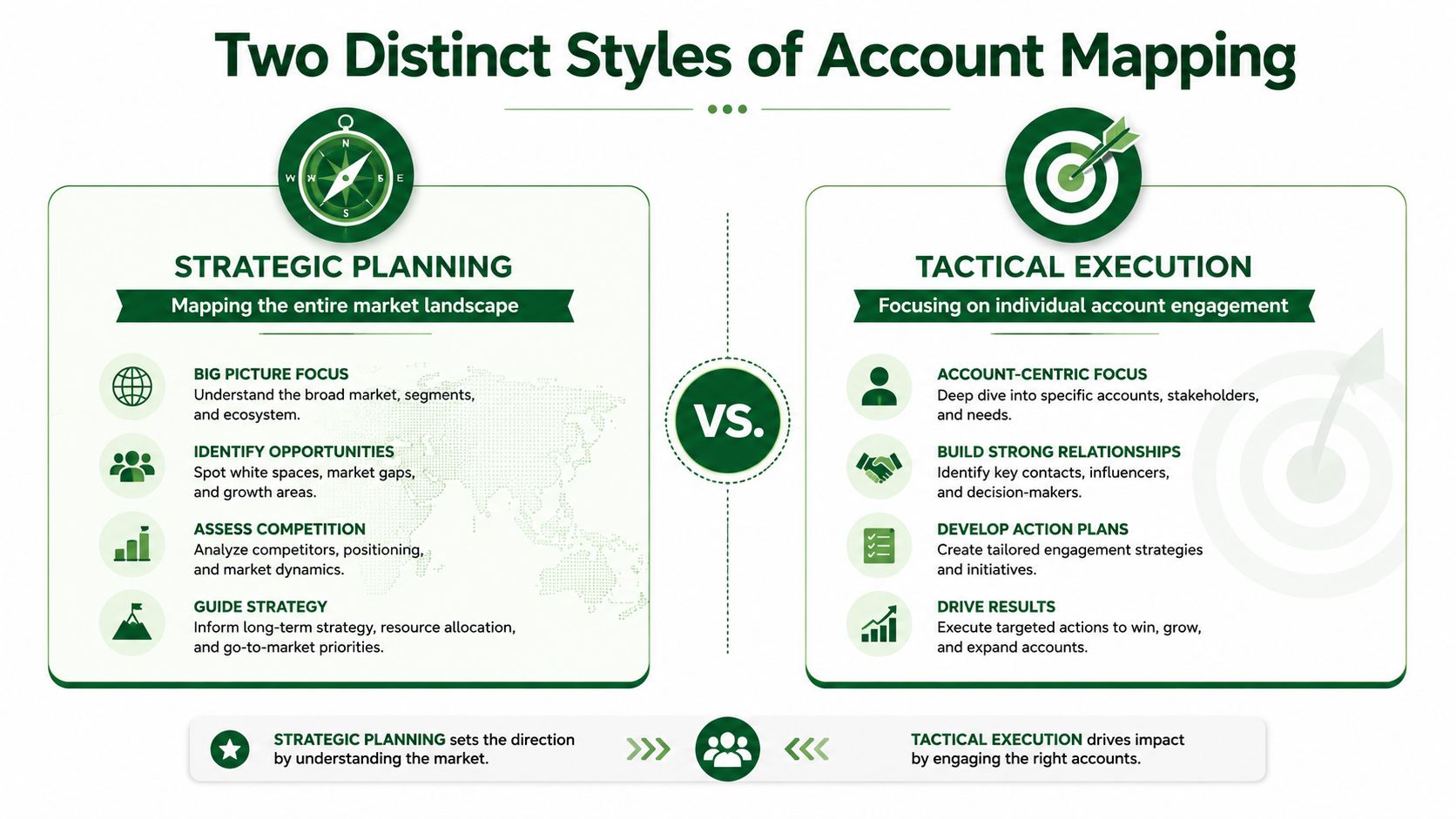
    A comparison infographic showing strategic planning versus tactical execution as two distinct styles of account mapping.

    Core Components of an Individual Account Map

    A useful individual account map needs more than names and titles. In practice, it has to show how the account is structured, which people shape the deal, and where your solution fits into that account's buying process.

    The matrix that makes the hierarchy visible

    A practical account map often starts with a matrix that places business functions across the top and job levels down the side. That layout surfaces two things at once. It shows where people sit in the organization, and it exposes gaps, such as a finance contact with no counterpart in operations or a senior leader with no identified champion below them DemandFarm's strategic account mapping guidance.

    That matters because a raw CRM export does not answer the questions reps need in the field. Who controls budget? Who can slow the deal down? Which contact cares about operational impact, and which one is focused on commercial value? If the map cannot answer those questions, it is just a cleaner contact list.

    The roles that actually matter

    A strong map should identify the economic buyer, technical evaluators, end-user champions, and likely blockers. Those roles are not interchangeable, and outreach should not treat them that way. The person who cares about workflow change is rarely the same person who signs off on spend, and the person who liked the demo may not drive adoption after the contract is signed.

    The map also needs relationship lines, not just reporting lines. Some people influence through authority, some through expertise, and some through trust. A rep who understands that structure can choose the right opener and avoid spending time on contacts who look senior but cannot move the process.

    The data that keeps it usable

    A map built only from CRM fields gets stale quickly. Useful inputs usually include CRM records, LinkedIn profiles, company press releases, job postings, and recent online signals. The point is to keep the map current, because accounts change through promotions, reorganizations, and new hires.

    A map that is not refreshed is usually a record of last quarter, not a guide for this week.
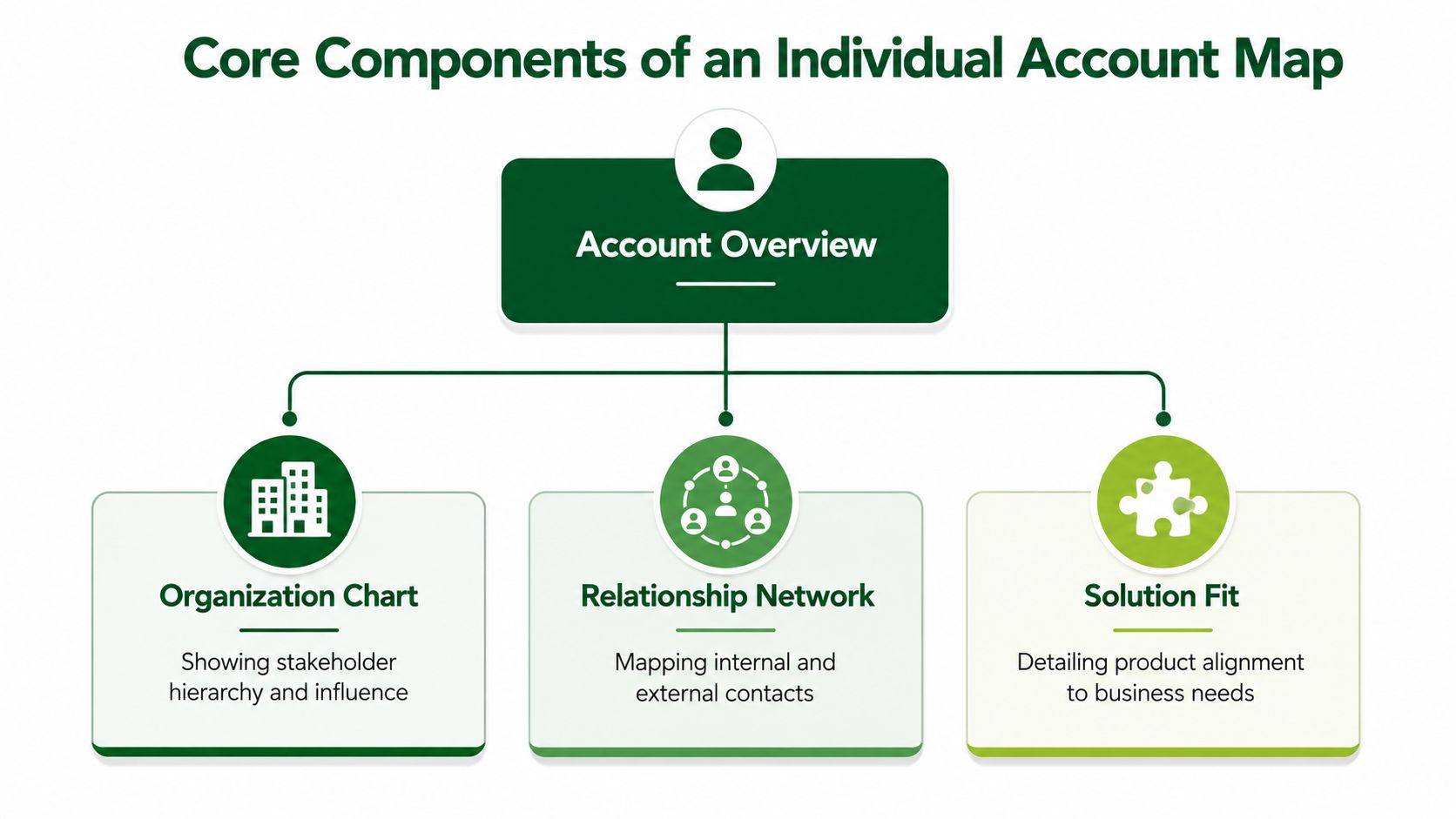
    A diagram outlining the three core components of an individual account map: organization chart, relationship network, and solution fit.

    Why Static Maps Fail Multi-Product B2B Companies

    A static account map assumes one account follows one buying path. That assumption falls apart in any company with multiple products, and it breaks even faster after acquisitions, when product lines, teams, and account ownership become harder to track.

    The same account can mean different things for different products

    A VP of Operations may matter for one solution and have little influence on another. A finance leader can be central for one product line, while a service leader controls access for a different one. If your map does not connect contacts to a specific product or buying signal, it treats every contact the same, which hurts precision in cross-sell and expansion motions.

    That is the gap in most generic definitions of account mapping. They describe the structure, then stop short of the modern problem, mapping an existing customer base against a full solution portfolio. Many teams still ask, “Who is in this account?” The sharper question is, “Who matters for this solution, right now?”

    Static spreadsheets age out fast

    The bigger issue is freshness. Static spreadsheets cannot keep up when a contact gets promoted, a new leader joins, or an internal reorg shifts ownership of the problem. Broader account mapping guidance already recognizes that accounts change often, but multi-product teams feel that churn more sharply because different offers pull different stakeholders into the deal.

    That is why account intelligence needs to stay current and stay tied to the offer being sold. Revenue enablement teams are not just managing contacts, they are managing which contact is most likely to move a specific product conversation forward. Without that link, reps fall back to the people they already know, which usually narrows the number of new paths into the account.

    What good looks like in a portfolio company

    The right model is account, solution, signal, opener. Not account, title, title, title. For a company with several product lines, the map should point to the right motion, not just the loudest seniority level. That is how teams stop sending the same generic play into every customer and start building a cross-sell motion that reflects the actual portfolio.

    A practical workflow has to connect the map to the product catalogue, then surface the right accounts fast enough for reps to act on them. PitchSmart's account intelligence workflow is built around that kind of product-specific research, which matters when different solutions require different stakeholders and different signals.

    A conceptual graphic illustrating complex business account mapping versus simple traditional diagrams on a desk.

    Manual Research Versus Automated Account Intelligence

    Teams usually build account maps in one of two ways. The first is the old-fashioned manual route, where reps research each account one at a time. The second uses automated research against a defined product catalogue, then scores accounts and surfaces signals in parallel.

    Manual research works, until the list gets larger

    Manual mapping is familiar. A rep opens LinkedIn, checks the company site, reads press releases, reviews job postings, and stitches together the buying committee in a spreadsheet. That can work for a small set of strategic accounts because the rep develops real context and can notice details that tools miss.

    The trade-off is obvious. Manual research doesn't scale, and consistency drops as lists grow or team members interpret roles differently. One rep may tag a contact as a champion, another may call the same person an influencer, and neither label is very useful if the map isn't linked to the product being sold.

    Automated research is faster, but only if the definition is clear

    Automated account intelligence covers entire lists in parallel, which matters for outbound and for expansion teams managing a large customer base. The catch is that the workflow has to start with a clear definition of what a good-fit account looks like for each product. Without that, automation just produces faster noise.

    PitchSmart is one option in this category. It researches accounts against the product or solution you define, links qualifiers and buying signals back to their source, and drafts outreach from the strongest hooks. That approach is built for teams that need to work from their own lists instead of renting a database.

    Manual vs Automated Account Mapping

    Criteria Manual Research Automated Research
    Coverage Best for a small set of accounts Better for large lists and portfolio coverage
    Consistency Depends on the rep More uniform when the product definition is clear
    Signal freshness Varies by how often someone revisits the account Easier to refresh in parallel
    Time per account High Lower once the workflow is set
    Best use case Strategic research on a few named accounts Scaled outbound or expansion mapping

    The wrong comparison is speed versus quality. The real comparison is how much precision you can sustain as the list grows.

    For teams that already know their target motion, the choice is often obvious. If the goal is one carefully researched account, manual can still be fine. If the goal is to map a portfolio of accounts against a specific solution, automation is the only practical route.

    See how the workflow is applied in practice

    Building Your Account Mapping Workflow

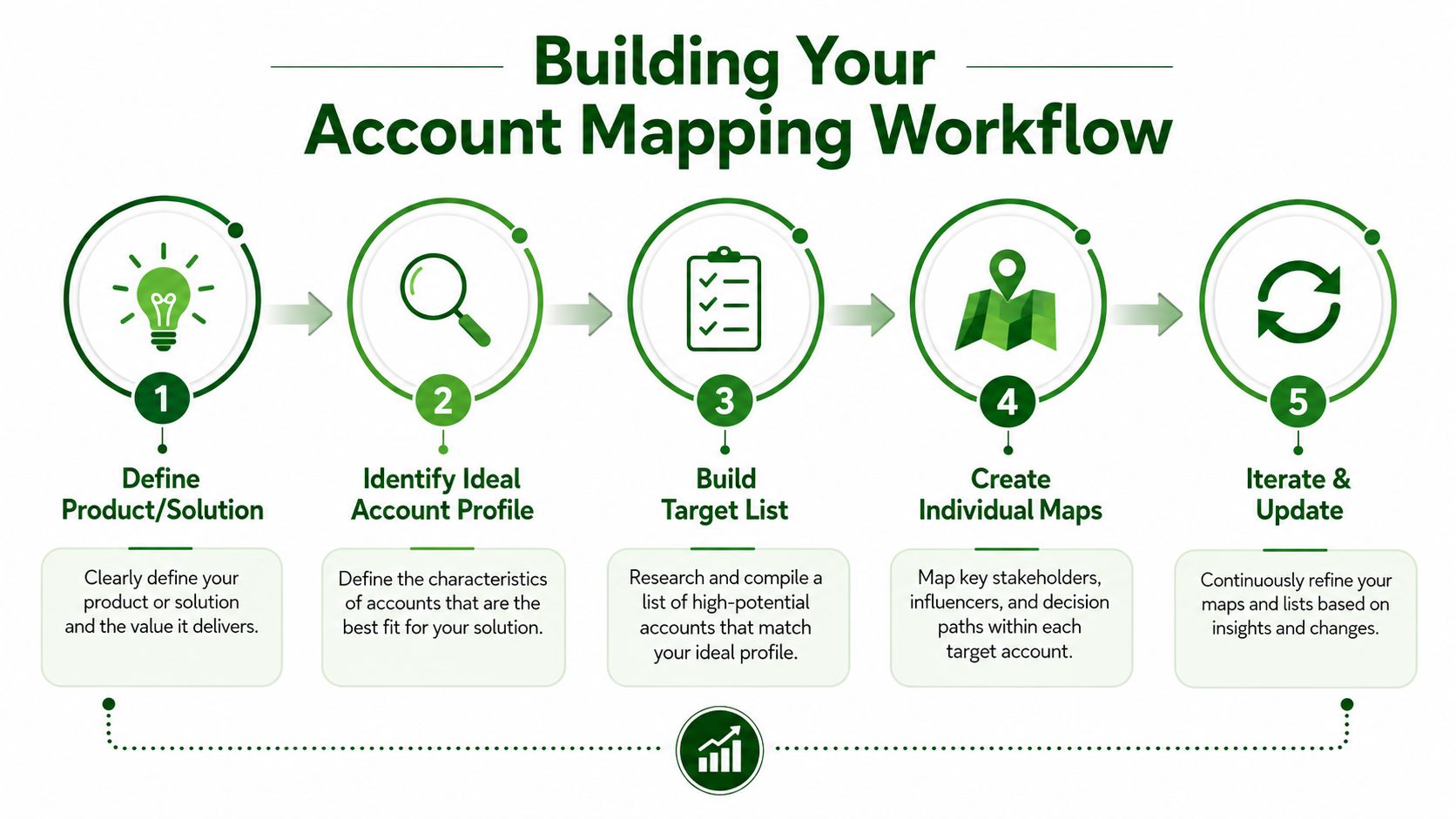
    A workable workflow starts with the product, not the account. That sounds simple, but a lot of teams skip that step, then wonder why the map does not help reps decide who to contact.

    Start from the solution, not the spreadsheet

    Define the product or solution first. Write down the problem it solves, what a good-fit account looks like, and which signals matter for that motion. A multi-product company should do this for each product line, because the right contact for one offer can be the wrong target for another.

    Once that definition is clear, pull the list from your own CRM or a synced contact file. Starting by renting a database usually means you spend time cleaning up weak fit data before you can use it. The stronger workflow starts with the accounts you already own, then researches them against the product definition you care about. If you want a practical reference for how teams document that process, PitchSmart's workflow docs show the kind of operating structure that keeps the work tied to the offer.

    Research in parallel, then rank by fit

    From there, research accounts in parallel and attach each qualifier back to its source. That matters because teams need to trust why a contact was flagged, not just that it was flagged. If the workflow can show the signal and the reason it matters, reps are much more likely to use it.

    The output should not stop at a map. It should become a contact-level action plan. A useful research workflow produces a per-account summary, then turns the strongest hooks into outreach drafts, often a three-email sequence per contact, ready to export into the engagement platform the team already uses. That keeps the work close to the selling motion instead of burying it in a static spreadsheet.

    Track the right outcomes

    The metrics that matter most here are deal velocity, win rates, and average deal size for mapped accounts versus unmapped ones. Those numbers tell you whether the map is improving actual revenue motion or just making the account view look cleaner.

    Avoid three common failures. Do not let the map go stale after org changes. Do not build it without tying it to a specific product. Do not treat every contact as equal just because they sit in the same account.

    A flowchart infographic outlining the five essential steps for building a professional business account mapping workflow.

    If you are standardizing this across a team, the research process should live in the same operating rhythm as your outbound motion. It works best when the workflow keeps the map tied to the sellable offer instead of drifting into generic account notes.

    Next Steps for Revenue Teams

    A solid account map gives revenue teams a practical view of where a customer account can expand, which contacts matter for each offer, and where the team is wasting time on generic research. For outbound motions, that usually means tighter targeting and better opening context. For expansion teams, it means knowing which slice of the customer base should see a specific message, and why that message belongs there.

    Start with a workflow audit. Measure how much time reps spend on non-selling work, especially manual research and list cleanup. Then define the product catalogue and the ideal account profile for each solution, so the map reflects the motion you sell.

    A pilot on a small set of accounts will show where the process holds up and where it breaks. Fifty accounts is usually enough to test whether the signals are useful, whether the right contacts are being mapped, and whether the output helps reps write sharper outreach. Compare that set with your normal motion on reply rates and pipeline generated, then tighten the workflow before you roll it out wider.

    The goal is a sharper, signal-driven outreach motion that sends the right message to the right person. For teams standardizing the process, the workflow should stay tied to the sellable offer and the account map should reflect your specific catalogue, not a generic firmographic list.

    Review how this fits your pricing and workflow needs

    Table of contents

    • The Research Problem That Account Mapping Solves
    • Why guessing burns pipeline
    • Two Distinct Styles of Account Mapping
    • Individual account mapping for selling into one account
    • Partner and ecosystem mapping for shared accounts
    • Core Components of an Individual Account Map
    • The matrix that makes the hierarchy visible
    • The roles that actually matter
    • The data that keeps it usable
    • Why Static Maps Fail Multi-Product B2B Companies
    • The same account can mean different things for different products
    • Static spreadsheets age out fast
    • What good looks like in a portfolio company
    • Manual Research Versus Automated Account Intelligence
    • Manual research works, until the list gets larger
    • Automated research is faster, but only if the definition is clear
    • Manual vs Automated Account Mapping
    • Building Your Account Mapping Workflow
    • Start from the solution, not the spreadsheet
    • Research in parallel, then rank by fit
    • Track the right outcomes
    • Next Steps for Revenue Teams

    Keep reading

    More articles

    Team Productivity Improvement Playbook for Outbound Sales
    team productivity improvementoutbound salessales enablement

    Team Productivity Improvement Playbook for Outbound Sales

    Diagnose blockers and drive team productivity improvement in outbound sales with process redesign, automation, KPIs, and change-management tactics.

    August 1, 202618 min read
    Data Enrichment Techniques for Outbound Sales Teams
    data enrichment techniquesoutbound saleslead research

    Data Enrichment Techniques for Outbound Sales Teams

    Learn practical data enrichment techniques that turn raw lead lists into signal-backed pipeline. Built for outbound sales and RevOps teams in 2026.

    July 31, 202616 min read
    Lead Generation Workflow That Books Meetings
    lead generation workflowoutbound salesB2B prospecting

    Lead Generation Workflow That Books Meetings

    Build a high-velocity lead generation workflow with proven stages, scoring, outreach sequences, and metrics that turn lists into qualified pipeline.

    July 30, 202617 min read