Your SDR has a list of accounts, a quota, and a CRM full of fields that look useful until they aren't. By noon, they've opened LinkedIn, company sites, job boards, press pages, and whatever sales tool claims to show intent. They've also written almost no emails worth sending.
That's the outbound problem many organizations try to solve with hustle. More tabs. More enrichment. More manual triage. The result is predictable. Reps spend their best hours deciding who might be worth contacting instead of talking to buyers. Generic sequences go out because the research backlog never clears.
Lead scoring automation helps, but only if you build it for outbound reality. That means scoring external buying signals, not just inbound activity like page visits or form fills. A useful outbound model tells reps which accounts deserve immediate attention, why they deserve it, and what to say first.
The Unscalable Grind of Manual Prospecting
A lot of outbound teams still run on detective work.
One SDR pulls a target list. Then comes the routine. Check the company website. Scan the leadership page. Look for hiring. Search for funding news. Guess whether the tech stack matters. Open LinkedIn. Open the CRM. Copy notes into a field that nobody fully trusts. Repeat until the rep either finds a reason to reach out or gives up and sends a bland template.
That work feels responsible. It's also the part that doesn't scale.
PitchSmart describes the same pain bluntly in its publisher background. reps often lose roughly 70% of their day to research, admin, and data entry instead of real selling. That's the bleeding neck for outbound. The issue isn't that teams lack willingness. It's that one-by-one prospecting turns prioritization into a manual labor problem.

Why manual triage fails
Manual prospecting usually breaks in three places:
- List quality collapses first. Teams start with broad account pulls, then ask reps to sort signal from noise by hand.
- Research quality collapses second. Even good reps cut corners when every contact needs fresh context.
- Follow-up timing collapses third. By the time a rep finds the right angle, the signal may already be stale.
That's why lead scoring automation matters for outbound. It replaces the daily argument over which accounts look interesting with a repeatable system for ranking who gets attention first.
A major 2026 benchmark roundup reported that 71% of automation programs now use a formal lead scoring model, up from 54% in 2023, which is a 17-point increase over three years and a sign that scoring has moved into the operational core of automation programs, according to Digital Applied's 2026 marketing automation benchmark roundup.
What outbound teams actually need from scoring
Inbound scoring often starts with web behavior. Outbound scoring has to start somewhere else. You're identifying likely buyers before they raise a hand.
That means the score must answer three practical questions:
- Is this account a fit
- Is there a current reason to contact them
- Can a rep use the reason in a real conversation
Practical rule: If a score can't help a rep decide who to call next and what to say in the opening line, it's a reporting metric, not a selling tool.
Good outbound scoring reduces wasted research. Better outbound scoring also produces cleaner messaging because the same signals used for prioritization become the raw material for personalization.
Choosing Your Ammo Signals That Actually Predict Intent
A common pitfall is over-scoring easy data and under-scoring useful data.
They assign points to job title, company size, and industry because those fields are available. Then they wonder why the model identifies accounts that fit the ICP but never respond. Fit matters, but outbound lives or dies on timing signals. If you want lead scoring automation to drive pipeline, score the events that make a conversation timely.
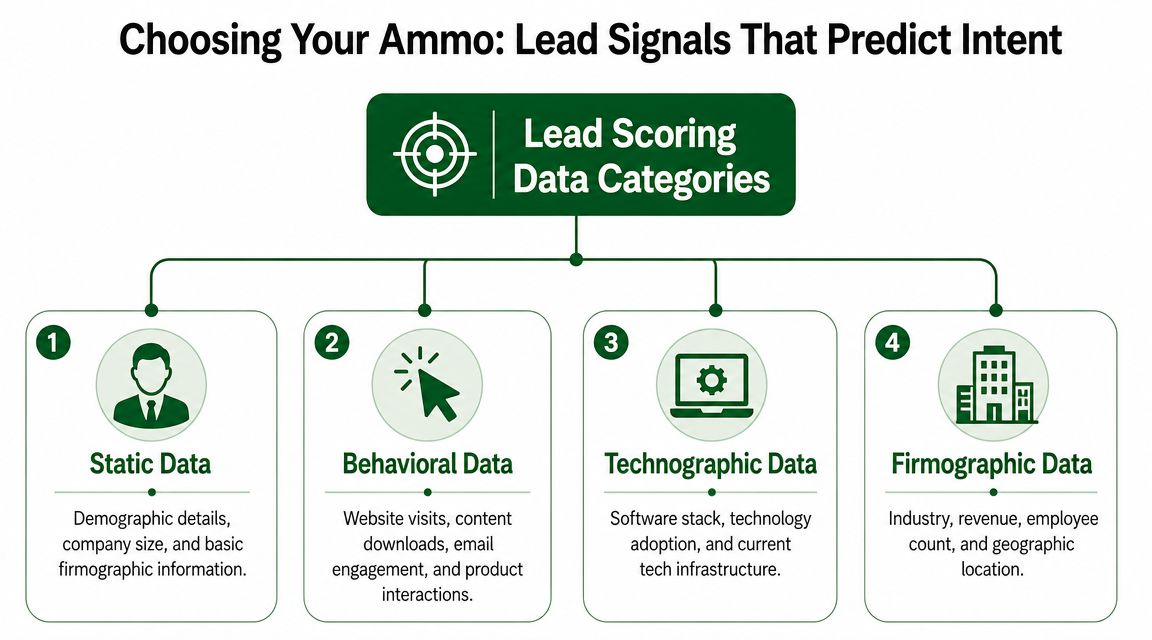
Start with fit but don't stop there
Static data is still useful. It keeps reps out of accounts that were never likely to buy.
The baseline set usually includes:
- Firmographic fit. Industry, company size, region, and business model.
- Role relevance. Whether the reachable contact owns the pain you solve.
- Technographic context. Tools already in use, likely integrations, or signs of migration risk.
These signals tell you whether the account belongs in the pool. They rarely tell you whether now is the right moment.
Dynamic signals do the real work
The strongest outbound signals usually reflect change. Buyers act when something in the business shifts and creates urgency.
Here are the categories worth watching most closely:
- Hiring movement. If a company is hiring around a workflow, team, or system you affect, they may be building capacity or exposing friction.
- Funding or expansion news. New capital, market entry, or regional growth often changes software priorities and process maturity.
- Leadership changes. A new executive can reset tooling, process ownership, and vendor openness.
- Product and packaging changes. A new offering often creates downstream needs in sales operations, enablement, and targeting.
- Technology changes. New tools, implementation activity, or stack changes can create integration pain or switching opportunities.
- Public commentary. Executive interviews, LinkedIn posts, webinars, and podcasts often reveal active priorities in plain language.
A lot of these signals are stronger than website visits for outbound because they're tied to business events, not browsing behavior.
The best outbound signals are observable signs of change. Change creates projects. Projects create buying motion.
Use signal quality as a filter
Not every signal deserves a score. Some are too broad. Others are too noisy.
A useful test is simple. Ask whether the signal passes all three checks:
| Check | What to ask |
|---|---|
| Relevance | Does this connect directly to the problem your product solves? |
| Timeliness | Does it suggest something active now, not just generally true? |
| Usability | Can a rep turn it into a credible opening message? |
For example, “mid-market SaaS company in North America” is relevant but weak on timeliness. “Hiring SDR managers after opening a new outbound team” is much stronger because it suggests an active operational need and gives the rep a reason to reach out.
What usually doesn't work
Outbound teams get in trouble when they score vanity signals too heavily.
Common mistakes include:
- Overweighting seniority alone. A VP title without a timely trigger is just a senior person at a company.
- Scoring generic social activity. Posting frequently doesn't mean buying.
- Treating all intent the same. A funding announcement and a random blog post mention shouldn't carry equal weight.
- Ignoring negatives. Hiring freezes, irrelevant tech stacks, or role mismatch should lower the score, not be present without affecting the score.
The right signal mix will vary by motion, but the pattern doesn't. Fit narrows the universe. External buying signals tell you where to spend rep time now.
Building Your Scoring Model Without a Data Science Degree
Most scoring models fail because they start with opinion. Somebody in leadership decides that a funding round should be worth more than a hiring surge, assigns a few round numbers, and calls it a framework. Reps then work the list and stop trusting the score.
A better model starts with one outcome and one baseline. Salesforce's practical workflow is straightforward: define the conversion outcome and baseline lead-to-customer conversion rate, segment historical leads by behavior or firmographic attribute, compute close rates for each attribute, and assign higher weights only to attributes whose close rates exceed the baseline, as explained in Salesforce's guide to lead scoring.
Build from won conversations, not from assumptions
For outbound, the cleanest conversion outcome usually isn't “opened an email” or “booked a meeting.” It's something downstream enough to matter. Qualified meeting accepted by sales. Opportunity created. Closed won. Pick the stage your team trusts most, then work backward.
The practical workflow looks like this:
- Define the outcome. Choose the revenue event you want the model to predict.
- Pull historical outbound data. Use past accounts, contacts, and outcomes from your CRM and sequencing tools.
- Group by signal. Separate records by signal type such as hiring, executive change, funding, tech change, or role match.
- Compare each group to baseline. If a signal closes above the baseline, it deserves positive weight. If it underperforms, reduce its weight or make it negative.
- Keep the first version simple. You can add complexity later if the early pattern holds.
If you want more examples of operational frameworks like this, the PitchSmart blog has adjacent reading on outbound research and sequencing.
An example outbound scoring rubric
Use point values as a decision aid, not as decoration. The exact numbers below are sample rules, not benchmarks.
| Signal Category | Specific Signal Example | Point Value | Rationale |
|---|---|---|---|
| Firmographic fit | In target industry and target account size | +10 | Basic ICP alignment |
| Role fit | Contact owns sales, RevOps, or outbound workflow | +12 | Strong problem ownership |
| Hiring signal | Hiring for SDRs, BDRs, or RevOps roles | +15 | Suggests active outbound buildout |
| Leadership change | New sales or revenue leader | +14 | New leaders often review process and tools |
| Expansion signal | Entering new market or launching new product line | +11 | Creates messaging and targeting pressure |
| Technographic signal | Relevant tool present in stack | +8 | Improves integration relevance |
| Trigger event | Recent public statement about pipeline or efficiency goals | +13 | High conversation value |
| Negative fit | Non-target geography or segment | -10 | Low likelihood of sales acceptance |
| Negative timing | Hiring freeze, layoffs, or obvious budget constraint | -15 | Buying motion may be weak or delayed |
| Negative contact quality | No role relevance to pain being solved | -12 | Low chance of meaningful reply |
What keeps the model honest
Don't chase sophistication too early. The peer-reviewed review in the verified data notes that logistic regression is one of the most commonly used classification algorithms for lead prioritization and that lead scoring works best when it's grounded in historical conversion data rather than subjective points. The same review also warns that sparse or poor-quality data can weaken the system. That's one reason simple, interpretable models often outperform bloated ones in real RevOps environments.
A model that sales can audit will beat a black box that nobody believes.
That means you should document every rule. Why it exists. What behavior it represents. What outcome it was tied to. If a rep disagrees with a score, that disagreement becomes useful feedback instead of hallway noise.
Integrating Your Model with CRM and Sales Workflows
A score sitting in a spreadsheet doesn't help anyone. Neither does a score buried in a CRM field that reps never look at.
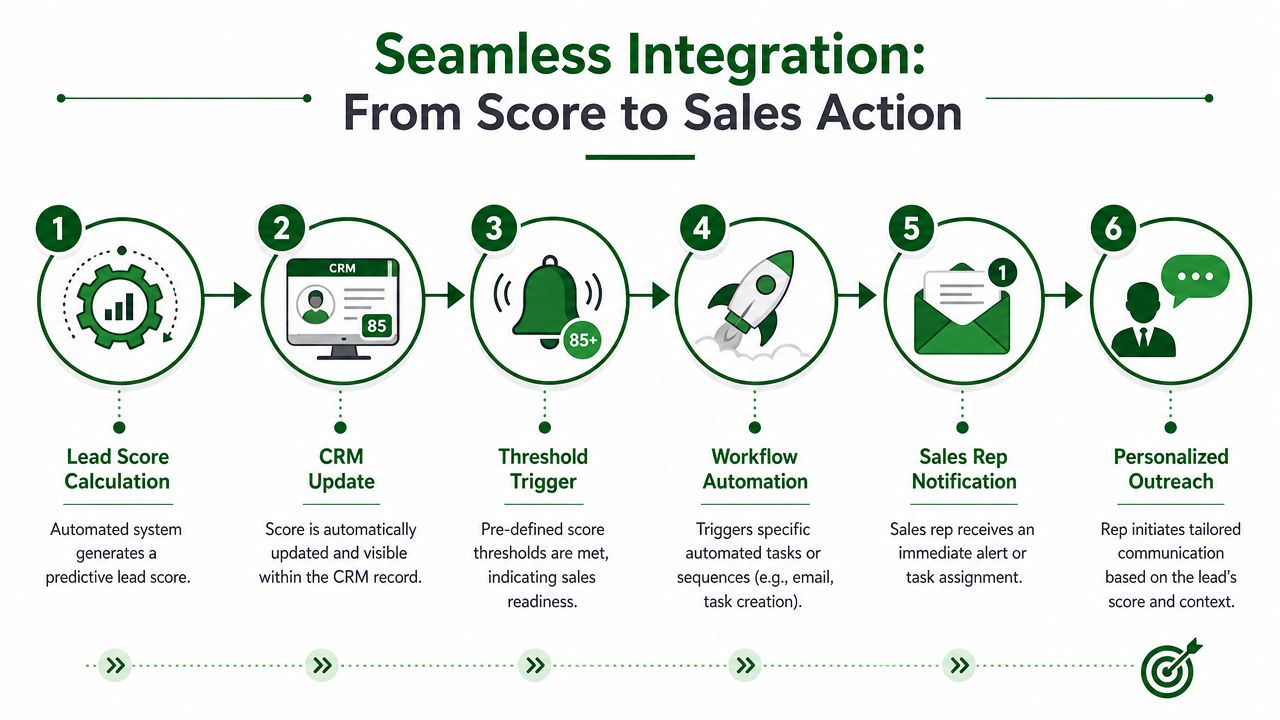
Lead scoring automation only changes pipeline generation when the score triggers action inside the workflow reps already use. That usually means your CRM, your sequencing platform, and your routing rules all need to agree on what the score means.
Put the score where reps make decisions
At minimum, your CRM should show:
- Current score
- Top contributing signals
- Last signal date
- Recommended next action
- Owner and queue status
That last part matters more than is often acknowledged. If a high-scoring account has no owner, no task, and no sequence state, the number is just visual clutter.
Salesforce recommends using CRM-driven predictive scoring to automate routing of high-scoring leads to the right reps in real time, which is useful because it turns scoring into an operating system for prioritization rather than a passive report. The same guidance also warns that poorly chosen rules can overfit noisy signals, so teams need periodic review rather than a one-time setup, as noted earlier from Salesforce.
Don't pass only the number
Reps don't need mystery math. They need context.
If the score jumped because the company hired a new outbound leader and posted RevOps openings, the rep should see that plainly in the record. Better yet, the rep should see a short explanation they can use in outreach. “Noticed you're building the outbound team and adding RevOps support” is usable. “Lead score 82” is not.
Here's the difference in practice:
| Bad handoff | Useful handoff |
|---|---|
| Score increased to 78 | Score increased after new VP Sales hire and outbound hiring activity |
| Tier A account | Tier A because role fit, hiring trigger, and recent product expansion |
| Contact ready for sequence | Open with hiring-driven angle and route to rep covering growth accounts |
That context should also feed your sequence logic. If you're exploring budget and workflow fit, compare the options in PitchSmart pricing against your current process needs, but keep the operational principle the same across tools. The signal that created the score should influence the first message, follow-up copy, and call task.
Build low-friction automation
The best workflow is usually boring:
- New or updated signal enters the system.
- Score recalculates.
- CRM record updates.
- Threshold rule fires.
- Account owner gets a task or alert.
- Correct sequence or call play launches.
- Outcome feeds back into the model later.
If a rep has to hunt for why the account scored well, your automation stopped one step too early.
This is also where many teams discover that routing by score alone creates hidden problems. Some reps get flooded with “hot” accounts that are hot for different reasons. Others receive records outside their specialization. Scoring works better when routing also considers territory, segment, product line, and rep capacity.
Setting Thresholds and Creating Sales Playbooks
Teams love round numbers. They set “sales-ready” at 100 points because it feels clean. Then reps either get swamped with weak accounts or starved of real opportunities.
That's why threshold design is harder than scoring design. The question isn't whether an account looks good in theory. The question is which score level produces downstream conversion without overloading the team.
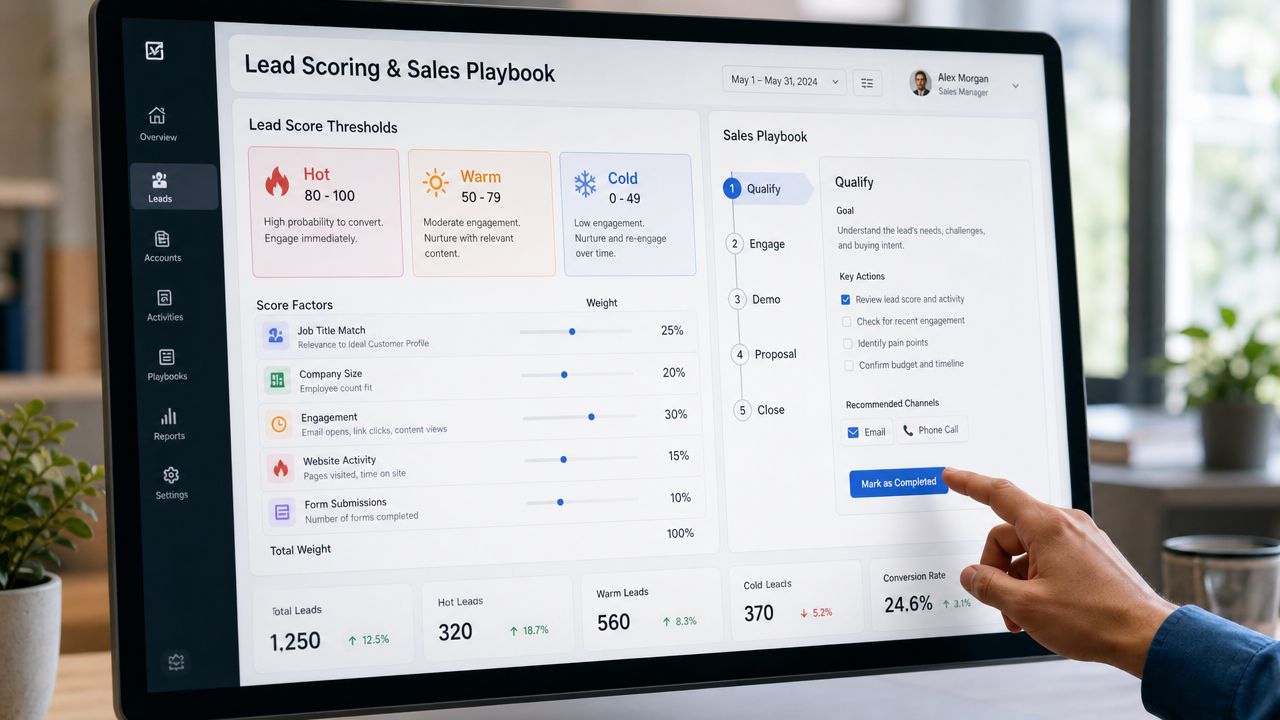
A frequently underexplained issue in scoring is how to set thresholds that are calibrated to conversion rather than generic cutoffs like “100 points equals sales-ready.” Guidance from Reform's data-driven lead scoring threshold guide recommends using historical conversion patterns, negative scoring, and periodic auditing to keep thresholds aligned with real deal outcomes.
Build thresholds around action capacity
Start with rep capacity, not scoring aesthetics.
If your SDR team can only work a limited number of new high-context accounts per day, your top threshold should isolate the accounts most likely to justify fast, personalized outreach. Everyone else should fall into lower-touch plays.
A practical tiering model looks like this:
- Tier A accounts get immediate rep action. These have strong fit plus a timely trigger with clear messaging value.
- Tier B accounts enter guided nurture. They're relevant, but either the timing is weaker or the trigger needs another supporting signal.
- Tier C accounts stay visible but deprioritized. Keep them out of the main queue unless new activity changes the picture.
The threshold matters less than the consistency of the action that follows it.
Match each tier to a real playbook
A score without a playbook creates indecision. A playbook without score logic creates wasted motion.
Use the score to define not just who gets contacted, but how they get contacted.
Tier A playbook
These accounts deserve the most rep time. The outreach should reference the exact trigger that pushed them into the top bucket.
Recommended actions:
- Write the opener from the signal. If hiring drove the score, lead with that operational change.
- Use multichannel fast. Email, LinkedIn, and a call task should happen in a tight sequence.
- Keep the ask narrow. Tie the pain to the event instead of pitching the whole platform.
After teams define these tiers, it helps to show reps what a score-triggered workflow looks like in practice:
Tier B playbook
These accounts shouldn't clog the priority queue, but they also shouldn't disappear.
Use lighter personalization. Mention the best available context, then let automation carry more of the follow-up cadence. If a second signal appears later, promote the account automatically.
Tier C playbook
Don't force outreach just because the account exists. Leave room for score changes, as negative scoring earns its keep. If there's weak fit, stale timing, or obvious friction, the correct play is often patience.
Watch for drift
Lead scoring automation gets fragile.
Buyer behavior changes. Product lines expand. New personas become relevant. A signal that correlated with meetings last quarter may stop mattering when the market shifts. The undercovered issue is model drift, especially for teams selling across multiple products or account types. Newer guidance stresses continuous retraining, quarterly audits, and preserving human override because static scores age badly in changing markets. Demandbase's discussion of AI lead scoring also points to the growing need for low-latency score surfacing and explanation when complexity rises, but that source is best treated as directional commentary rather than a benchmark.
The fastest way to lose rep trust is to keep old thresholds after the market changes.
Audit thresholds regularly. Look for patterns in accepted meetings, opportunity creation, rep overrides, and ignored alerts. If reps repeatedly work accounts below the threshold and win, your model is telling on itself.
From Manual Research to Automated Revenue
Outbound teams don't need more scoring theory. They need a system that reduces research time, improves targeting, and gives reps a credible reason to start conversations.
That system starts with signal selection. Then it gets stronger when you weight signals against real conversion outcomes, push the score into CRM workflows, and tie thresholds to concrete sales plays. Most of the manual work that used to sit with SDRs gets compressed into a repeatable process. Reps spend less time proving an account is interesting and more time talking to the right ones.
The upside isn't just speed. It's efficiency. Peer-reviewed evidence suggests lead scoring can materially improve revenue efficiency, with some studies reporting up to a 70% increase in lead-generation ROI, according to this peer-reviewed review of lead-scoring models. The same review is also a good reminder to stay grounded in reliable historical data. If the inputs are messy, the score won't save you.
What good outbound scoring changes
When lead scoring automation is working, a few things become obvious:
- Reps stop doing one-by-one prospect triage.
- Managers can enforce priority with less guesswork.
- Personalization gets easier because the signals already explain the why.
- Routing improves because sales-ready means something operational, not symbolic.
That's the shift from manual research to automated revenue. Not a prettier dashboard. Not another point system nobody trusts. A cleaner path from external buying signal to rep action.
If you want to operationalize that shift, start with the raw material. Clean lists. Research at scale. Signal capture tied to sources. Messaging hooks that come from actual account changes instead of generic templates. You can explore that workflow on the PitchSmart homepage.
PitchSmart helps outbound teams replace one-by-one prospect research with bulk lead research, source-backed buying signals, and automated outreach built from real conversation hooks. If your reps are still spending most of their day deciding who to contact and what to say, try PitchSmart and turn your existing list into a scored, segmented, ready-to-work outbound queue.