Sales teams don't have an email list problem. They have a pipeline leakage problem.
Reps spend only 35.2% of their time selling, while 64.8% goes to non-selling work like research, admin, and list-building, according to Convex's summary of the sales productivity problem. If your team is still treating managing email lists like a light admin task, you're letting bad data eat the majority of the day before a rep ever gets to a live conversation.
That changes how this topic should be handled. Managing email lists isn't about keeping a database tidy for reporting. It's a RevOps discipline that protects deliverability, cuts research waste, sharpens targeting, and gives SDRs a cleaner path to meetings.
Why Your Email List Is Costing You Deals
Poor list quality drains selling time before the first email goes out. It slows rep execution, weakens deliverability, and turns solid messaging into noisy results.
For outbound teams, list management is a RevOps issue because it directly shapes rep capacity and pipeline coverage. If the contacts are off, the territory is wrong, or the context is missing, reps stop prospecting and start repairing data. That work rarely shows up in campaign planning, but it shows up fast in missed activity, lower reply quality, and fewer meetings from the same headcount.
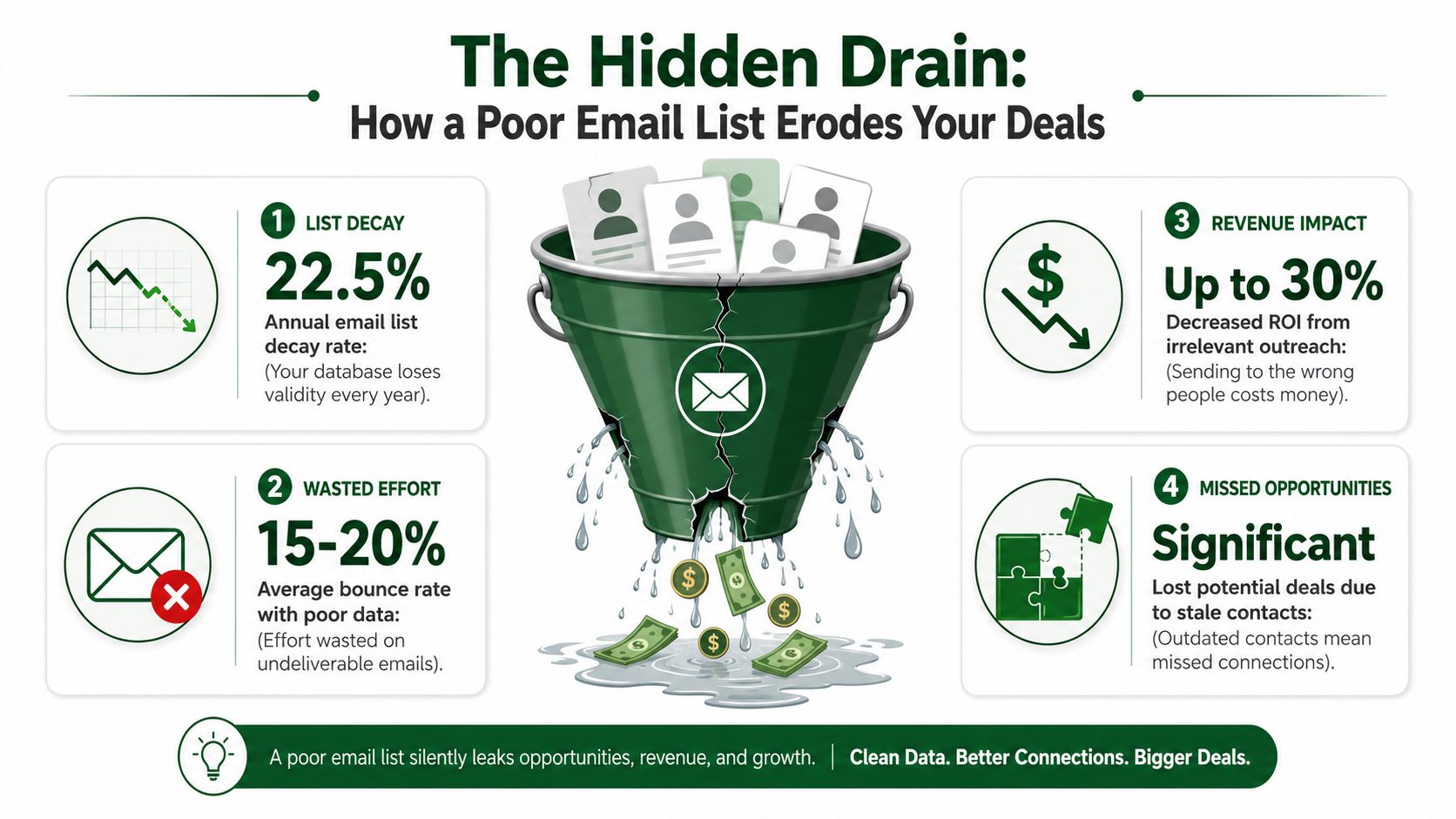
The pattern is familiar. A rep gets a list that looks usable at first glance. Ten minutes later they are checking titles, fixing company names, excluding bad-fit accounts, and searching LinkedIn for basic context that should have been attached before the record ever hit their queue. That is not prospecting. That is upstream operational debt pushed onto the sales floor.
Bad list management creates avoidable sales friction
The cost lands in three places:
- Research waste: Reps verify records manually instead of spending that time on live accounts.
- Execution waste: Good sequences underperform because the contact, account, or timing is off.
- Deliverability risk: Bounces and low relevance make future outbound harder to land in the inbox.
Practical rule: If a rep has to verify core contact data before sending, the list is not ready to work.
Outbound pipeline depends on throughput. Reps need enough clean, relevant contacts to stay in motion without stopping to clean every batch by hand. Once list hygiene gets treated as a side task owned by whoever notices the problem first, performance becomes inconsistent team by team and rep by rep.
I have seen this happen in organizations where marketing, sales, and RevOps each owned part of the data but no one owned list readiness. Marketing had names. Sales had targets. Reps had personal spreadsheets full of exceptions and workarounds. The result was predictable. Activity stayed high on paper, but conversion suffered because too much rep effort went into fixing inputs instead of creating conversations.
Data quality problems also distort coaching. Managers review a weak sequence and focus on copy, send times, or rep effort. Sometimes those are the issue. Often the bigger problem is that the team started with contacts that were outdated, poorly matched, or missing the context needed for relevant outreach. In that environment, even disciplined reps struggle to produce consistent pipeline.
Strong outbound teams treat the list like production infrastructure for sales. They care about whether records are accurate, reachable, assigned correctly, and usable inside the workflow reps follow every day. That shift changes list management from an admin chore into a direct driver of productivity and pipeline.
Scrub and Sanitize Your Prospecting Foundation
A list can lose a meaningful share of its usable contacts within a year if no one maintains it. Clean Email cites average annual email list decay of 22.5%, which means a list of 10,000 prospects loses 2,250 contacts every year without active management, according to its write-up on subscription fatigue and list decay. For outbound teams, that hits pipeline capacity. Reps work just as hard, but more touches go to dead inboxes, wrong people, and records that should have been filtered out before they ever reached a sequence.
Treat decay like an operating constraint
Prospect data starts aging the moment it enters your system. People switch jobs, companies change domains, teams get reorganized, and generic inboxes stop routing anywhere useful. If RevOps does not account for that drift, SDRs inherit the cleanup work, and productivity drops fast.
This is why list hygiene should sit inside the outbound operating model, not off to the side as occasional admin work. A dirty list hurts more than deliverability. It distorts conversion data, creates false negatives on messaging, and sends reps into accounts that were never workable to begin with.
A practical baseline looks like this:
- Verify before first send: Raw imports should not go straight into cadence.
- Quarantine risky records: Invalid domains, role accounts, and known hard bounces need review before assignment.
- Refresh on a schedule: Re-verification should follow a set cadence based on list age, send volume, and data source.
- Apply clear exit rules: Once a record is confirmed bad or outdated, remove it from active prospecting instead of letting it reappear in the next upload.
Remove the records that create drag first
Start with the contacts that waste touches or damage sender performance.
- Hard bounces: Pull them out immediately after failure.
- Role-based addresses: Addresses like info@ and sales@ rarely map cleanly to ownership or intent.
- Duplicate contacts: Duplicates split activity history and create conflicting outreach.
- Outdated role matches: A valid address tied to the wrong title or function still leads to bad outreach.
- Long-idle records with no progress: If a contact has gone nowhere across repeated attempts, stop recycling them without a reason to re-enter.
A smaller clean list outperforms a bigger list full of risk.
The mistake is trying to do this by hand. Manual review works for a rep cleaning twenty records. It breaks when a team is importing thousands of contacts from events, enrichment vendors, inbound forms, and rep-built account lists. Then every SDR invents a different rule for what counts as usable, and your CRM turns into a collection of local exceptions.
Build verification into intake
The fix is operational. Put validation steps at the point where records enter the system, before routing, sequencing, and enrichment stack more effort on top of bad inputs.
In practice, that means setting intake rules by source. Purchased or scraped lists need stricter verification than hand-raised targets from named accounts. Permission-based collection can use double opt-in where it fits the motion. Bounce status, suppression logic, and ownership rules should update automatically so bad records do not keep circulating between marketing, sales, and RevOps.
That discipline protects more than inbox placement. It protects rep time. If SDRs spend the first hour of each day checking domains, fixing titles, and removing duplicates, the list is not supporting pipeline generation. It is slowing it down.
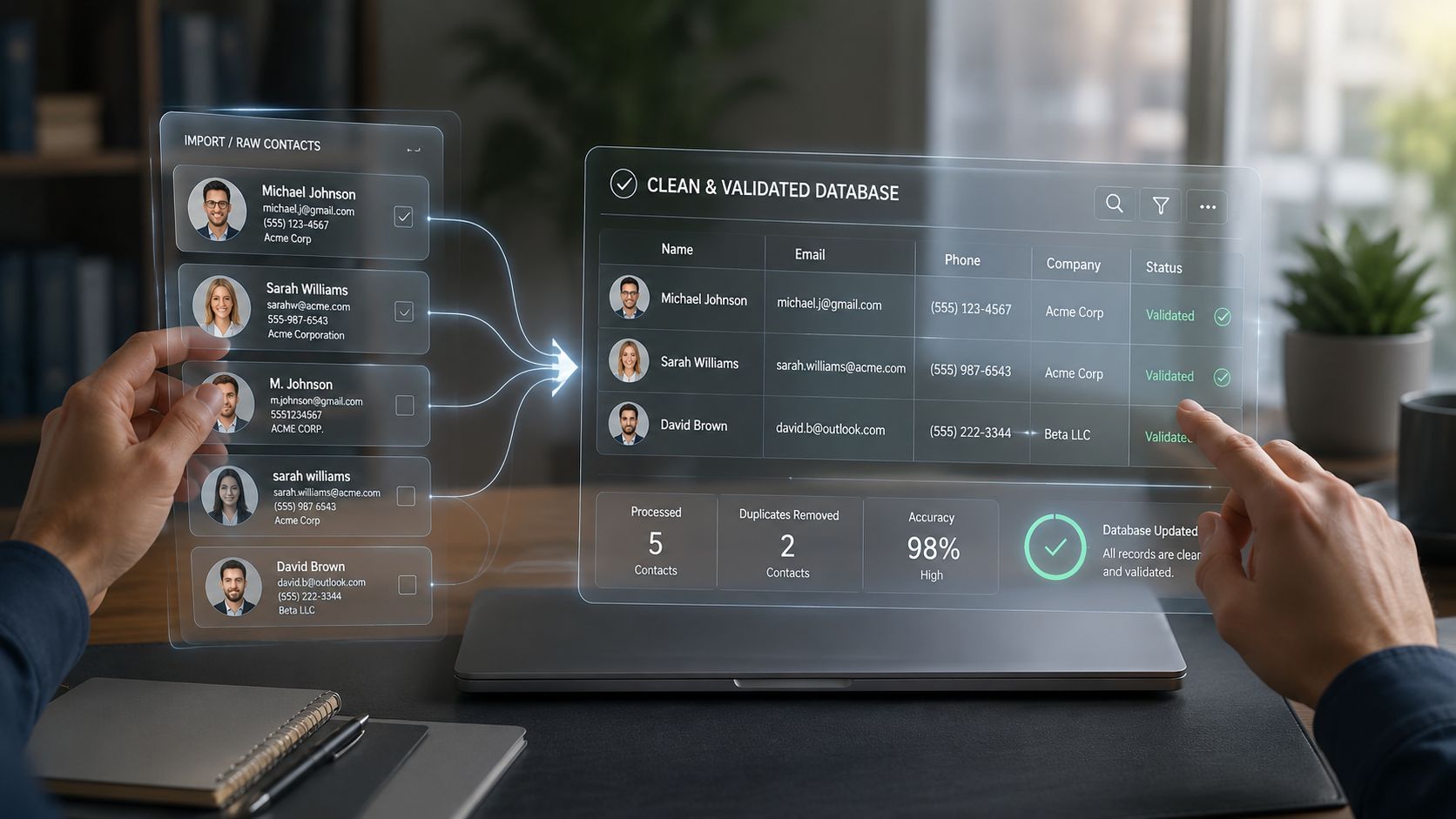
A quick visual on what disciplined hygiene should look like in practice:
Managing email lists at this stage is operational work. Done well, it gives reps cleaner targets, cleaner reporting, and more live conversations per hour of prospecting.
Segment Your List Beyond Static Firmographics
Most outbound segmentation is stuck at the easiest level to export. Industry. Headcount. Geography. Maybe seniority.
That's not useless. It's just not enough. Static firmographics tell you who a company is, not what's happening inside it right now. Outbound works better when segmentation reflects motion, friction, and timing.
Static segments create generic outreach
A rep can build a tidy list of Series A SaaS companies with 50 to 200 employees and still send weak email. Why? Because every account in that segment can be in a completely different operating state. One is hiring aggressively. Another is consolidating tools. A third is onboarding a new sales leader. The surface category is the same. The buying context isn't.
For B2B SaaS, event-based logic should matter more than static profile fields. Mailtani's segmentation guidance specifically recommends prioritizing activation milestones, login gaps, and trial age, and notes that this approach can multiply open and click rates compared with batch-and-blast sending.
Use signals that reflect actual motion
For outbound teams, better segments usually come from change signals and behavioral signals such as:
- Product usage signals: Activation milestones, login gaps, trial age, or sudden drops in usage.
- Org change signals: New executives, team expansion, role backfills, or territory changes.
- Commercial signals: Funding events, pricing changes, partnerships, or category expansion.
- Research signals: Recent online activity that gives a rep a credible reason to start a conversation.
That changes the message completely. Instead of "We help SaaS teams improve efficiency," the rep can say, "Noticed your team is hiring into outbound and recently expanded sales leadership. Usually that's when list coverage and rep research quality start to break at the same time."
| Dimension | Old Way (Static) | New Way (Dynamic & Signal-Based) |
|---|---|---|
| Industry | SaaS, fintech, healthcare | SaaS accounts with recent activation changes or trial-age thresholds |
| Company size | Employee count band | Teams showing buying motion, expansion, or leadership change |
| Seniority | VP, Director, Manager | Contacts tied to the initiative that current signals suggest is active |
| Territorying | Geography or named account list | Priority order based on relevance and recent activity |
| Messaging | One sequence per segment | Hooks adapted to the signal that placed the account in the segment |
Segmentation should help a rep know what to say first, not just who to email next.
Managing email lists stops being clerical work. A segment is a decision. It decides whether a rep leads with pain, timing, use case, or change event. If the segment is too broad, the message becomes generic. If the segment reflects live conditions, personalization gets easier and faster.
Enrich and Personalize Your Outreach at Scale
The biggest outbound bottleneck isn't writing emails. It's gathering enough context to write one that deserves a reply.
Manual account research remains the largest discretionary time drain in prospecting. Reps who prepare thoroughly spend 1 to 3 hours per account, while account intelligence platforms can cut that research time by 50% to 85%, according to SalesMotion's analysis of sales time management. That's the difference between a rep working a handful of accounts in depth and a team covering a territory with real consistency.
Research is where good intent dies
Most reps know generic emails underperform. The problem is they don't have the time to personalize properly at scale.
So they compromise. They scan a homepage. They skim LinkedIn. They guess at priorities from a recent funding round or job post. Then they write a first line that sounds personalized but doesn't change the substance of the message. Buyers see through that immediately.
Another issue is workflow sprawl. Reps collect notes in one place, build lists in another, and draft in a third. Context gets lost between tabs. Good hooks disappear. Sequence quality becomes dependent on whoever is most patient with repetitive work.
What useful enrichment actually looks like
Useful enrichment isn't just appending fields. It gives the rep material they can act on now.
That usually means:
- Verified contact context: Role, account fit, and confidence that the person is reachable.
- Recent signals: Online activity or business changes that create a timely opening.
- Conversation hooks: A specific reason this prospect should hear from you this week.
- Prioritization cues: A way to rank which accounts deserve immediate attention.
The best systems don't just enrich one lead at a time. They work across the whole list in parallel, so reps aren't trapped in one-by-one prospecting. That matters for managers, too. It creates a repeatable research standard instead of letting each SDR improvise what "enough prep" means.
If personalization requires a rep to open ten tabs per account, the process won't survive quota pressure.
Turn research into outreach without copy-paste chaos
Once the list is enriched, the next move is operational. Convert research into a conversation plan and sequence logic quickly, before the signal gets stale.
A strong workflow looks like this:
- Import the list from your CRM or CSV. Start with the accounts your team already owns.
- Run bulk research across the full segment. Pull in current qualifiers and activity cues.
- Score for relevance. Put likely timing and fit ahead of vanity attributes.
- Generate outreach from the best hooks. Seed a concise email and LinkedIn sequence from actual account context.
- Push clean insights back into the systems reps already use. Keep the record portable, not trapped in a research silo.
Teams looking for practical examples of that kind of outbound workflow can review related thinking on the PitchSmart blog.
What doesn't work is pretending scale and personalization are mutually exclusive. They aren't. The trade-off is between manual research and operationalized research. One burns rep hours. The other makes personalized outreach repeatable.
When managing email lists includes enrichment, the list becomes more than a send file. It becomes a prioritized map of where to spend selling time.
Maintain List Health with Automated Workflows
One cleanup pass won't save your domain. List health is a system, not a project.
A healthy email list should keep bounce rates under 2% and spam complaints at 0.3% or lower, according to Mailmend's benchmarks for email list hygiene and maintenance. For outbound teams, those aren't soft guidelines. They are operating thresholds that protect inbox placement.
Set rules before your domain pays the price
If reps keep mailing old or unresponsive contacts because "maybe this next message will land," the whole team absorbs the downside. Deliverability problems don't stay isolated to one rep's campaign for long.
That's why a sunset policy matters. Mailsoftly's recommended methodology is practical: define inactivity thresholds such as 90 days with zero engagement or 10 unopened emails, suppress dormant contacts from normal campaigns, trigger a three-email re-engagement sequence every 90 days, and permanently delete contacts after 12 months of post-re-engagement suppression.
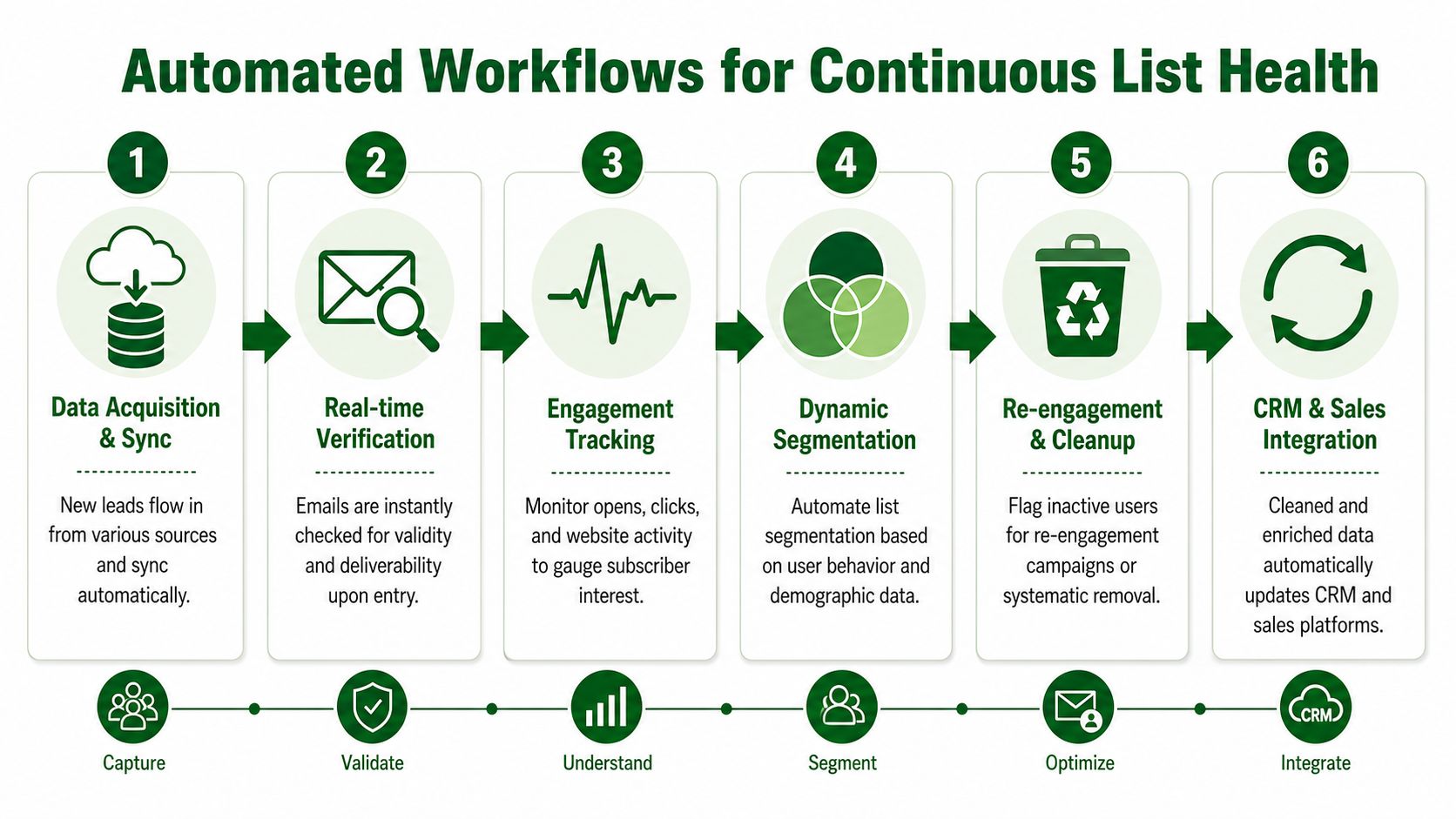
Early removal often protects performance better than endlessly trying to revive a dead segment.
Privacy and data handling matter here too. If your team is syncing records across tools, make sure your workflow respects the standards outlined in your vendors' privacy practices, including PitchSmart's privacy documentation.
A workable automation model
A practical maintenance workflow for outbound usually includes four recurring motions:
- Intake control: Verify and normalize new contacts before they enter active prospecting pools.
- Behavior monitoring: Watch for engagement, bounce patterns, and complaint signals.
- Automated suppression: Pull dormant or risky contacts out of standard sequences without waiting for a rep to notice.
- Lifecycle cleanup: Re-engage selectively, then remove records that keep lowering list quality.
Mature RevOps teams distinguish themselves. They don't ask reps to remember the hygiene rules. They encode the rules into the workflow.
One more judgment call matters. Don't wait until buyers resent your outreach. Prospeo's discussion of early sunsetting notes that removing subscribers with 120 or more days of inactivity can improve deliverability for the remaining active users. The operational lesson is clear. Protect the active segment first.
Managing email lists effectively means the system keeps the database usable between campaigns, not just before them.
Stop Managing Lists and Start Building Pipeline
The teams that win outbound don't treat list work as background admin. They treat it like production infrastructure.
A strong process does four things well. It removes risky records before they hurt deliverability. It segments by signals instead of lazy firmographics. It enriches accounts with context a rep can use. Then it keeps the whole machine healthy with suppression, sunsetting, and routine refreshes.
Bad list management pushes reps into janitorial work. Good list management gives them a reason to call, a reason to email, and a better shot at landing in the inbox. That's the difference between activity and pipeline.
There's also a simple productivity truth underneath all of this. Bad contact data costs reps 546 hours per year according to SalesMotion's write-up on the cost of inaccurate contact data. If you're serious about reclaiming selling time, managing email lists can't stay manual.
The end state isn't a prettier CRM. It's a cleaner outbound system where reps spend more time in conversations and less time fixing records.
If you're evaluating tools, start with the one question that matters most. Does this reduce research and hygiene work for reps, or does it just move the burden around? The answer determines whether your team gets faster or just busier.
You can review plan options on PitchSmart pricing if you're ready to replace one-by-one prospecting with a workflow built for speed.
PitchSmart helps outbound teams turn messy lists into usable pipeline inputs. Upload a CSV or pull from your CRM, run bulk research across the full list, uncover activity-based hooks, and generate customized 3-step email and LinkedIn outreach without the usual tab chaos. Start a free trial at PitchSmart.