Your SDR writes a solid cold email. The offer is relevant. The target account fits your ICP. Then the rep burns half the morning trying to answer basic questions the CRM should already know. Who just changed jobs? Which accounts are hiring? Did the company announce funding, a launch, or a leadership change? By the time the rep finds a usable hook, the sequence is late and the message is generic anyway.
That's the core problem with CRM data enrichment in outbound. It isn't a cleanliness project. It's a speed and relevance problem. Bad records force reps into manual research, and manual research kills volume, timing, and consistency. PitchSmart's own operating context puts it plainly: repetitive research, admin, and data entry can consume roughly 70% of a rep's day. When that happens, your team isn't running outbound. They're doing investigative work in browser tabs.
Good CRM data enrichment fixes that. Great CRM data enrichment goes further. It doesn't just append company size and industry. It surfaces the signals that give reps a reason to reach out right now, with context that sounds human.
The Hidden Tax on Your Sales Team
A lot of outbound teams think they have a messaging problem when they really have a data problem.
The rep opens Salesforce or HubSpot, sees a contact record with a name, title, and domain, then starts the scavenger hunt. LinkedIn. Company site. Press release search. Job board search. Maybe a quick Google query to find whether the team is expanding or whether the buyer recently moved into role. That work happens before a single email goes out.
The hidden tax isn't just the time. It's the inconsistency. One rep is thorough. Another is fast but shallow. A third gives up and sends a template. Your CRM becomes a system of partial truth, and the quality of outreach depends on how much patience each rep has that day.
That's expensive. One industry guide reports that 44% of companies lose over 10% of annual revenue because of poor-quality CRM data, which is a direct reminder that incomplete or inaccurate records hit pipeline and sales performance, not just database hygiene (Data Ladder's data enrichment guide).
What this looks like in the real world
The typical failure pattern is easy to spot:
- Leads enter the CRM half-finished. You get a work email and maybe a company name, but not enough context to prioritize.
- Reps compensate with manual research. Every account becomes a mini research project.
- Outreach goes generic. When the research burden is too high, teams fall back on broad personalization tokens that buyers ignore.
- Follow-up slows down. The time to first relevant touch stretches out because the rep is still gathering context.
Practical rule: If your reps have to leave the CRM to find the reason to contact someone, your enrichment model is too weak for outbound.
Why CRM data enrichment matters more in outbound than inbound
Inbound can survive with cleaner routing and better lead scoring. Outbound needs sharper timing. The team has to know who to contact, why now, and what angle gives them a believable opener.
That's why CRM data enrichment should be treated as sales infrastructure. The point isn't to make records prettier. The point is to give reps usable context fast enough that they can spend more of the day selling and less of it researching.
For high-velocity teams, enrichment isn't separate from prospecting. It is prospecting.
Planning Your Signal-Driven Enrichment Strategy
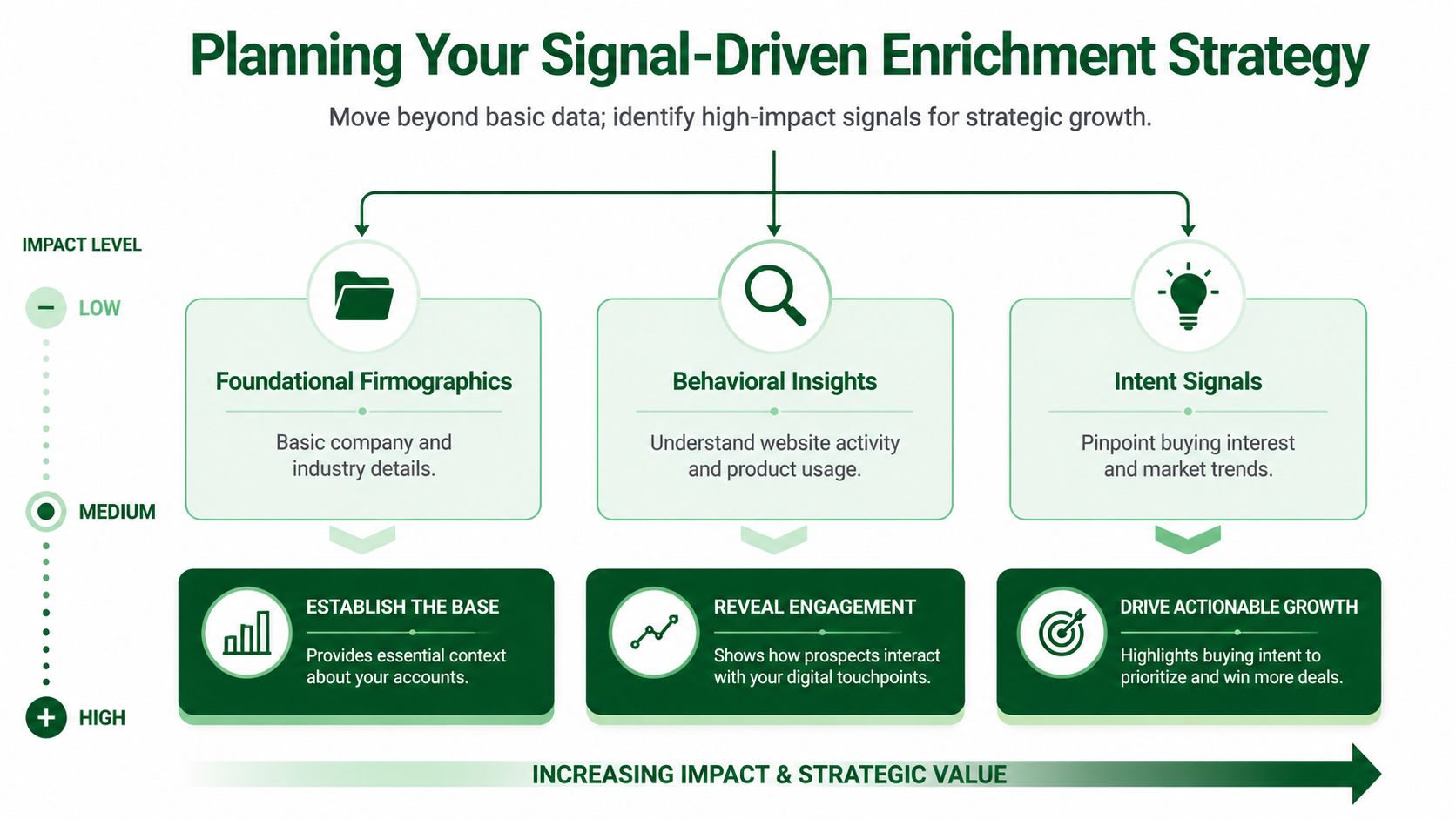
Traditional enrichment starts with fields like company size, annual revenue, geography, and industry. Those matter. They help you qualify accounts and route ownership. But they rarely give a rep a conversation starter.
Modern enrichment has shifted toward automated appending and regular refresh cycles, and that shift includes adding changing buying signals such as executive hires, funding rounds, and M&A activity (ZoomInfo's overview of CRM data enrichment).
Why static fields aren't enough
A rep doesn't book meetings because the account has a certain employee count. They book meetings because the outreach lands when something relevant is happening.
Static fields answer, “Is this account broadly in our market?”
Signals answer, “Why should we talk to them this week?”
That distinction changes how you design CRM data enrichment. If your entire stack is built to append company facts, you'll improve segmentation but still leave reps hunting for the hook.
What to enrich for outbound
For outbound, useful enrichment falls into three layers.
| Layer | What it helps with | Example fields or signals |
|---|---|---|
| Foundational | Basic qualification and routing | industry, geography, company size, role |
| Contextual | Better segmentation and messaging | tech stack, function, team focus, hiring patterns |
| Trigger-based | Timing and relevance | job change, funding, leadership hire, product launch, public activity |
The highest-value work usually happens in the third layer.
In practice, I'd define a small set of custom signals tied to your motion. Not dozens. A focused list. The strongest programs usually start with a few questions your reps already ask manually:
- Role-change signals: Has this person moved jobs recently?
- Hiring signals: Is the company actively hiring for roles that imply a current initiative?
- Leadership-change signals: Has a new executive joined who may reshape priorities?
- Public activity signals: Is this buyer discussing a problem space in posts, comments, or interviews?
- Company event signals: Has the account announced funding, expansion, or a structural change?
The best enrichment field is often the one that gives the rep an opening sentence, not the one that makes the dashboard look complete.
There's also a practical trade-off here. More data doesn't automatically make outbound better. Too many low-value fields create clutter, confuse segmentation, and slow the team down. If your reps can't explain why a field matters to prioritization or messaging, it probably doesn't belong in the core workflow.
For signal-driven teams, LinkedIn social activity is especially useful because it shows what a specific person is participating in right now. That's usually more valuable for outreach than a generic static attribute pulled from a database.
Implementing a Modern Enrichment Workflow
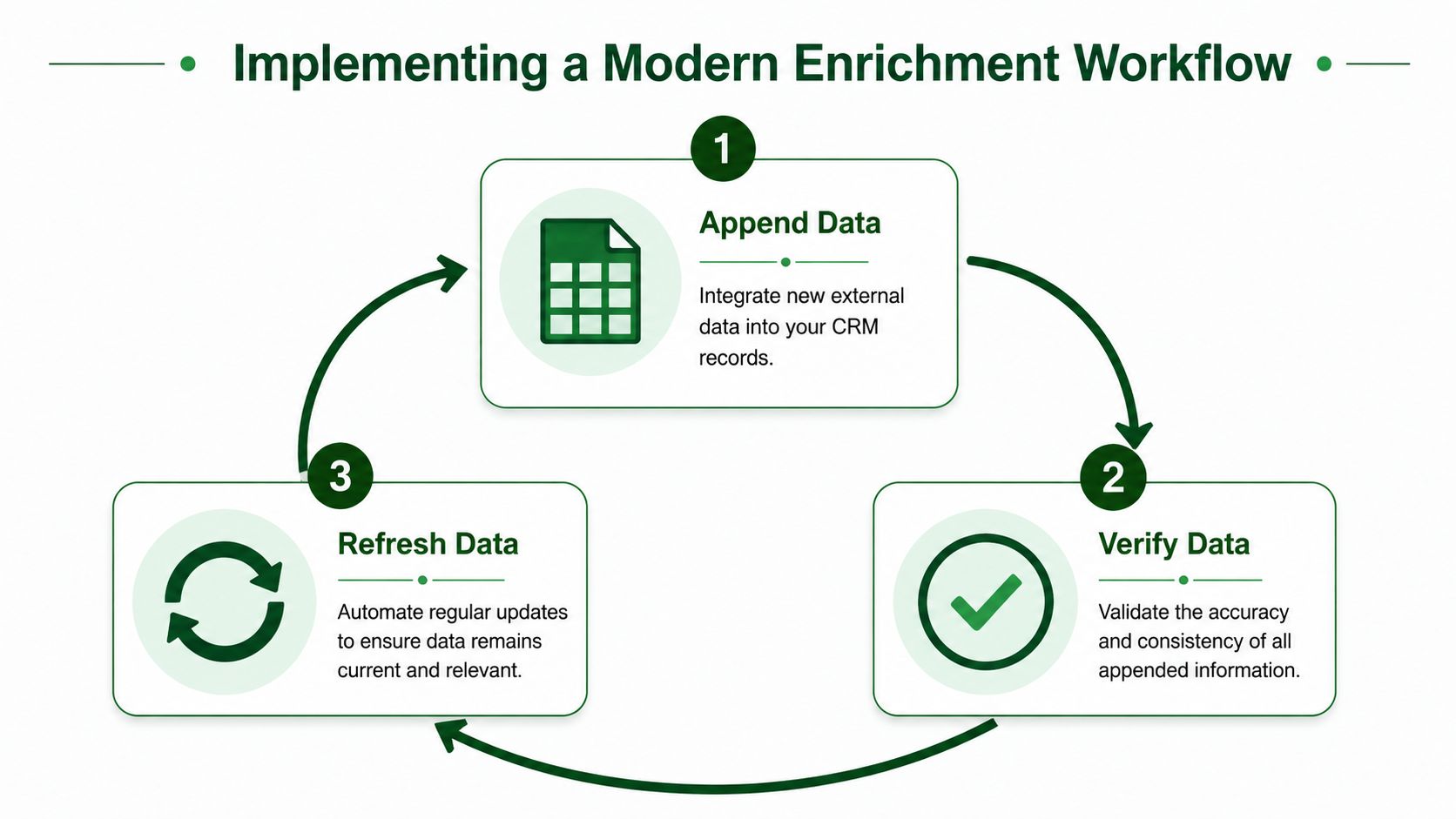
The backbone of a workable enrichment system is simple: append → verify → refresh. Add missing data. Check whether it's trustworthy. Refresh it on a schedule so the CRM doesn't slide back into decay (monday.com's guide to data enrichment).
Start with append verify refresh
Most teams get the first step right and the next two wrong.
They append data in bulk, push it into the CRM, and call the job done. Then reps start finding bad titles, stale job moves, weak matches, and duplicate fields. Trust drops fast. Once reps stop trusting enriched records, they go back to browser research.
A good workflow avoids that by making each stage explicit:
Append what the CRM is missing
Fill in core identifiers, account context, and signal fields that matter for routing and outreach.Verify before the field becomes operational
Don't let every appended value drive scoring, territory routing, or sequence logic immediately. Validate the match and confidence first.Refresh on a real cadence
Data ages. Signals expire even faster. Your process needs a rule for when to re-check old records.
A useful implementation detail is to preserve original CRM values where appropriate, map enriched fields into standardized destinations, and only overwrite fields when freshness rules justify it. That protects the system from random field churn and makes debugging far easier.
How signal research works in practice
AI-driven research changes the game for outbound.
Instead of buying a giant static database and hoping the record includes the right insight, the system can run targeted research against a defined signal. For example, if your signal is “recently changed jobs,” the workflow can query for whether a named person at a named company appears to have changed roles within a recent period. The output may be messy or inconclusive, so a second layer reviews the result and classifies it into a usable yes or no decision.
That matters because real outbound signals are often ambiguous. Public information doesn't always return a clean answer. A lot of queries come back with “not enough data.” That's normal. But when a signal does hit, it gives the rep something far better than a generic personalization token. It gives them a timely reason to reach out.
A practical workflow often looks like this:
- Upload a list from your CRM or CSV
- Define signal prompts tied to your market and product
- Run research in parallel across the list instead of one record at a time
- Classify the result into operational fields your team can filter and score
- Review the source trail so reps and RevOps can trust what was found
- Segment the list based on matched signals for targeted messaging
If you want a deeper look at replacing one-by-one prospect research with a more scalable process, this walkthrough on automating lead research for outbound teams is worth reading.
Later in the workflow, it helps to show the team the cycle visually before rolling it out broadly.
If a signal can't be explained in one sentence to an SDR, it won't survive implementation. Keep the logic simple enough that the team knows why a record was flagged.
The step that trips teams most often is verification. Not appending. Not syncing. Verification. Reps can tolerate an incomplete record. They won't tolerate a misleading one.
Choosing Your Enrichment Tools and Data Sources
The enrichment market looks crowded, but for outbound there are really three categories that matter.

The three categories that matter
Legacy data brokers sell access to large contact and company datasets. They're useful when you need broad coverage, basic appending, and scale. The downside is obvious to anyone who has run outbound from these systems. The record may be present, but the context for why now often isn't.
Point solution APIs give RevOps more control. You can enrich domains, verify emails, append firmographics, or bolt on specific data types. These tools can work well, but they usually require more technical effort and more governance than teams expect.
AI research platforms represent a different model. Instead of relying only on prebuilt databases, they can investigate a custom question against public signals and return a usable outcome. That's a much better fit when your outbound motion depends on recent activity, niche qualifiers, or hard-to-structure buying context.
What makes a source useful for outbound
The core question is simple. Does the source help the rep start a relevant conversation?
That's why not all data sources deserve equal weight.
- Firmographic databases are good for qualification. They tell you whether the account resembles your ICP.
- Technographic and operational data help with positioning. They can show fit, stack, or likely use case.
- Social and public activity data often create the best outbound hooks because they reveal what the person or company is focused on now.
That last category is where many teams underinvest. LinkedIn social data, in particular, can reveal what a person is commenting on, posting about, or paying attention to. For outbound, that's usually stronger than a stale static field because it points to active interest, not just profile metadata.
Buy data for qualification. Research signals for timing. Those are different jobs, and the best teams don't force one tool to do both.
If you're comparing categories and want a broader look at the trade-offs, this guide to lead research tools for sales teams is a useful reference point.
One more filter matters. Transparent sourcing. If your reps can't tell where the insight came from, they'll hesitate to use it in outreach. A sourced signal beats a black-box score every time.
Measuring ROI and Ensuring Data Quality
The wrong way to measure CRM data enrichment is to count how many fields you appended.
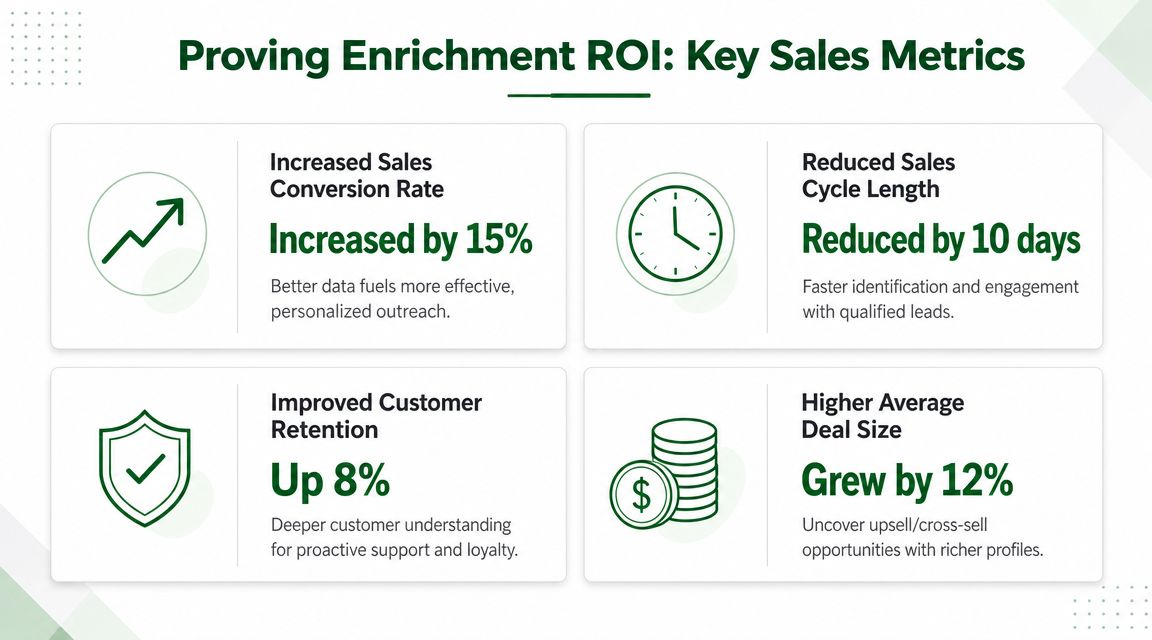
The right way is to ask whether enriched records helped your team prioritize better, reach out faster, and generate stronger engagement. Practitioner guidance points to a better measurement set: data completeness, accuracy, freshness, conversion lift, and engagement uplift. The same guidance cites a vendor-reported example where enrichment pushed email bounce rates to below 2%, which shows how verification and cleansing can improve deliverability when records are kept current (Rings.ai on enrichment best practices).
Track outcomes not appended fields
For outbound teams, I'd look at a short operating dashboard.
| Metric | Why it matters |
|---|---|
| Time to first relevant outreach | Shows whether enrichment reduces research delay |
| Reply quality | Tells you whether the message landed with actual context |
| Meeting rate from enriched segments | Measures whether signal-based targeting beats broad lists |
| Bounce and deliverability trends | Exposes contact quality issues quickly |
| Lead-to-opportunity movement | Connects enrichment to pipeline, not activity |
Notice what's missing. “Records enriched this month.” That can be useful operationally, but it doesn't prove value on its own.
What usually persuades leadership is a clean comparison between enriched and non-enriched cohorts. Did the signal-backed list convert better? Did verified records produce cleaner deliverability? Did reps spend less time doing manual research before first touch?
Build a refresh rule reps can trust
Freshness is where ROI gets protected.
A field that was accurate once can still damage performance if it isn't reviewed later. A sensible rule is to refresh records after initial enrichment, then trigger a re-check when the data is old enough that the rep can't safely rely on it. In practice, a two-month refresh threshold for viewed leads is a workable operational policy because it limits unnecessary reprocessing while keeping active records current.
That kind of rule matters more for signal fields than static fields. A company's industry usually won't change often. A buyer's current public focus might.
Operator note: The CRM should show when a signal was last checked. Reps trust timestamps more than promises.
Strong measurement also depends on separating quality from quantity. A team can append a lot of fields and still hurt performance if the fields are stale, badly mapped, or irrelevant to outreach. That's why freshness and accuracy deserve equal weight with conversion metrics.
Avoiding Common Pitfalls and Staying Compliant
Most enrichment programs fail in boring ways.
They collect too much data, assign ownership to nobody, and treat enrichment like a quarterly cleanup job instead of an always-on operating process. Governance and compliance also get ignored until a routing error, bad campaign, or legal review forces the issue.
That's risky because data doesn't sit still. One widely cited estimate says about 2.1% of customer data becomes outdated every month, which is exactly why governance, verification, and scheduled refreshes matter in practice (Harte Hanks on CRM data enrichment gaps).
Where enrichment programs usually break
A few failure modes show up again and again.
Data drowning
Teams enrich every field they can buy or infer. Reps get flooded with noise. The fix is to prioritize fields that support routing, segmentation, or messaging.No owner in RevOps
If nobody owns mapping, refresh policy, and exception handling, the CRM turns into a patchwork. One team appends data. Another team questions it. Nobody resolves the conflict.One-time enrichment mindset
A bulk append may clean things up temporarily, but records start aging the moment the project ends. A real program has refresh logic and operational review.Black-box trust problems
When reps can't see where a signal came from, they hesitate to use it. For outbound, sourced context is safer and more persuasive than unsupported assertions.
Compliance gets easier when your process is transparent
Modern research-driven enrichment has an advantage over opaque data resale models.
If your process focuses on public, on-the-record information, ties signals back to their original source, and gives teams clear controls over refresh and usage, compliance becomes easier to manage. Not effortless. Easier. The discipline is in limiting what you collect, documenting why you use it, and making sure the CRM doesn't operationalize low-confidence data without review.
That also means your reps need boundaries.
- Use enrichment to improve relevance. Don't use it to create creepy outreach.
- Prefer observable business context. Public activity, company events, and role changes are easier to justify than obscure personal data.
- Document source and timestamp. If a field influences outreach or routing, the team should know where it came from and when it was checked.
- Route privacy questions fast. Sales shouldn't improvise policy. If you need the standard, use your company's published privacy information.
The best compliance posture is usually the least theatrical one. Be specific, be transparent, and don't collect data your team can't defend using.
PitchSmart helps outbound teams turn CRM data enrichment into something reps can use. Upload your list, run bulk research across custom buying signals, generate sourced conversation hooks, and build segmented outreach without the tab chaos. If your team is tired of manual prospect research and generic cold emails, try PitchSmart and see what signal-driven outbound looks like in practice.
Drafted with the Outrank app