Website tracking is often treated like a marketing dashboard. That's a mistake. Sales reps already lose huge chunks of their week to non-selling work. According to the Forrester Activity Study summary cited by SalesMotion, the average rep burns nearly two full days per week on administrative tasks, and sales organizations spend only 25-32% of working time on direct selling activities like calls, demos, and negotiations. If your site is generating buying signals and your reps still have to dig through tools, research accounts manually, and guess at relevance, your traffic isn't an asset. It's backlog.
The question isn't whether you can track website visitors. The question is whether you can turn those visits into a prioritized outbound motion fast enough to matter. In B2B, a pricing page visit, repeat product-page session, or return from a target account should trigger action, not sit in an analytics report until the month-end review.
Why Your Website Traffic Is a Wasted Asset
Most B2B teams have traffic data, but they don't have a sales workflow. That's the gap. Marketing can tell you that visitors landed on product pages. Sales still doesn't know which accounts deserve outreach today, which ones are just browsing, and which rep should act first.
That disconnect creates two expensive failures at once. First, real buying signals sit untouched. Second, reps compensate by doing manual account research, tab-hopping across LinkedIn, company sites, CRM records, and enrichment tools just to build a basic point of view before sending a message.
The real problem isn't traffic volume
A healthy traffic report doesn't help if it can't answer three sales questions:
- Who visited: Not just a session count, but the company behind the visit.
- What they cared about: Product pages, pricing, integrations, docs, case studies, or careers.
- What sales should do next: Ignore, monitor, route, or contact.
If you can't answer those quickly, your team is still operating on guesswork.
Practical rule: If a rep has to investigate every interesting visit by hand, your tracking setup is creating work, not saving it.
The worst version of this looks familiar. Someone forwards a screenshot from analytics. A rep gets told to “look into this account.” Then the rep spends time confirming firmographics, finding the right contact, checking whether the activity means anything, and drafting a message from scratch. The signal goes cold before outreach goes out.
Analytics alone doesn't create pipeline
Sales needs tracking that supports decisions. Generic website analytics often stop at reporting. They tell you page views, sessions, and acquisition paths, but they don't create a clean handoff into outbound execution.
That matters because website visits are often the earliest visible sign of account interest. If your team waits for a form fill to act, you're ignoring useful commercial intent. If your team acts on every visit, reps waste time on weak signals.
A strong RevOps setup sits between those extremes. It filters noise, defines what counts as meaningful activity, and routes only credible account signals into a sales queue.
Website tracking becomes valuable when it shortens the time between interest and a relevant outbound touch.
The core shift is simple. Stop thinking about website data as a marketing report. Start treating it as the front end of account prioritization.
Building Your Foundational B2B Tracking Stack
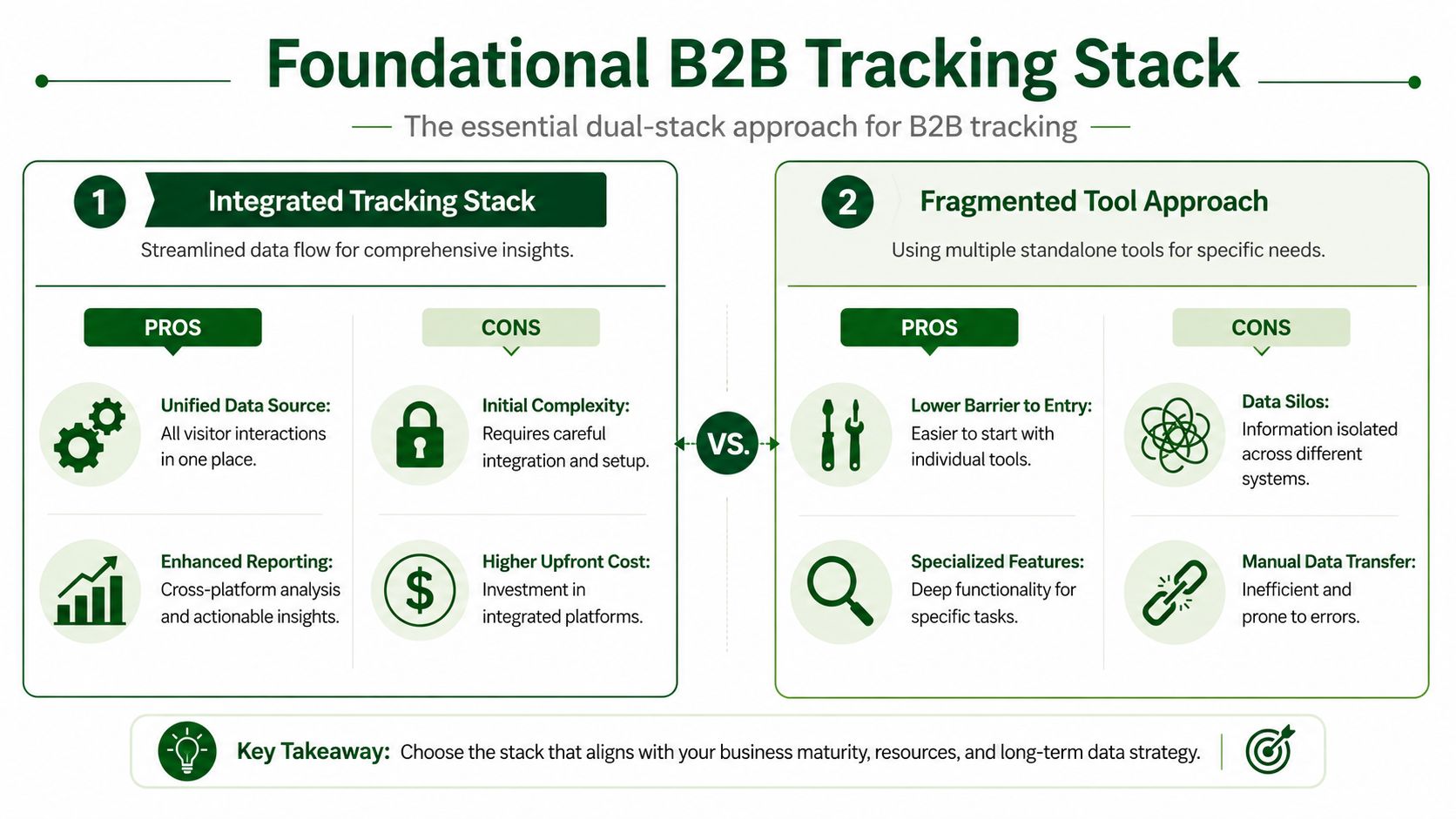
The fastest way to fail at how to track website visitors is to rely on a single tool. Sales needs to know both what happened and why it matters. One system rarely does both well.
Google Analytics remains the default quantitative layer. According to Contentsquare's guide to website tracking tools, Google Analytics is used as the primary tool by approximately 74% of analytics professionals, and 85% of product teams use a dual-tool stack for quantitative and qualitative insights. That pattern makes sense in B2B sales. Quantitative data shows volume, source, page paths, and conversion events. Qualitative tools show friction, confusion, and interaction patterns that raw reports miss.
Why one tool never gives sales the full picture
GA4 answers the structured questions. Which channels drove traffic. Which pages were viewed. Which events fired. Which campaigns produced engaged sessions. That's useful for pattern detection and routing logic.
Hotjar, Microsoft Clarity, or UXCam answer the behavior questions. Where did visitors hesitate. Which sections got ignored. Which pages caused rage clicks or dead-end behavior. For sales, that context sharpens messaging. If target accounts keep returning to an integrations page and stalling, the rep shouldn't lead with a generic opener. They should speak to implementation confidence.
A fragmented setup still works at the beginning, but it creates manual reconciliation later. Teams end up comparing reports across tabs, exporting CSVs, and debating whether two systems are describing the same behavior.
What sales should pull from each layer
Use a simple division of labor:
| Tool Type | What It Tells You (The 'What') | What It Shows You (The 'Why') |
|---|---|---|
| Quantitative analytics | Traffic source, page sequence, conversion events, repeat visits | Not much context on motivation or friction |
| Qualitative analytics | Less about totals and attribution | Scroll behavior, click patterns, friction points, confusion signals |
That stack is enough to start if you stay disciplined.
- Use GA4 as the system of record: Keep event names consistent, define conversions carefully, and make sure campaign attribution is usable.
- Use session replay selectively: Review sessions tied to high-value pages or target accounts instead of trying to watch everything.
- Keep sales-facing outputs simple: Reps need a signal summary, not a dashboard tour.
If you're refining your analytics operating model, the broader PitchSmart blog covers adjacent outbound workflows that benefit from cleaner account-level data.
The stack should reduce interpretation time. If reps need an analyst to explain every signal, your setup is still too fragile.
Turning Anonymous Visitors into Target Accounts
Only a small slice of your website traffic will ever fill out a form. The revenue opportunity sits in the rest. Sales teams that can translate anonymous account activity into a prioritized outbound queue get more at-bats before competitors know a deal exists.
Start with account resolution, not perfect identity
Outbound does not need perfect person-level tracking to be effective. It needs a credible answer to one question: which accounts are showing buying behavior right now?
That changes how you set up website visitor tracking. The goal is not a prettier analytics report. The goal is to convert unknown sessions into named companies your reps already care about, then attach enough context that outreach feels timely instead of random.
Start with a simple rule. If a visit cannot change account prioritization, it should not create work for sales.
Build an account identification workflow sales can trust
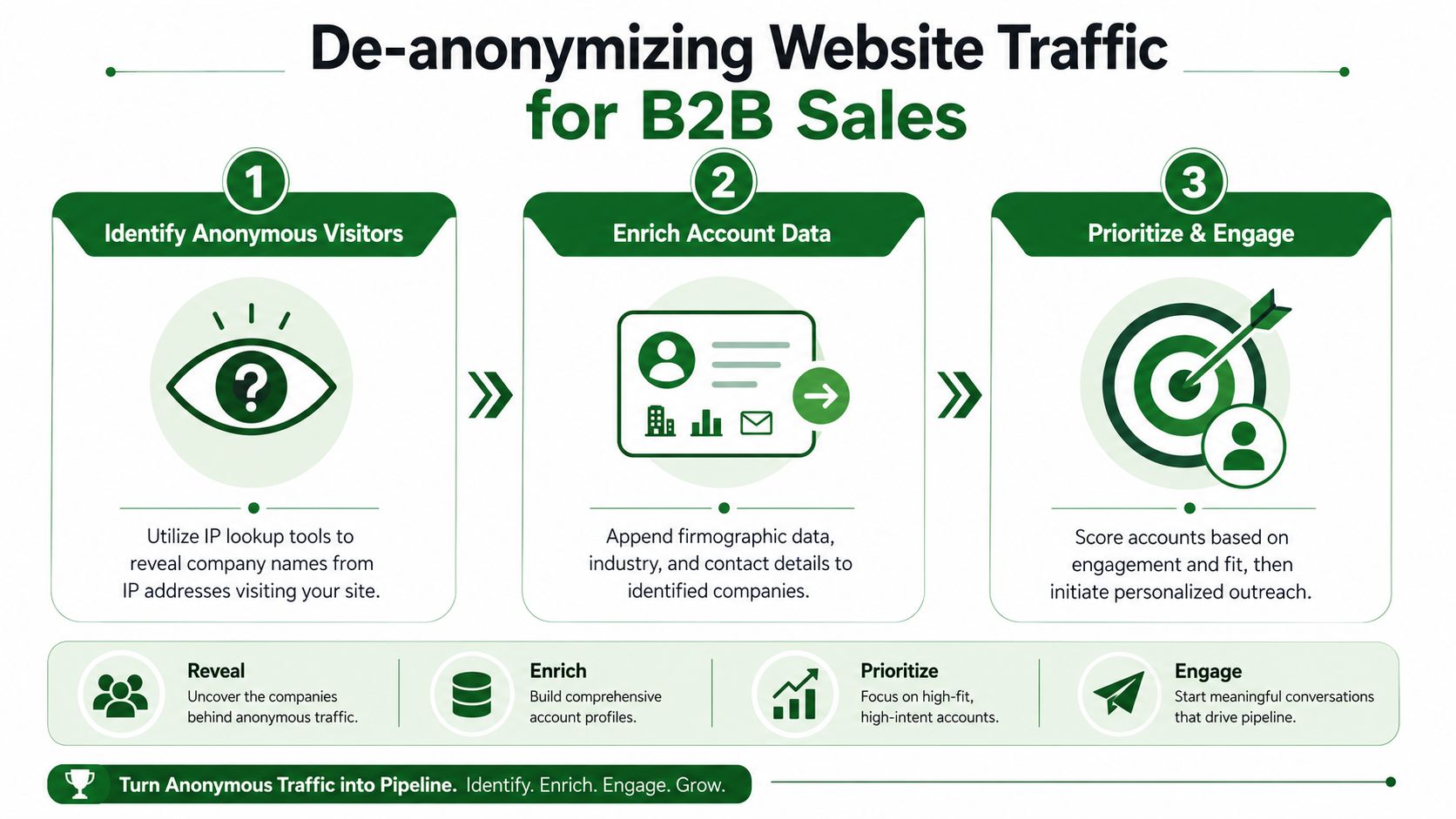
Anonymous visitor identification works best as a sequence, not a single tool feature.
First, resolve traffic to a company where possible through IP matching or a website visitor identification platform. Factors.ai's guide to identifying anonymous website visitors explains the practical limitation clearly: this process usually identifies the company, not the individual user. For B2B outbound, that is still useful. It tells your team which target accounts are active, even if it does not reveal the exact stakeholder behind the visit.
Second, enrich the account before routing it anywhere. Match the company against ICP criteria, territory, account owner, open opportunity status, and current sequence status. A visit from a Fortune 500 target account deserves a different response than a visit from a student, agency, or vendor.
Third, attach behavior that gives the account context. Sales needs more than a company name. They need a reason to act.
Use signal combinations that map to outbound action
Single events create noise. Combinations create a sales signal.
Three signal types tend to work well together:
Account identification
A recognizable company lands on the site. That creates awareness, not urgency.Visit source or campaign context
The account arrives from a category campaign, a comparison page ad, a webinar follow-up, or an outbound click. That explains why they showed up.Commercial behavior
The account visits pricing, integrations, product pages, case studies, security documentation, or implementation content. Repeat sessions raise the score.
The highest-value accounts usually show at least two of these at once. For example, if a target account returns through a paid category campaign and spends time on integration pages, an SDR has a real reason to reach out. If the same account reads one blog post and disappears, sales should leave it alone.
That trade-off matters. Lower thresholds create more volume for reps, but they also create more false positives and wasted touches.
Reverse IP gives sales an account to research. It does not give them permission to write as if they know who visited.
Qualify the account before it hits an SDR queue
Website traffic creates plenty of junk. Shared office networks, consultants, competitors, and existing customers can all look active if you route everything blindly.
A short qualification pass keeps the queue usable:
- Fit: Is this company in your ICP and assigned territory?
- Depth: Did the account visit high-intent pages or skim one low-intent asset?
- Recency: Did the activity happen recently enough to support timely outreach?
- Repeat behavior: Has the account come back, or was this a one-off visit?
- Sales context: Is there already an open opportunity, active sequence, or customer motion in progress?
I prefer routing fewer accounts with better evidence. Reps respond faster when the list is short and believable.
Create an output sales can act on in under a minute
Do not send raw web events to reps. Send an account brief.
A useful handoff includes the account name, visit date, number of sessions, top pages viewed, acquisition source, ICP status, and the recommended next action. That action might be "research contacts in IT," "send a call opener tied to integrations," or "hold until repeat visit."
Website visitor tracking becomes outbound intelligence. The website stops being a passive reporting surface and starts acting like an early warning system for account activity.
If you are asking how to track website visitors in a way sales will use, route accounts only after identity, fit, and behavior line up. That is the point where traffic turns into pipeline coverage.
How to Interpret Buying Signals for Outbound Sales
Tracking creates raw material. Interpretation decides whether your team creates pipeline or noise.
Organizations overreact to weak signals and underreact to clustered ones. A single blog visit from a target account rarely justifies outreach. A return visit to product pages, followed by pricing and integration content, is a different story. The difference isn't the page itself. It's the pattern.

Separate account intent from person intent
Many sales teams get sloppy. They identify company activity and then act as if they know exactly who is researching. They don't.
GrowthBook's analysis of unique visitor tracking highlights a critical gap in most guidance: teams often de-anonymize traffic at the company level via IP matching, but that doesn't solve individual identity across devices without authenticated user flows. For B2B sales, that's a major distinction. A visit from a named account tells you the account may be in market. It does not prove which stakeholder is involved.
That changes how outreach should sound. Reps shouldn't write as if they know who viewed the page. They should reference likely business relevance at the account level.
Good signal-based outreach sounds informed, not creepy.
Read behavior in context
The best interpretation model is simple and practical. Combine fit with engagement depth.
Consider these scenarios:
Low-priority signal
A target account lands on one blog post from organic search and leaves. That's awareness, not intent. Don't route it.Monitor signal
An account visits a solution page and later returns to a case study. That may justify watchlisting, especially if the account is strategically important.Action signal
An account from your named list visits multiple product pages, returns to pricing, and engages with implementation-related content. That's the kind of sequence that deserves outbound.
A lightweight scoring model helps, even if it's not formal software scoring. Sales and RevOps can agree on weighted behaviors qualitatively:
| Signal Type | Likely Meaning | Sales Response |
|---|---|---|
| Single top-of-funnel content view | Early curiosity | No direct outreach |
| Repeat product-area browsing | Problem exploration | Monitor and enrich |
| Pricing or implementation content with repeat engagement | Active evaluation | Prioritize outreach |
The trap is trying to be too precise. You don't need a perfect model on day one. You need a model reps trust enough to use consistently.
A practical way to improve quality is to review won deals and lost opportunities against historical website activity. Look for recurring patterns. Did strong opportunities revisit integration content? Did weak ones stop at educational content? That feedback loop makes your outbound triggers sharper over time.
Activate Your Signals with Automated Research and Outreach
Once you've identified a promising account, the next failure point appears fast. A rep sees the signal, then starts manual follow-up. They research the company, hunt for the right contacts, scan recent activity, draft a personalized opener, and try to build a sequence around it. That work kills speed.

The bottleneck is manual follow-up
Sales reps already spend too much time researching. SalesMotion's analysis of manual account research states that automating account research returns 300+ hours per rep per year to active selling. That's why website tracking on its own isn't enough. If every identified account still requires one-by-one research, your system moved the bottleneck downstream.
The same problem shows up in message quality. Reps know the account visited. They still don't know which angle to use, which contact to start with, or how to connect the website behavior to a credible business conversation. So they default to generic outreach.
That defeats the purpose of signal tracking.
Turn tracked behavior into outbound execution
At this point, the workflow has to become operational.
A useful process looks like this:
- Feed high-intent accounts into a research layer: Don't ask reps to assemble the account picture by hand.
- Append context beyond the visit: Pull firmographic details, relevant business context, and recent signals that support a conversation.
- Create activity-based hooks: Tie the message to the kind of interest the account is showing, not just a generic persona pitch.
- Launch a sequence fast: Use the strongest hook to seed email and LinkedIn outreach while the signal is still fresh.
For teams that want to remove the research bottleneck, tools built for outbound execution matter more than another dashboard. The value isn't in seeing that traffic happened. The value is in turning that account list into prioritized research, conversation angles, and ready-to-send outreach without burning rep time. That's especially important if you're evaluating workflows against a platform's pricing and rollout options.
Here's a product walkthrough that shows what that kind of operational workflow looks like in practice:
The strongest teams don't treat website visitor data as a report for sales to glance at. They treat it as an input into bulk, customizable lead research, advanced list segmentation, activity-based conversational hooks, and automated multi-step outreach. That's how traffic turns into pipeline instead of another dashboard no one acts on.
If a signal can't trigger research and outreach quickly, it isn't part of your sales engine yet.
Build Your Signal-Driven Sales Engine
Companies that already know your market are raising their hands on your website every week. The sales problem is not traffic volume. The sales problem is whether your team can identify those accounts, judge intent correctly, and get a relevant outbound sequence live before interest fades.
A working B2B tracking system sits inside outbound operations, not off to the side as a reporting layer. It gives sales a way to decide which accounts deserve rep time, what kind of message fits the behavior, and when a signal is strong enough to justify action. When that system is set up well, your website becomes a steady source of account intelligence for pipeline generation.
Operate with consent and discipline
Privacy rules have pushed website tracking toward first-party data and consent-based collection. That shift helps sales teams because it forces cleaner setup, better data quality, and fewer bad assumptions.
A compliant setup keeps a few principles in place:
- Use consent-aware tracking: Respect the user's choice before collecting behavioral data.
- Favor first-party identity handling: Build around data your team collects directly.
- Avoid false precision: Account-level visibility is useful. Treating it like person-level certainty creates risk and hurts trust.
What a working system looks like
The model is simple. Analytics shows what happened on the site. Behavior tools explain where interest or friction showed up. Identity and enrichment turn part of that anonymous traffic into named accounts. Signal thresholds define when sales should act. Research and outreach workflows turn those signals into conversations.
That is how to track website visitors in a way that supports revenue, not just reporting.
Teams that run this well keep the operating model tight across RevOps, SDRs, and sales leadership. Fewer tools, clear ownership, and defined trigger points beat a stack full of disconnected alerts. Once reps can see which accounts visited, the next bottleneck is usually execution speed. If account research, message drafting, and sequencing still happen one by one, signal value decays before the first touch goes out. That is why many teams centralize this motion in an outbound execution platform built for signal-based prospecting, because the job is not to collect more visitor data. The job is to turn account signals into research, prioritization, and outreach while they still matter, which is the exact workflow PitchSmart is designed to automate.
PitchSmart helps outbound teams turn account signals into action. Upload a list or pull accounts from your CRM, run bulk research across the whole segment, surface activity-based hooks, and generate personalized outreach without forcing reps into one-by-one manual research. If your website traffic is showing buying intent, PitchSmart helps you move from signal to conversation faster.