PitchSmart uses essential cookies to keep the platform running. With your permission, we also use analytics cookies to improve the product. We never sell your data. See our Privacy Policy for details.

    Back to blog
    lead source trackingRevOps attributionCRM source dataUTM trackingB2B pipeline

    Lead Source Tracking: A RevOps Implementation Guide

    Build a reliable lead source tracking system that survives the journey from first click to closed revenue. Practical taxonomy, capture, and CRM mapping steps.

    August 2, 2026/15 min read
    Lead Source Tracking: A RevOps Implementation Guide

    Your rep opens a lead record, sees a vague source label, and “cleans it up” before routing it to the account owner. The dashboard still looks tidy. The problem is that months of attribution history just got overwritten, and nobody notices until a board review or budget decision depends on it. That's the lead source tracking failure, not the missing UTM on a form.

    A lot of teams are still fighting the wrong battle. They keep tuning form fields and campaign tags, while source drift after intake destroys trust in the numbers. If you've ever had a CRM migration, an integration sync, or a well-meaning rep overwrite source data, you already know the pain, the report looks authoritative and the pipeline story doesn't hold up.

    Why Your Lead Source Data Is Probably Wrong

    The most common failure isn't at the form. It's after the lead lands. A rep updates a source field during qualification, an integration writes back a new value from marketing automation, or a workflow normalizes labels differently across regions. By the time that lead becomes pipeline, the source field often reflects the last system or person who touched it, not the origin that created the opportunity.

    That's why lead source tracking needs to be treated as a data governance problem, not just a capture problem. ActiveProspect recommends capturing UTMs and campaign details automatically, locking the Original Source so it can't be overwritten, and auditing the full lead flow so source can be tied to downstream pipeline and revenue rather than just lead volume. Their practical sequence is straightforward, define the taxonomy, capture at intake, normalize and deduplicate before CRM writeback, protect immutable fields, then report outcomes by source, because the failure mode is usually source drift after intake. See the implementation guidance in ActiveProspect's lead source tracking guide.

    The two-field model that holds up

    The fix is to separate intent from history. Original Source preserves first-touch origin. Latest Source shows the most recent meaningful interaction. If you only keep one field, you force one use case to destroy the other.

    Practical rule: if a field answers two different business questions, split it into two fields.

    That split matters in multi-product companies, especially after acquisition. A customer can first arrive through one product line, later engage with another, and then renew through a cross-sell motion. If you overwrite the original origin each time, you don't have attribution anymore, you have a timeline of edits.

    The point isn't to freeze the record forever. It's to make sure the record can explain both demand creation and later re-engagement without collapsing into whichever update happened last. That's the only way source data survives real revenue operations.

    Building a Source Taxonomy That Maps to Your Go-to-Market Motions

    A source taxonomy should reflect how your revenue team works. Generic buckets like Web or Event feel tidy, but they hide the differences that matter in reporting. An inbound content download, a partner introduction, and a cross-sell signal from an existing account all behave differently in pipeline, so they should not sit in the same bucket.
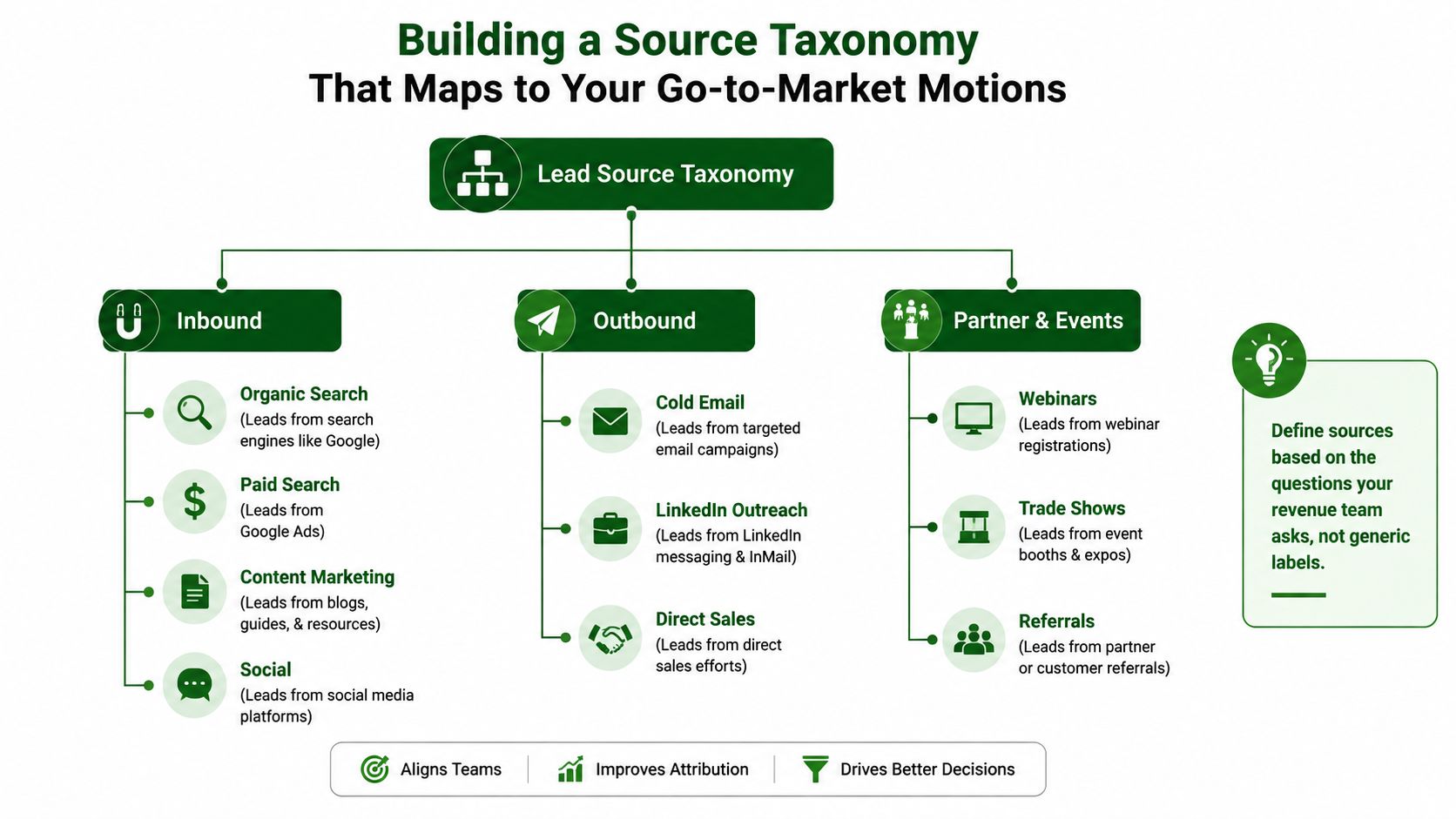
    A diagram illustrating a lead source taxonomy categorized into Inbound, Outbound, and Partner & Events channels.

    Start with a controlled vocabulary, then map it to the motions you run. For a 1,000 to 5,000 person B2B company selling multiple product lines, a practical taxonomy often includes categories like Organic Search, Paid Search, Content Marketing, Social, Cold Email, LinkedIn Outreach, Direct Sales, Webinars, Trade Shows, and Referrals. The useful test is simple, can a manager tell from the label whether the source came from demand capture, outbound prospecting, partner influence, or an existing-account motion.

    Build the picklist around decisions

    A good taxonomy helps leaders answer questions they already ask in pipeline reviews. If a source label can't help you compare cross-sell performance against net-new demand, it's too vague. If it forces reps to guess whether a webinar from a partner counts as partner-sourced or event-sourced, it's too loose.

    Rule of thumb: sources should be narrow enough to support reporting, but broad enough that reps don't invent their own labels.

    The governance piece matters just as much as the taxonomy itself. Reps should choose from a restricted picklist, not type free text. Admins should own new additions. And every new value should have a clear definition tied to an actual motion, not a one-off campaign name that's dead in three weeks.

    Keep source and campaign separate

    Source is the stable answer to where the lead came from. Campaign is the contextual detail about what moved it. If you pack campaign logic into the source field, your reports get noisy fast and you lose the ability to compare motions over time.

    That's especially useful for multi-product companies. One product line might be driven by inbound demand, while another relies on account-based outbound or partner introductions. A clean taxonomy lets you see those patterns without forcing everything into a generic funnel shape.

    The pre-uploaded visual above is worth keeping close during implementation. It's a good reminder that source tracking works best when the labels reflect how your team sells, not how a CRM dropdown happens to be organized.

    Capturing Source Data at Arrival and Persisting It Server-Side

    The highest-reliability approach records source context the moment a visitor arrives, stores it in first-party storage tied to your own domain, and then attaches it server-side when the form submits. That sequence matters because the source context is most reliable at arrival, before browser restrictions, cross-device behavior, or script timing issues can strip it away. Lead Source's guidance is clear on this point, capture the referrer, full UTM set, ad click identifier, and entry page immediately, then preserve that context in first-party storage and send it from the server at submission time. Read the implementation pattern in Lead Source's tracking guide.
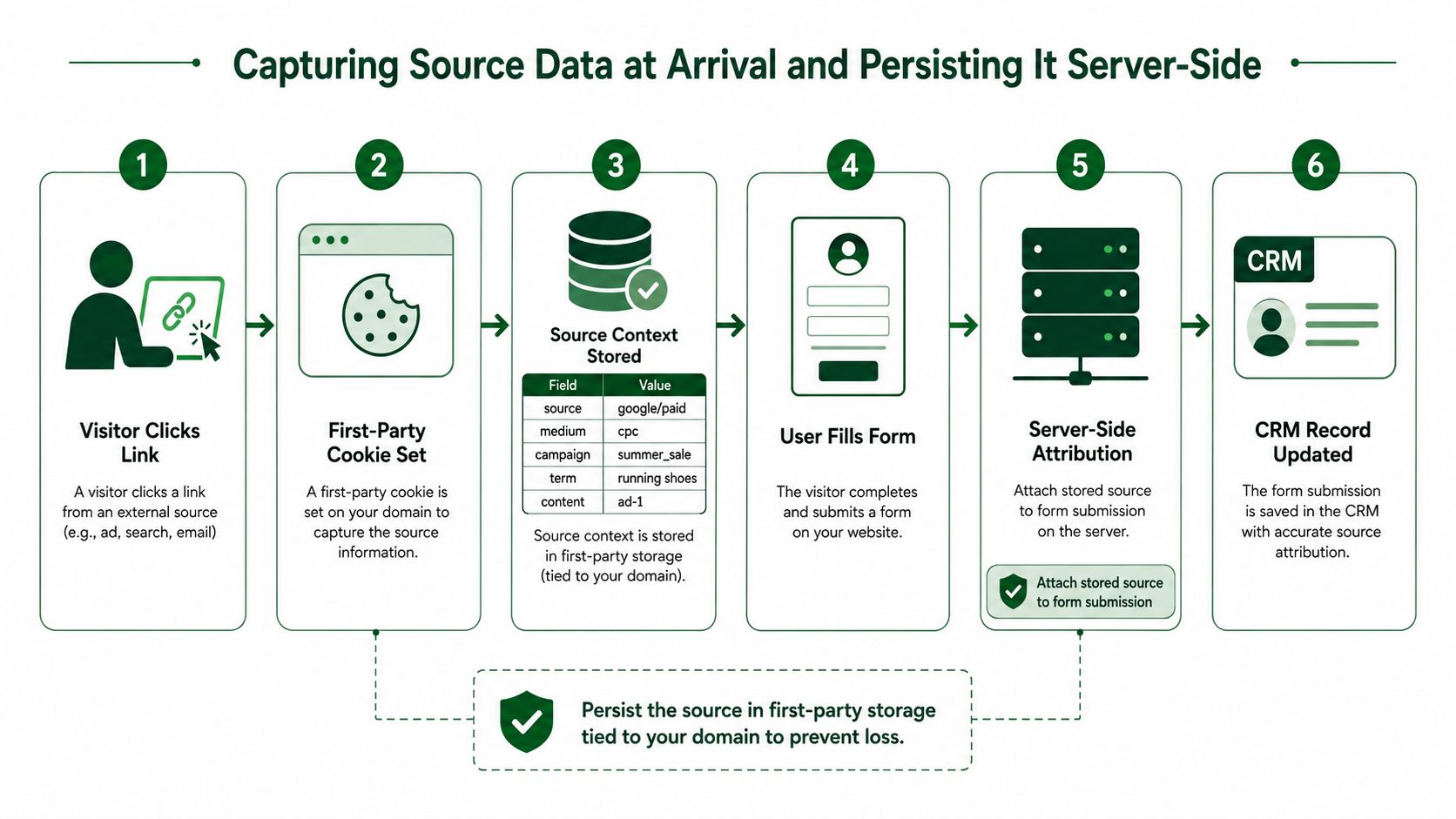
    A diagram illustrating the process of capturing and persisting lead source data via server-side attribution.

    The weak version of this setup is client-side only capture. It looks fine until browser privacy restrictions, a third-party script race, or a cross-device journey drops the data before the form posts. Once that happens, someone backfills source manually, and now you've introduced human judgment into a field that should have been captured deterministically.

    What to capture immediately

    Capture the source context on arrival, not at conversion. That includes the UTM parameters, the referrer, the click identifier where available, and the landing page the visitor first saw. If the UTM data is incomplete, referrer and landing-page logic can help, but those are fallback signals, not the primary truth.

    The best implementation pattern is boring on purpose. Store the values in first-party storage, attach them server-side when the form submits, and write them into the CRM only after normalization and deduplication have happened. That keeps the CRM from becoming a junk drawer of half-true source values.

    Don't wait for the form submit to ask where the visitor came from. By then, the browser may have already made that answer unreliable.

    The difference shows up in reporting quality later. If source survives the full session, you can audit the journey from initial visit to CRM record without manual backfill or late overwrite. That's the benchmark that matters.

    If you're tightening privacy handling alongside capture logic, keep your policy and consent path aligned with the storage model. The internal privacy guidance is a useful reference point for reviewing how source data and consent should be treated together.

    Mapping Source Fields into Your CRM with Immutable Protection

    A solid architecture uses Original Source and Latest Source together, not one or the other. Original Source should be locked at creation and protected from edits by reps and integrations. Latest Source should update when a new meaningful touchpoint occurs, so later re-engagement still shows up without erasing the first-touch record.

    CRM Field Architecture for Source Tracking
    Field Name Type Edit Permissions Update Trigger Protection Rule
    Original Source Immutable picklist Admin only, if at all Set once at creation Never overwrite after initial write
    Latest Source Mutable picklist Automation and admins New campaign or re-engagement Overwrite only through governed rules
    Source Detail Text or structured field Automation only Captured UTM or referrer mapping Never used for reporting rollups
    Source Timestamp Datetime System only Initial capture or latest update System-owned audit field

    The important part is not the field names themselves, it's the edit model. If reps can change Original Source, the data will drift. If integrations can write anything they want, the same thing happens faster. Protecting the field is less about user friction and more about preventing silent corruption.

    Put the rules in the CRM, not in tribal knowledge

    Field-level permissions should reflect business logic. Original Source belongs to system creation logic, not manual cleanup. Latest Source can be updated by automation when a qualified re-engagement happens. Source Detail stays available for operational context, but it shouldn't drive summary reporting.

    Practical rule: if a field is used in executive reporting, treat it like a controlled asset.

    That also means you need an audit trail. If a source changes outside the normal automation path, you should know who changed it, when, and from which integration or workflow. Without that trail, you won't catch overwrite patterns until the quarter is already closed.

    Normalize and deduplicate before CRM writeback. That's the step many teams skip because it feels like housekeeping. It isn't housekeeping, it's the difference between a field that can be trusted and a field that just looks populated.

    The internal terms page is relevant here for teams that want to review how controlled systems define ownership and usage boundaries before automating field behavior.
    Choosing an Attribution Model for Multi-Product B2B Sales Cycles

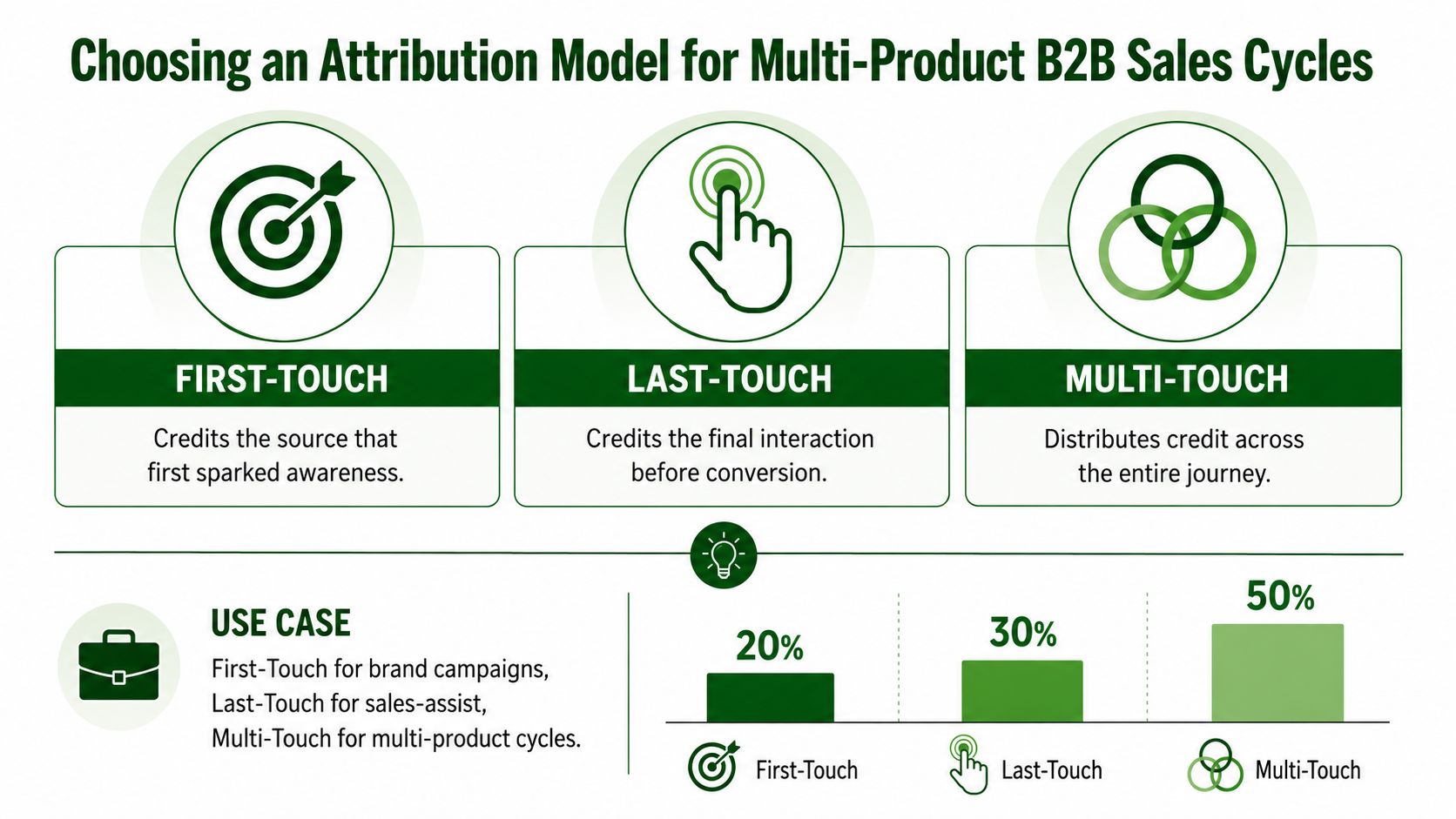
    First-touch, last-touch, and multi-touch each answer a different question. First-touch tells you what created awareness. Last-touch tells you what helped close. Multi-touch shows the journey across both. In a multi-product B2B business with long cycles and cross-sell motions, the wrong model can make a healthy channel look weak or make a noisy channel look indispensable.

    An infographic illustrating three marketing attribution models: First-Touch, Last-Touch, and Multi-Touch with their usage percentages.

    The choice depends on the question you're trying to answer. If leadership wants to know what starts demand, use first-touch. If sales wants to understand the final nudge before conversion, last-touch has value. If RevOps needs to understand how multiple motions interact across a long journey, multi-touch is usually the only model that doesn't flatten the story.

    Use cases by question, not by preference

    First-touch works best when brand, content, or top-of-funnel motions are the thing under review. Last-touch is useful when you want to isolate the interaction that preceded conversion. Multi-touch is better when the buying process involves multiple functions, product lines, or stages that can't be reduced to one event.

    That's especially true in cross-sell environments. A customer might discover a second product through a customer success interaction, then convert after an outbound assist, then expand later through a partner intro. If you force that chain into one field, the report will tell you what changed last, not what created the opportunity.

    Query design should match the model

    The reporting query has to match the attribution model or the conversation goes sideways. First-touch reports should roll up by the original source field. Last-touch reports should look at the latest source associated with conversion. Multi-touch reports need a journey view, because the value is in the sequence, not just the endpoint.

    A source model is only useful if the sales leader can read it without translating it twice.

    For teams selling multiple product lines, that distinction keeps planning honest. A source that drives strong initial engagement may not be the one that closes the second line. That doesn't make it useless, it means you're asking it to answer the wrong question if you only look at closed-won revenue.

    The internal PitchSmart blog can be helpful if you want to see how account research and motion-specific hooks are discussed alongside source context in outbound workflows.

    Reconciling Captured Attribution with Customer-Reported Discovery

    Captured source data is the floor, not the ceiling. Some buyers will tell you they found you through a referral, a search result, a podcast mention, or a conversation that never showed up cleanly in the tracking stack. That's why Outfunnel recommends asking leads and customers how did you hear about us and comparing the answer with captured data, while Cometly pushes teams to judge sources by conversion to opportunity, average deal size, sales cycle length, and customer lifetime value. See the discussion in Outfunnel's lead source tracking guidance.

    The useful move is not to choose one truth and ignore the other. It's to compare them. When customer-reported discovery and captured attribution disagree consistently, you've probably got a gap in collection, an untracked offline motion, or a source taxonomy that's too blunt to represent the actual path.

    Look for quality, not just volume

    A source can produce a lot of leads and still underperform on revenue quality. If you only look at lead count or MQLs, you can easily miss the fact that a channel brings in lower-value opportunities, longer cycles, or weaker retention. Revenue teams need a source view that gets past raw volume and asks whether the source produces customers worth keeping.

    That's especially important when privacy restrictions and browser limits leave holes in the capture stack. The more those gaps matter, the more you need the human-reported answer as a check, not as a replacement for system capture.

    Use the mismatch as a diagnostic

    When the same source keeps looking strong in lead volume but weak in revenue quality, the likely issue isn't just attribution math. It might be a source that attracts curiosity but not buying intent, a campaign that fills the top of the funnel with poor-fit accounts, or a taxonomy that collapses very different motions into one label.

    If the source looks great in the dashboard but weak in the forecast, don't defend the dashboard. Inspect the path.

    That's where the reconciliation process pays off. You stop treating attribution as a single report and start treating it as a feedback loop. The goal is a source system that can survive disagreement and still tell you something useful about what creates revenue.

    Governance Checklist and Ongoing Validation

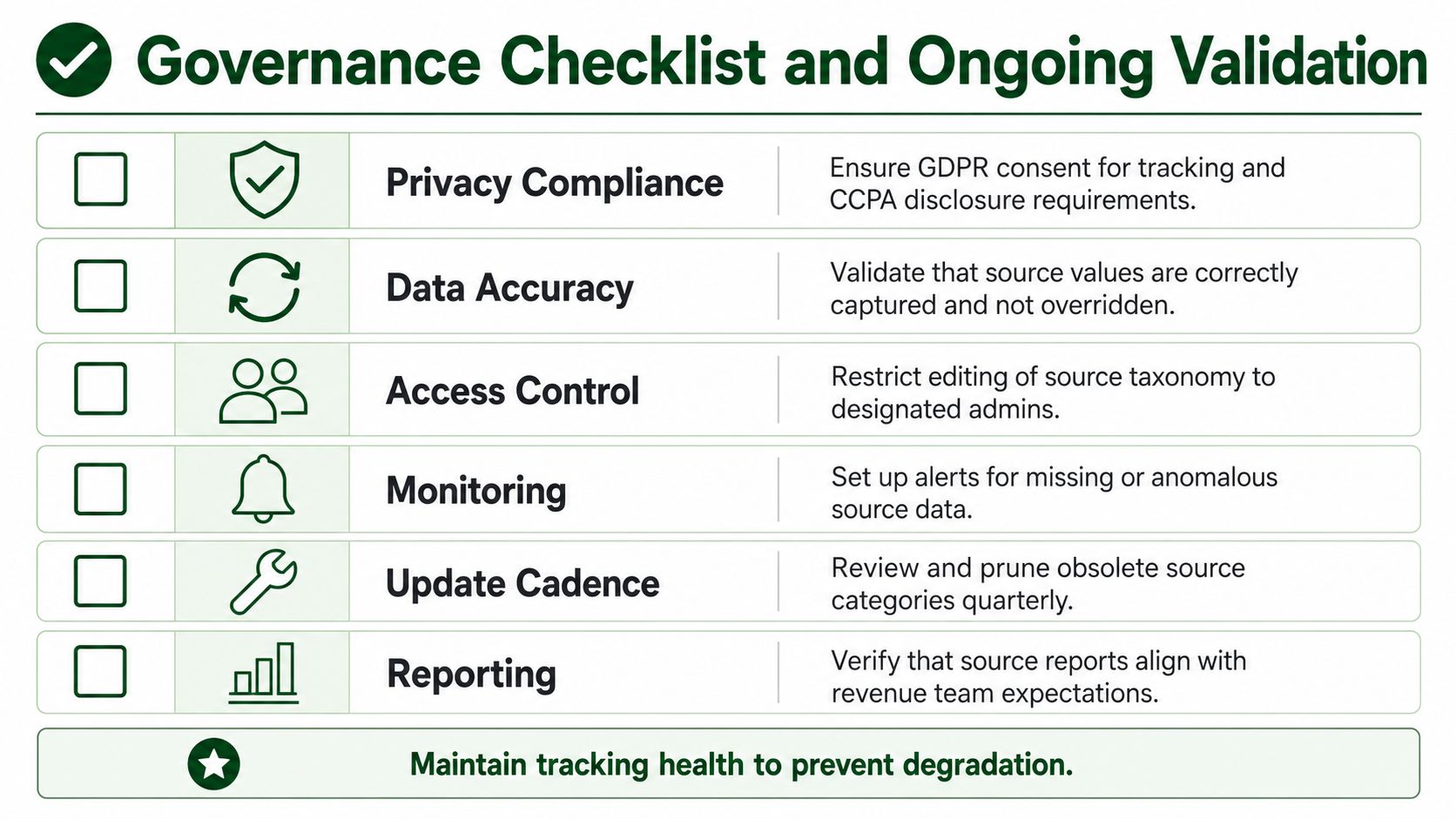
    Lead source tracking degrades unless someone owns it. A clean implementation can drift fast if reps edit fields casually, integrations change behavior, or new motions get added without taxonomy updates. Monthly review of source field edits and quarterly reconciliation of captured versus reported sources are the difference between a reliable system and a quarterly business review full of apologies.

    A governance checklist table outlining essential steps for maintaining data integrity, privacy compliance, and tracking health.

    Use a checklist that covers compliance, permissions, monitoring, and taxonomy upkeep. GDPR consent for tracking and CCPA disclosure requirements need to be handled deliberately, not bolted on later. Editing rights should be restricted to designated admins. Alerts should flag missing or anomalous source data before it leaks into reporting.

    What to validate on a routine basis

    • Privacy compliance: confirm tracking consent and disclosure language still match how source data is collected.
    • Access control: verify that only the right people can edit source taxonomy and protected fields.
    • Monitoring: surface missing source values, unusual overwrite patterns, and sync anomalies.
    • Update cadence: prune obsolete source categories and add new motions when the business changes.
    • Reporting alignment: make sure source reports still match how the revenue team talks about pipeline.
    • Field audit: check for integrations or workflows that are writing to the wrong source field.

    The best time to catch source drift is before the quarter closes, not after the numbers are already in the board deck. A monthly field audit and a quarterly source reconciliation are usually enough to catch most issues before they turn into bad decisions.

    The governance layer is what keeps the system usable over time. Without it, even a well-designed taxonomy and capture stack will rot under everyday operational pressure.


    If you want a cleaner way to research accounts, build source-aware outbound motion, and keep attribution tied to real signals, visit PitchSmart and see how it fits into your RevOps workflow. It's built for teams that need motion-specific research, better hooks, and a more disciplined way to turn signals into outreach without losing control of the underlying data.

    Table of contents

    • Why Your Lead Source Data Is Probably Wrong
    • The two-field model that holds up
    • Building a Source Taxonomy That Maps to Your Go-to-Market Motions
    • Build the picklist around decisions
    • Keep source and campaign separate
    • Capturing Source Data at Arrival and Persisting It Server-Side
    • What to capture immediately
    • Mapping Source Fields into Your CRM with Immutable Protection
    • Put the rules in the CRM, not in tribal knowledge
    • Choosing an Attribution Model for Multi-Product B2B Sales Cycles
    • Use cases by question, not by preference
    • Query design should match the model
    • Reconciling Captured Attribution with Customer-Reported Discovery
    • Look for quality, not just volume
    • Use the mismatch as a diagnostic
    • Governance Checklist and Ongoing Validation
    • What to validate on a routine basis

    Keep reading

    More articles

    Team Productivity Improvement Playbook for Outbound Sales
    team productivity improvementoutbound salessales enablement

    Team Productivity Improvement Playbook for Outbound Sales

    Diagnose blockers and drive team productivity improvement in outbound sales with process redesign, automation, KPIs, and change-management tactics.

    August 1, 202618 min read
    Data Enrichment Techniques for Outbound Sales Teams
    data enrichment techniquesoutbound saleslead research

    Data Enrichment Techniques for Outbound Sales Teams

    Learn practical data enrichment techniques that turn raw lead lists into signal-backed pipeline. Built for outbound sales and RevOps teams in 2026.

    July 31, 202616 min read
    Lead Generation Workflow That Books Meetings
    lead generation workflowoutbound salesB2B prospecting

    Lead Generation Workflow That Books Meetings

    Build a high-velocity lead generation workflow with proven stages, scoring, outreach sequences, and metrics that turn lists into qualified pipeline.

    July 30, 202617 min read