You spent half the morning researching a target account, opened six browser tabs, checked LinkedIn, skimmed the company's latest product page, found a weak hook from a funding announcement, then recorded a “personalized” video that took three takes to get right. You sent it, waited, and got nothing back.
That's the part most advice on video email marketing skips. The problem usually isn't effort. It's the operating model behind the effort.
Outbound teams are told to personalize every touch. They're told to use video to stand out. They're told to sound human. But if the process still depends on one rep doing one-off research, one-off scripting, and one-off recording for every prospect, the channel collapses under its own labor cost long before it becomes a repeatable pipeline motion.
Your Personalized Videos Are Still Being Ignored
A common outbound failure looks productive from the inside. An SDR researches one account at a time, writes a custom opener, records a short video, edits nothing, sends it, then repeats the cycle until the day is gone. The activity feels high effort because it is high effort. It just doesn't scale.
That's why reps burn out on video before they ever get good at it. The camera isn't the bottleneck. The prep work is.
B2B sales reps spend only 28–30% of their workweek on actual selling and prospecting, meaning 70–72% of their time is consumed by non-selling tasks like manual research, CRM data entry, and administrative work, with 2026 benchmarks confirming this ratio across industries. When a team adds manual video outreach on top of that, they usually stack another labor-heavy task onto an already broken system.

What reps are told to do versus what actually happens
Teams often seek to include all of this in every email:
- Relevant context: Something tied to the prospect's business, role, or current initiative.
- A personal video: Short enough to watch, specific enough to feel real.
- A clear CTA: Usually a reply, a click, or a meeting.
- Fast execution: Enough volume to matter across a territory.
In practice, the rep usually gets only two of the four. If they make the outreach personal, they lose volume. If they protect volume, they send generic video that nobody cares about.
Generic text email is easy to ignore. Generic video is worse because it asks for more attention while proving you did less homework.
The result is familiar. Reps stop trusting video. Managers decide “our market doesn't respond to it.” RevOps sees the channel as hard to standardize. None of those conclusions are really about video. They're about an expensive workflow that can't support personalization at scale.
Why Smart Video Email Is a Revenue Driver Not a Gimmick
There's a big difference between adding video to an email and running video as a performance channel.
A gimmick is a rep recording the same vague clip for everyone on a list and hoping the novelty carries the message. A revenue driver is a message that uses video to compress trust, relevance, and clarity into a short touch that earns the next conversation.
The economics support that distinction. Embedded video in email drives a 9.1% conversion rate compared to 5.4% for non-video emails, representing a 69% lift, while marketers using video in email report $41 ROI per $1 spent, a 46% higher return than image-only campaigns. That doesn't mean every outbound team should blast videos at every account. It means the channel is worth operationalizing when the message is relevant enough to justify the attention it asks for.
What video does that plain text often can't
Video works in B2B outbound when it does three jobs at once:
| Function | Why it matters in outbound |
|---|---|
| Shows credibility fast | Prospects can hear tone, see confidence, and assess whether the rep sounds prepared. |
| Reduces ambiguity | A short screen recording or face-to-camera explanation often makes a complex point easier to grasp than a dense paragraph. |
| Signals effort | A targeted video implies the rep looked at the account and made a deliberate outreach choice. |
That last point matters most. Buyers don't reward video because it's video. They respond when the format makes the relevance more obvious.
Where teams get it wrong
The failure mode is treating production quality as the lever. Teams debate webcams, microphones, lighting, and editing tools while the core issue sits upstream. If the message is generic, a sharper camera just delivers generic better.
Practical rule: In B2B outbound, the best video email marketing usually looks simple and sounds informed.
That's why the strongest video emails often feel plain. They reference one timely observation. They connect that observation to a problem the buyer already owns. They ask for one small next step. The medium helps. The relevance closes the gap.
Solving the Scalable Personalization Bottleneck
The hard part of video outreach isn't recording. It's finding something worth saying to each prospect before you hit record.
Manual personalization breaks because the workflow is serial. One rep opens one account, checks one set of pages, writes one opener, then moves to the next. That model can produce a great message for a handful of accounts. It can't power a consistent outbound program across hundreds of prospects without eating the team alive.
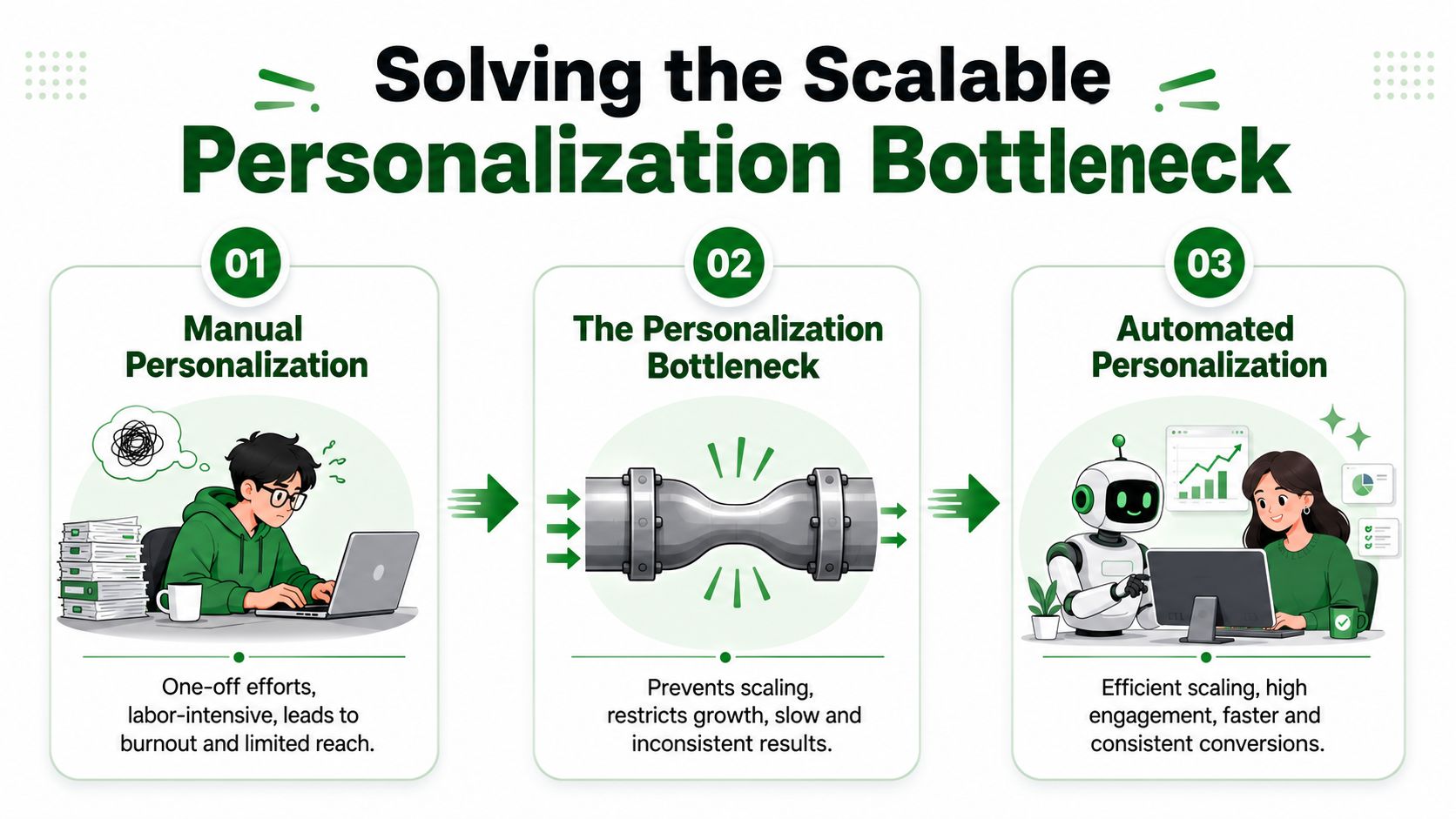
The real bottleneck sits before the camera turns on
When teams say, “We don't have time to do personalized video,” they usually mean one of three things:
- Research takes too long: Reps lose momentum jumping between company sites, LinkedIn, news pages, and CRM notes.
- Hooks are inconsistent: One rep finds a useful trigger. Another settles for “noticed your company is growing.”
- Sequence quality varies: Even if the first touch is decent, follow-ups drift back into template language.
That's why video outreach is often strongest when it starts with systematized research, not creative brainstorming. If a team can surface buying signals, recent activity, role-specific pain, and conversation starters across an entire list, the rep's job changes. They stop searching for a hook and start choosing the best one.
What scalable personalization actually looks like
A scalable outbound motion usually has four operational layers:
Bulk research across the list
Work from a defined account set or CSV, not random rep-by-rep hunting.Signal-based prioritization
Segment accounts by recent activity, buying cues, and fit instead of treating every lead the same.Conversation-ready hooks
Give reps usable angles they can reference in the video opener without rewriting from scratch each time.Sequenced follow-up
Turn the first insight into a multi-touch email and LinkedIn sequence so the video isn't a one-off stunt.
Automation and AI can free up approximately 20% of a sales team's capacity, directly addressing the 70% non-selling time burden and enabling reps to shift focus from admin to high-value customer conversations. For video email marketing, that regained capacity matters twice. It gives reps more time to contact prospects, and it improves the quality of what they say when they do.
If your team still researches one account at a time, video will stay a boutique tactic. Once research becomes parallel and repeatable, video becomes operational.
A RevOps-led approach doesn't ask every rep to become a creator. It gives them a research-backed workflow, standard messaging scaffolds, clear segmentation rules, and a short path from account insight to send-ready outreach. That's the difference between “we tried video” and “video is now part of how we generate pipeline.”
Your Playbook for High-Impact Video Outreach
The most effective workflow is simple. Segment first. Script from a real signal. Record short. Send with a subject line that earns the open. Then let the sequence carry the conversation.
A modern outbound stack should make that process easier, not heavier. Tools that centralize account context and recent buyer signals help reps build outreach from evidence instead of guesswork. That's the value of a platform like PitchSmart, especially when a team needs bulk research, activity-based hooks, automated three-step outreach, and segmentation based on buying signals rather than hand-built notes.
Signal-based segmentation
Don't start by recording videos for everyone in the same way. Start by grouping prospects according to why they might care now.
Useful segments often include:
- Recent activity accounts: Prospects showing visible movement online, such as launches, messaging shifts, or new initiatives.
- Pain-pattern clusters: Similar companies with the same likely operational bottleneck.
- High-fit dormant targets: Strong ICP match, low engagement, but worth a high-effort first touch.
- Priority buying windows: Accounts where timing or internal motion suggests extra urgency.
The point isn't to make every video unique. The point is to make every video belong to a relevant segment, then personalize the opening around one account-specific signal.
Crafting the 30-second script
Most sales videos should feel like a spoken opener, not a mini demo. Keep the shape tight:
Lead with the trigger
Mention the signal you saw. Be specific.Connect it to a likely problem
Show that you understand the implication, not just the fact.Offer a narrow reason to talk
Ask for a reply or a short conversation, not a big commitment.
A simple structure looks like this:
Noticed your team has been leaning into [recent initiative]. Usually when that happens, teams also run into [relevant bottleneck]. I recorded this because I had one idea on how to handle that without adding more manual work. If it's relevant, I'm happy to send the outline.
That works because it sounds earned. It doesn't try to close the deal inside the video.
Simple production for sales reps
Your rep doesn't need a studio. They need a repeatable recording setup they can use without friction.
- Use a stable frame: Face-to-camera or a quick screen share is enough.
- Open fast: Don't waste the first seconds on greetings and disclaimers.
- Keep it natural: Minor imperfections are fine if the message is sharp.
- Record in batches: Build videos for one segment at a time while the context is fresh.
Here's a practical example of the kind of lightweight format teams can use:
Writing subject lines that get opened
Subject lines should make the video obvious without sounding promotional. Including the word “video” in email subject lines increases open rates by 6–19%, and campaigns with video see an average click-through rate increase of 65% over static emails.
Good subject lines usually combine three ingredients:
- The word video
- A company or person reference
- A plain-language reason to open
Examples:
- Video for Acme's outbound workflow
- Quick video on your SDR research process
- Made a short video for Sarah
- Video idea after reviewing your team's outreach
Avoid sounding like marketing automation. If the subject line reads like a newsletter, the message loses the personal feel before the recipient even opens it.
Advanced Tactics to Maximize Engagement and Deliverability
Once the basics are in place, the gains come from removing friction. That means choosing the right playback experience, designing for silent viewing, and keeping the email simple enough to land in the inbox and get consumed quickly.
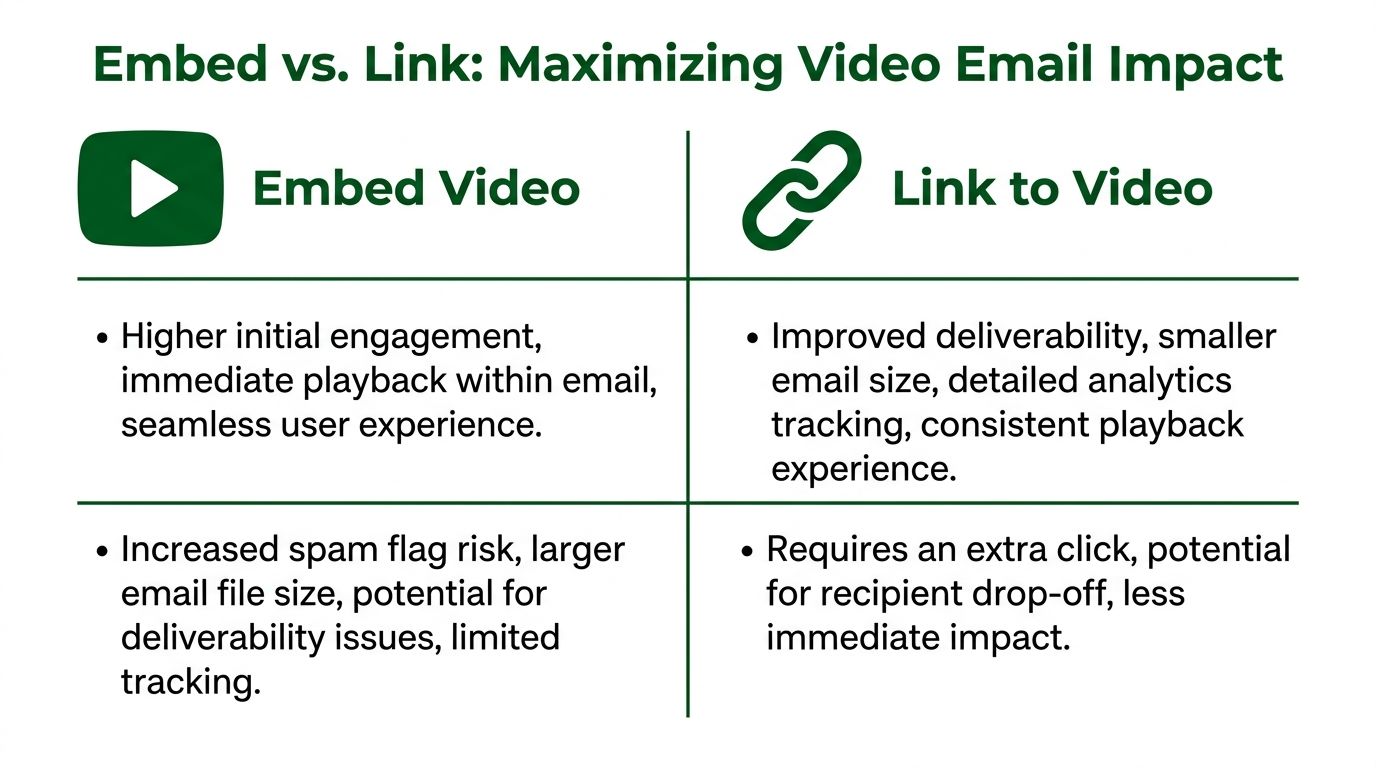
Embed versus link
In theory, in-email playback feels better. In practice, many teams still use thumbnails or GIF previews that link out to a hosted page because inbox support is inconsistent.
That trade-off matters in outbound. The common practice of linking out to a video landing page introduces a 20-30% drop-off rate, a critical point of friction that sabotages cold email momentum and that many guides fail to address. If the prospect opened the email, noticed the thumbnail, and still didn't click through, you paid the relevance cost without getting the viewing benefit.
A useful decision framework:
| Option | Best use | Main trade-off |
|---|---|---|
| Embedded or near-embedded playback | When the inbox experience supports it and reducing friction matters most | More technical complexity |
| GIF or thumbnail linked out | When deliverability and compatibility take priority | Extra click can kill momentum |
| Text-first email with video CTA | When the message must stay ultra-light | Lower visual pull |
For cold outbound, a strong middle ground is often a compelling thumbnail or GIF that makes the value proposition visible before the click.
Design for silent-first viewing
A lot of reps still record as if the prospect will listen with audio on. That's a mistake in real inbox conditions.
The first few seconds should work with no sound at all. Use visible on-screen text to carry the message, especially the hook. If the viewer only glances at the thumbnail or starts the clip muted, they should still understand why the email is relevant.
Field note: If the opener only works when the prospect hears your voice, the opener isn't strong enough yet.
That usually means:
- Put the account-specific cue on screen early
- State the problem visually, not only verbally
- Keep the first frame clean enough to read instantly
Protect deliverability while testing
Video outreach should behave like a disciplined outbound program, not like a creative experiment with no controls. Keep the email body lean. Don't overload it with large assets, extra links, and aggressive formatting.
Teams usually get better results when they test one variable at a time:
- Thumbnail choice: Human face, screen capture, or text-led frame.
- Opening line: Trigger-first versus problem-first.
- CTA style: Reply ask versus meeting ask.
- Follow-up sequence: Video first touch versus video second touch.
For teams building a more repeatable research-to-sequence workflow, the operational side matters as much as the media side. The best outbound blogs, including the guidance collected on the PitchSmart blog, are useful because they treat research quality, segmentation, and send mechanics as part of the same system.
Measuring the ROI of Your Video Email Campaigns
If a team can't explain why one video email worked and another failed, they don't have a channel yet. They have anecdotes.
RevOps should treat video email marketing like any other outbound motion. Measure it across the funnel, connect behavior to pipeline, and diagnose breakdowns by stage. Don't stop at opens.
Track the metrics that map to pipeline
A practical scorecard usually includes:
- Open rate: Useful for subject line and sender-name testing.
- Play rate: Did the recipient start the video after opening?
- View depth: Did they get far enough to understand the point?
- Reply rate: Did the message create conversation?
- Meetings booked: Did the conversation convert to pipeline movement?
You can also review these by segment. A short video to high-intent accounts should be judged differently from a reactivation touch to colder targets.
For operators comparing cost to output, the commercial lens matters too. That's where packaging, team capacity, and workflow design come in. If you're evaluating what it takes to operationalize the motion, the PitchSmart pricing page is a useful example of how to think about a research layer as infrastructure rather than as another isolated point tool.
Use failure patterns to diagnose the workflow
The fastest way to improve is to read performance in sequence.
If opens are healthy but play rate is weak, your thumbnail or setup probably isn't compelling enough. If people start the video but don't reply, the issue is often one of these:
- The opening hook was relevant, but the body drifted generic
- The CTA asked for too much
- The prospect understood the message, but didn't see urgency
A good video doesn't rescue a weak outbound strategy. It exposes it faster.
That's why the best teams review video outreach at the pattern level. They don't just ask whether a rep looked polished. They ask whether the segment was right, whether the signal was meaningful, whether the first sentence earned attention, and whether the next step felt easy to accept.
Stop Selling Manually Start Connecting with Video
Video works in B2B outbound when it proves relevance quickly. It fails when teams treat it like a production challenge instead of a research and workflow challenge.
That's the central mistake behind most weak video programs. Reps spend too much time hunting for context, too much time building one-off messages, and too little time talking to buyers. The result is familiar. Low output, inconsistent quality, and a channel the team abandons before it matures.
A better approach is operational. Research the list in parallel. segment by real buying signals. Build short scripts from actual account context. Turn the first touch into a sequenced follow-up motion across email and LinkedIn. Keep the videos simple and the personalization strong.
Video email marketing isn't about looking polished. It's about sounding prepared at scale.
If your team still relies on manual research and hand-built hooks, the video layer won't save the motion. It will just make the inefficiency more obvious. Fix the system first, then let video amplify what already works.
PitchSmart helps outbound teams replace one-by-one prospect research with bulk, signal-backed account intelligence, so reps can spend less time gathering context and more time sending relevant outreach that earns replies. If you want a faster way to build segmented lists, uncover conversation hooks from recent activity, and launch automated email and LinkedIn sequences from those insights, try PitchSmart.