
Sales teams don't have a data shortage. They have a signal shortage.
Sales representatives spend only 35.2% of their workweek selling, while 64.8% goes to research, administrative tasks, and list-building, according to a Forbes analysis cited in industry productivity reporting. That changes how you should think about web text extraction. This isn't a developer-side scraping exercise. It's a revenue problem.
For RevOps leaders, the core question isn't how to pull text from a website. It's how to turn messy public web content into account context, buying signals, and outbound hooks that help reps send better emails faster. Generic cold outreach fails because it sounds generic. Manual research fails because it doesn't scale. Web text extraction sits underneath both problems.
The Hidden Drain on Your Sales Team
Manual research looks harmless because it happens in small chunks. A rep opens the company site, scans the homepage, checks the blog, reads a press release, jumps to LinkedIn, copies notes into the CRM, and then tries to turn that pile into an email. Repeat that across a book of accounts and you don't get personalization at scale. You get pipeline drag.
The hardest part is that most of this work doesn't feel broken while it's happening. It feels responsible. Reps think they're preparing. Managers think they're enforcing quality. RevOps thinks it's necessary because better targeting should lead to better conversations. But if your team spends more time collecting context than using it, your process is upside down.
The real cost is lost selling time
The problem isn't just labor. It's delay. Every hour a rep spends stitching together account notes is an hour they're not in live conversations, not following up, and not reacting to fresh buying signals. By the time the research is done, the trigger event that made the account interesting may already be old.
A lot of teams try to solve this by lowering the personalization bar. They send broader sequences with weak relevance because that's what the math allows. That creates the second bleeding-neck problem. Outreach goes out on time, but it lands flat because it wasn't grounded in anything specific the buyer cares about.
Practical rule: If a rep has to open more than a handful of tabs to write a first-touch email, your research workflow is too manual to scale.
Why extraction belongs in RevOps
Web text extraction gives RevOps a way to standardize research instead of leaving it to rep-by-rep improvisation. Done well, it pulls useful language and facts from public pages, strips away navigation junk and boilerplate, and turns account research into structured inputs your team can use.
That matters because outbound quality depends on context quality. If your source material is inconsistent, your messaging will be inconsistent too. If the process depends on each rep interpreting websites manually, you won't get repeatable signal capture across a team.
A solid extraction layer changes the operating model:
- Reps stop copying and pasting from sites into notes.
- Managers get more consistent account context across territories and segments.
- RevOps can define what matters such as product launches, hiring themes, messaging changes, partnerships, or new market focus.
- Outbound gets faster without getting lazier because the research step is systematized.
This is why web text extraction matters to sales. It isn't about harvesting text for its own sake. It's about removing the manual work that keeps good reps away from selling.
What Is Web Text Extraction for Sales
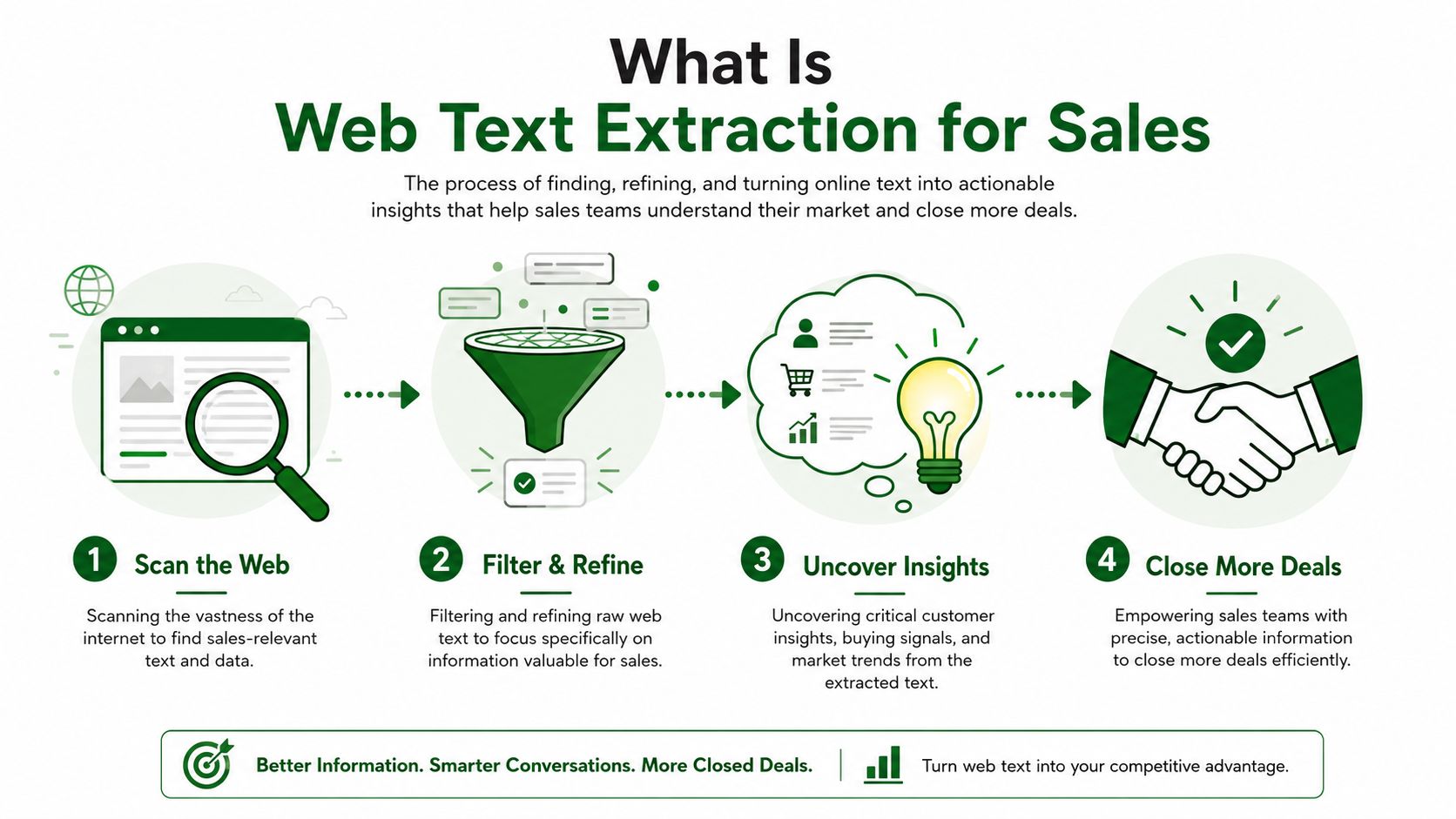
For sales, web text extraction means taking public web pages and isolating the parts that help a rep understand an account. Think less "download the whole website" and more "pull the lines, facts, themes, and activity cues that support a relevant message."
The term "web scraping" often evokes images of raw HTML, brittle scripts, or giant CSV files full of junk. Sales doesn't need everything on the page. Sales needs the right fragments. The difference is huge. One gives you noise. The other gives you context you can route into lead scoring, segmentation, and personalized outreach.
From pages to fields
The easiest way to explain it is as a translation layer. Company websites are written for humans. Sales systems need fields, tags, and prompts.
A homepage might contain positioning language. A careers page might reveal where the company is investing. A blog might show strategic priorities. A customer story might expose the buyer persona they care about most. Extraction pulls those clues out of messy page layouts and turns them into something operational.
Here's what that often looks like in practice:
| Web page type | Useful extracted output for sales |
|---|---|
| Homepage | Positioning, ICP language, product focus |
| Careers page | Hiring themes, department priorities |
| Blog or newsroom | Launches, partnerships, expansion signals |
| About page | Company narrative, market category, leadership context |
| Product pages | Feature language, use cases, pain points addressed |
That distinction matters because not all extraction is equally useful. Pulling every visible word from a page may satisfy a technical requirement, but it doesn't help an SDR decide how to open an email.
Why this matters now
This is no longer a niche engineering task. The global web scraping market, which relies on web text extraction technologies, reached $1.03 billion in 2025 and is projected to reach $2.00 billion by 2030, according to analysis of HTML and JSON data extraction trends. The bigger point for sales leaders is what that market growth signals. Companies now treat extraction as infrastructure.
Modern teams also expect cleaner outputs than raw page dumps. Expert-level extraction increasingly uses AI and NLP to identify main content areas and remove irrelevant elements, then return structured output such as JSON or CSV. That approach matters for sales because reps and systems need clean inputs, not HTML clutter.
Clean extraction is what turns a company website from a browsing experience into a queryable sales asset.
If your outbound engine depends on public web data, mastering extraction isn't optional anymore. It's how you build research coverage across accounts without asking reps to do analyst work one tab at a time.
Why DIY Extraction Fails Sales Teams
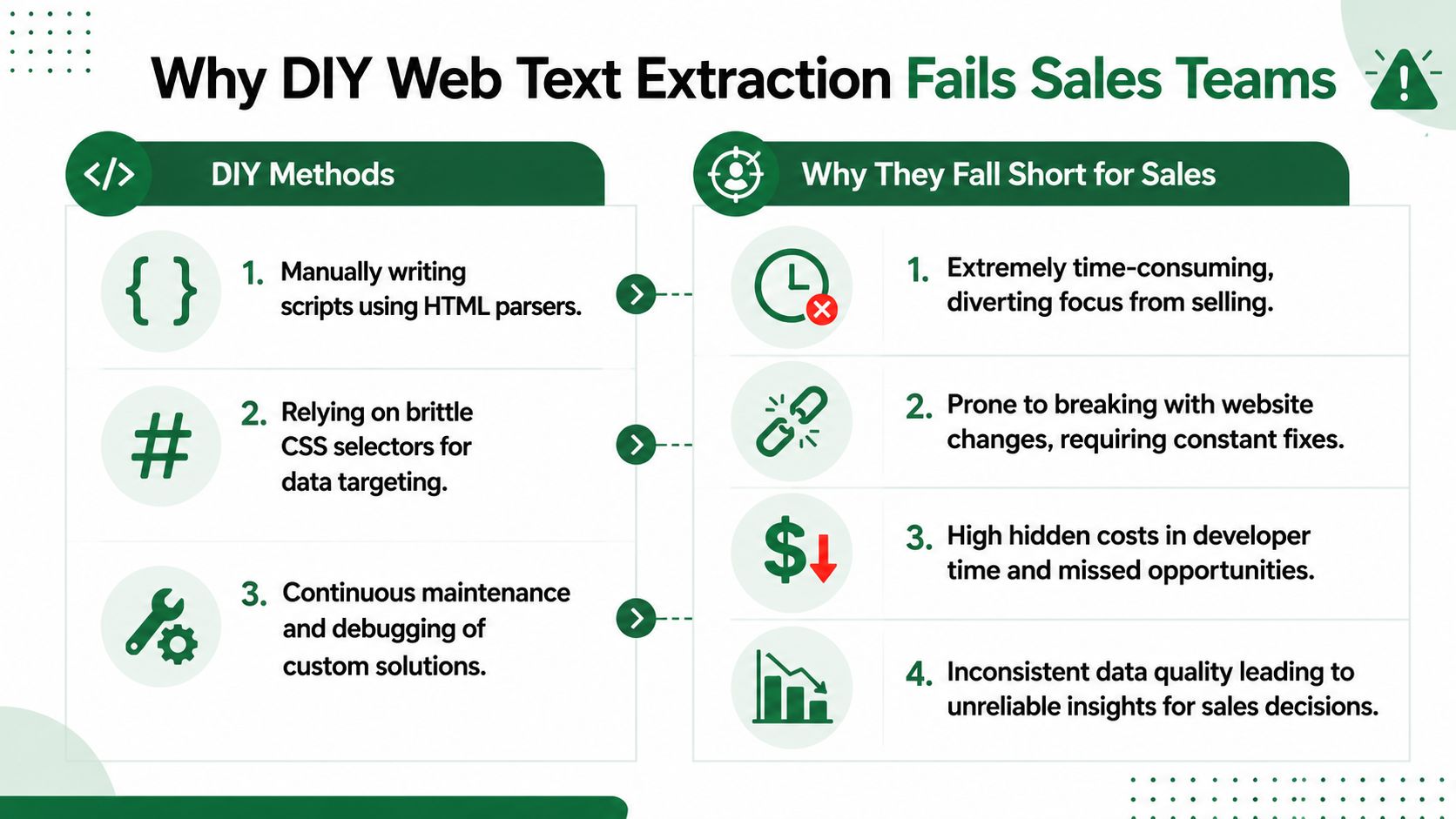
A lot of RevOps teams start in the same place. Someone writes a script. It targets a set of pages, uses a parser, maybe a few CSS selectors, and pushes text into a spreadsheet or internal database. For a pilot, that can work.
The trouble starts when the pilot becomes a process. Sales doesn't need a one-time scrape. Sales needs an extraction workflow that keeps working next week, next month, and across a changing set of target accounts. That's where most DIY systems collapse.
The script works until the site changes
A developer can absolutely write a scraper that finds a headline, body text, or job section on a known page structure. But websites change. Navigation shifts. classes get renamed. components move. content gets nested differently. Your extraction logic doesn't care why. It just breaks.
That isn't a theoretical risk. Effective extraction workflows need multiple selector versions because unvalidated selectors cause 30 to 40% extraction failures in production environments, according to Databar's guide to web data extraction workflows. For a sales team, that failure rate is brutal. It means fields go blank without warning, stale logic survives in production, and reps lose trust in the outputs.
Sales needs reliability, not cleverness
The deeper issue is organizational. DIY extraction sounds efficient because engineering builds it once. In reality, someone has to own:
- Selector maintenance when target sites change structure
- Fallback logic when the expected content block isn't present
- Validation checks so bad outputs don't pollute your CRM or sequence logic
- Monitoring and retries when pages fail to load or return incomplete content
- Field normalization so the same signal is captured consistently across different websites
That's not just development work. It's ongoing operations work. Most sales orgs don't budget for that. They end up with a hidden dependency on one technical person who understands the pipeline well enough to fix it.
A fragile extraction layer is worse than no extraction layer. Teams start acting on incomplete account context and don't realize the source is failing.
There's also a throughput problem. DIY methods usually begin with page-by-page thinking. Sales needs list-level thinking. If your team is researching hundreds or thousands of accounts, one-off parsers become a maintenance backlog fast.
The hidden mismatch with outbound
Engineering often judges extraction by whether the script returns text. Sales should judge it by whether the output is usable in outreach.
Those aren't the same thing.
A parser might successfully collect body copy but miss the details that matter to an SDR, like whether the company is expanding into a new market, hiring for a priority function, or changing how it talks about a product line. It might flatten a page into plain text and strip away the structure that gives meaning to headers, lists, and grouped sections. That leaves reps with a blob of words instead of a usable hook.
If the end user is sales, the extraction system has to be built around operational relevance, not just technical completeness.
Turning Raw Text into Actionable Buying Signals
Extracted text becomes valuable only when you can interpret it. A pile of homepage copy, blog paragraphs, and careers listings won't book meetings by itself. The sales advantage comes from turning that raw material into buying signals, message angles, and qualification cues.
That's where the intelligence layer matters.

Raw text is not sales intelligence
Strong extraction systems increasingly use AI-powered models and natural language processing to identify the main content area of a page, remove scripts, styles, and other non-content elements, and produce structured output without custom HTML parsers, as described by OpenGraph's content extraction approach. For sales, that structured output is the starting line, not the finish line.
Once the text is clean, you can map it to questions that matter for outbound:
- What does this company say it does?
- What priorities keep showing up across product, hiring, and content pages?
- What changed recently enough to justify outreach now?
- Which phrases sound like pains, initiatives, or strategic bets?
Many developer-first guides stop too early. They show you how to extract article content. They don't show you how to decide whether the output supports segmentation, prioritization, or a strong first line.
What to extract from common pages
A good sales workflow doesn't treat every page the same. Different page types produce different signal classes.
- Homepage and product pages can reveal positioning language, category terms, use cases, and the pains the company wants buyers to associate with them.
- Hiring pages often expose where budget, urgency, or operational focus is heading.
- News and blog content can surface launches, partnerships, market moves, and shifts in messaging.
- Customer stories can tell you which verticals, team types, and outcomes the company values enough to publish.
That's the difference between data collection and signal design. You're not just gathering text. You're deciding which kinds of public text deserve to influence routing, scoring, and messaging.
For teams building that workflow, the PitchSmart blog is a useful place to study how research-backed outbound connects signal capture to actual prospecting execution.
Where AI earns its keep
AI is useful here because it can classify extracted content into outreach-ready outputs. A model can help group themes, identify likely triggers, summarize relevance, and draft a conversational hook grounded in source material. That's far more useful than giving a rep an unfiltered page transcript.
Here's a simple before-and-after view:
| Raw extracted text | Sales-ready interpretation |
|---|---|
| "We're expanding our platform for multi-location operations" | Possible expansion or complexity signal for ops-focused outreach |
| "Hiring senior demand generation leadership" | New go-to-market investment, likely process and tooling review |
| "Announced integration with a major data platform" | Trigger for ecosystem, data, or workflow conversation |
Later in the workflow, a rep still needs judgment. Not every signal is worth using. But AI narrows the field and packages context in a way that saves time.
A walkthrough helps if you're evaluating how this fits into modern research workflows:
The best outbound hooks usually come from recent, public, account-specific language. Web text extraction is how you capture that language before it disappears into someone else's tab history.
The PitchSmart Way Bulk Research Without the Hassle
Teams often encounter difficulties not due to a lack of access to public web data, but because they can't operationalize it across a list. Research stays manual, fragmented, and slow. One rep might capture strong context on a few accounts. Another skips the step entirely because the day is already full.
That gap is where PitchSmart's outbound research platform fits. Instead of asking reps to work account by account, it runs bulk, customizable lead research across a list, ties findings back to original sources, and turns those findings into usable outreach inputs.
What an outbound ready workflow looks like
The practical difference is workflow design. Instead of "open tabs and take notes," the system is built for parallel research and sales action.
A strong setup looks like this:
- Upload or sync a target list. Accounts come from a CSV, CRM, or an existing prospecting motion.
- Run research in bulk. Public web content gets processed across the list rather than one account at a time.
- Surface proprietary data points and recent activity. The output isn't just text. It highlights conversational hooks and qualification cues.
- Segment by buying signals. Teams can split lists by what matters for their motion instead of relying only on firmographic filters.
- Launch automated outreach. The best hooks seed a 3-step email and LinkedIn sequence so reps start from relevance, not from a blank page.
That last part matters because sales teams often fix research and still leave messaging manual. PitchSmart closes that loop by turning extracted and analyzed web context into outreach-ready copy paths.
Why this changes rep behavior
The productivity case for this kind of workflow is already visible in the broader market. Sellers using AI agents for sales enablement report a 34% reduction in time spent on prospect research and a 36% reduction in time spent on email drafting, according to Landbase's summary of AI and seller productivity. Those are exactly the two drains that keep outbound teams from scaling personalized touches.
When reps don't have to build context from scratch, a few good things happen quickly:
- They work deeper into the list because research isn't the bottleneck.
- They personalize with fresher inputs using activity-based hooks drawn from recent online signals.
- They keep sequence quality high because the first touch is grounded in something specific.
- Managers can standardize what "good research" means instead of relying on rep intuition.
Operational takeaway: The best sales research systems don't just collect facts. They produce a conversation plan the rep can use immediately.
For RevOps, that's the primary value. Bulk web text extraction on its own is interesting. Bulk research that feeds segmentation, prioritization, and automated multi-step outreach is what effectively changes pipeline generation.
Stop Researching Start Selling
If your team still treats account research as a manual craft, you're paying for it twice. First in rep time. Then again in weaker outreach when reps, under pressure to maintain activity, cut corners.
The fix isn't more discipline. It isn't another playbook telling reps to "personalize better." The fix is to redesign the workflow so context gets gathered and structured before the rep starts writing. That's what makes web text extraction useful to sales in the first place.
What to change first
RevOps teams usually get the most immediate lift by cleaning up three things:
- Standardize signal definitions. Decide what your team counts as a meaningful trigger, such as hiring momentum, messaging changes, expansion cues, or recent launches.
- Separate extraction from interpretation. Pull clean text first, then classify it into usable fields and hooks.
- Push outputs into action. Research should end in segmentation, prioritization, and ready-to-send messaging, not in another dashboard.
A lot of teams stop halfway. They build a data collection layer, then wonder why reps still don't use it. Reps adopt workflows that help them start conversations faster. If the research output doesn't make the next step easier, it won't stick.
The business case is simple
Manual web research doesn't scale. Generic outbound doesn't convert well. Web text extraction gives sales teams a way out, but only if the output gets translated into buyer-relevant signals and usable sequences.
That's the shift. You're not building a bigger database. You're building a faster path from public information to quality outreach.
For teams that want that without another brittle internal workflow, PitchSmart pricing and trial options make it easy to test a system built for bulk lead research, signal-backed segmentation, and automated outreach from your own list.
PitchSmart helps outbound teams turn public web data into actual pipeline. Upload a list, run bulk research, surface buying signals and conversation hooks, and launch customized sequences without the tab chaos. Start a free trial with PitchSmart.