Your reps open the day with good intentions and end it buried in tabs. One tab for LinkedIn. One for the company site. One for Google search operators. One for a verification tool. One for the CRM. Another for notes. By lunch, they've “researched” a handful of accounts and still haven't started the actual job, which is starting conversations.
That's the trap behind most advice on finding peoples email address. It treats the problem like a scavenger hunt. In B2B outbound, the primary problem is operational. You don't need an email. You need the right, deliverable work email for the right person, and you need it fast enough that reps can still personalize outreach and build pipeline.
The difference matters. A guessed address that bounces is worse than no address at all. A role inbox that routes nowhere wastes a touch. A stale contact record poisons follow-up. Teams that scale outbound well stop treating email discovery as a one-off task and start treating it like a data quality workflow.
The Real Cost of Manual Prospecting
Manual prospecting looks harmless when you describe each task on its own. Check LinkedIn. Search the company site. guess an address. Verify it. Log it. Repeat. In practice, it turns a sales role into a research role.
That's why this problem hits so hard on outbound teams. Reps are hired to open opportunities, but they often spend roughly 70% of their day on research, admin, and data entry instead of live selling activity. That lost time compounds. Fewer touches go out, follow-up slows down, and managers mistake low output for low effort when the actual issue is a broken workflow.

The scale of email makes this more difficult than most new SDRs expect. There were an estimated 4.73 billion email users worldwide in 2026, with around 3.13 million emails sent every second, and 86% of people have at least three email addresses, according to Porch Group Media's email usage roundup. For prospecting, that means the challenge usually isn't whether an address exists. It's identifying the correct inbox among work, personal, legacy, alias, and sign-in accounts.
Why reps stall out
The first mistake is assuming contact discovery is a simple lookup problem. It isn't. It's a matching problem.
A rep has a name, a role, and maybe a company domain. From there, they're trying to infer identity from incomplete signals. If they get lucky, they find a clean public mention. More often, they get partial evidence and a list of plausible guesses. That uncertainty is what makes manual work so slow.
- Too many weak signals: A company bio, old webinar page, or cached result might point to an address pattern but not the target's current inbox.
- Research interrupts selling: Every extra tab switch breaks momentum. Reps lose the thread before they even write the opener.
- Bad data creates downstream damage: One wrong address doesn't just waste one send. It distorts reporting, follow-up, and territory planning.
Practical rule: If a rep has to build contact data one prospect at a time, the team will bottleneck long before it bottlenecks on messaging.
Why this matters operationally
RevOps teams usually spot this first in the lagging indicators. Sequence volume is inconsistent. Bounce issues appear without a clear root cause. Some reps outperform because they've built their own hacks, while everyone else drowns in manual work.
The fix isn't “research harder.” It's to stop treating finding peoples email address as a side task. It's part of pipeline production, so it needs a defined process, a quality threshold, and a clear line between what's worth a rep's time and what should be systemized.
Why Traditional Email Hunting Does Not Scale
One-off email hunting methods still have a place. If you need to reach one speaker before an event, one executive for a warm intro, or one partner contact for a renewal issue, manual work can get you there. The trouble starts when teams try to use those same tactics to feed a real outbound engine.
The one off search trap
Older workflows were built around public clues and educated guessing. That used to be more workable when contact data was easier to surface and teams were prospecting at lower volume. It's less reliable now. Consumer data summarized by Zettasphere's review of email address usage notes that the average consumer has 2.5 email addresses, while 51% have used the same address for more than 10 years. That mix creates a messy reality of persistent inboxes, inactive inboxes, personal addresses, and work addresses that manual searches struggle to separate.
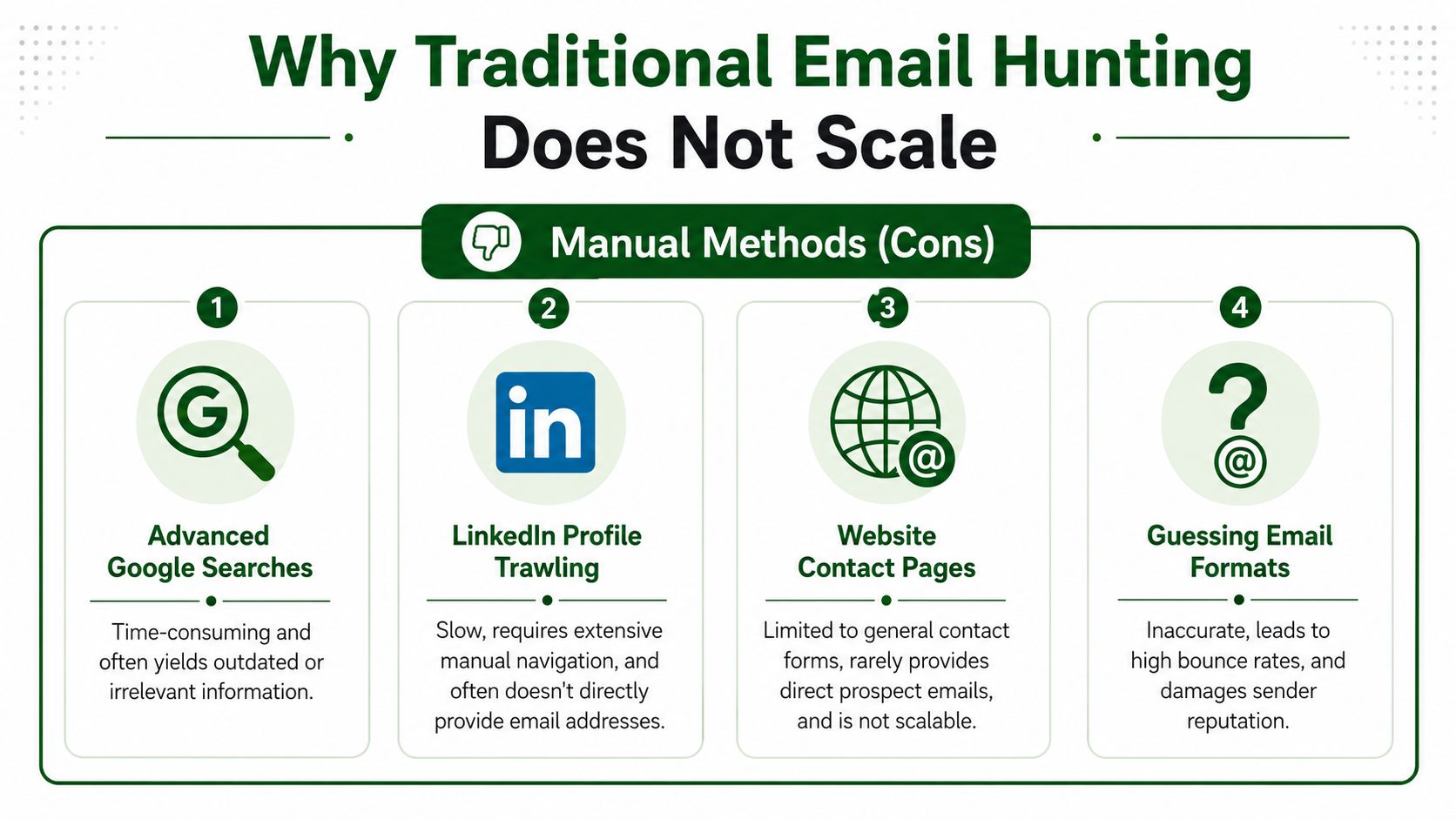
The common methods break down for different reasons:
- Google searches: Useful for finding public traces, but results are often outdated, indirect, or tied to role accounts.
- LinkedIn profile trawling: Good for confirming title and employer. Bad for directly producing a verified inbox.
- Company contact pages: Helpful for support or sales aliases. Rarely useful for named decision-makers.
- Pattern guessing: Better than random guessing, but still risky if the domain uses multiple formats or old aliases.
Manual Email Finding Methods Compared
| Method | Time per Lead | Typical Accuracy | Scalability |
|---|---|---|---|
| Google searches | High | Low to moderate | Poor |
| LinkedIn profile review | High | Moderate for role confirmation, low for direct email discovery | Poor |
| Website contact pages | Moderate | Low for direct prospect emails | Very poor |
| Guessing email formats | Low per guess, high when rework is included | Low without verification | Poor |
A lot of teams underestimate the rework cost in that table. The issue isn't just the first search. It's everything that follows when the result is incomplete. Reps still have to validate the name, role, domain, and inbox. Then they have to decide whether the address is safe enough to use.
This walkthrough gives a good visual of why the old methods wear reps down over time:
What breaks first at volume
At small volume, manual research mostly wastes time. At larger volume, it starts to hurt execution quality.
The first thing to break is consistency. One rep documents patterns well. Another doesn't. One rep verifies. Another assumes. One rep logs uncertainty. Another stuffs a guess into the CRM and moves on. Within a few weeks, the team is no longer working from the same standard.
The method that “works fine for a few accounts” usually fails the minute you try to run it every day, across segments, with clean reporting.
The second thing to break is confidence. When reps don't trust the contact data, they hesitate to send. Or they blast anyway and hope. Neither behavior produces a healthy outbound system.
Inferring Patterns and Verifying Your Guesses
If you're still doing some manual work, there is a smarter version of it. Don't start with the target person. Start with the company.
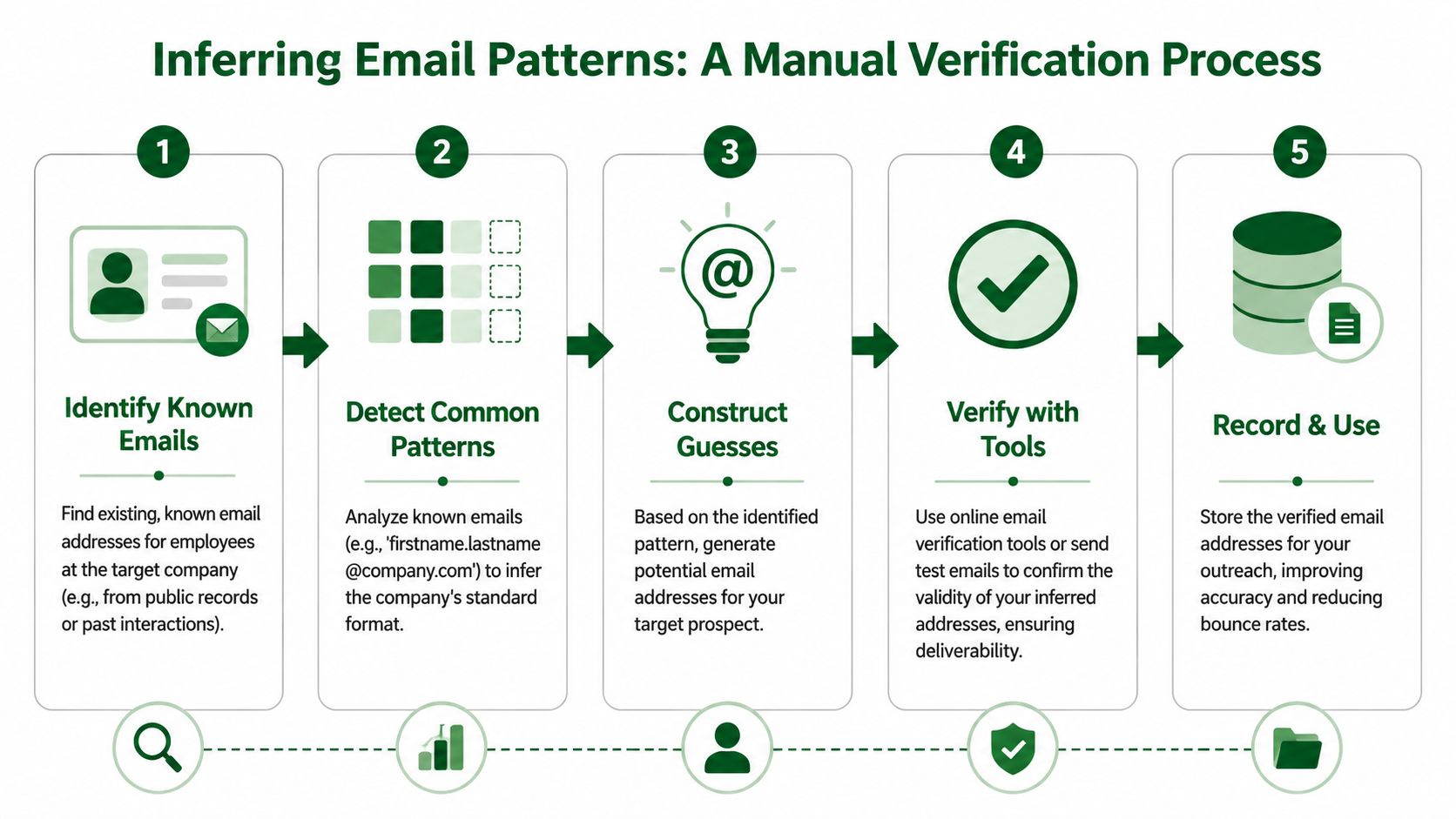
The most reliable semi-manual approach is to identify a few known employee emails, infer the company's pattern, generate the likely address for your prospect, and then verify it before outreach. That workflow is recommended in LaGrowthMachine's guide to looking up email addresses. The key point is simple. The pattern must be validated, not assumed.
A better manual workflow
This is the manual process worth teaching new reps because it introduces discipline.
Find confirmed employee emails
Look for named employees at the same company whose addresses are already known from prior communication, public speaker pages, or existing CRM history.Look for the format, not the person
If two or three known addresses follow the same structure, you probably have the company pattern. Common examples include first name only or first name plus last name.Generate one candidate, maybe two
Don't create a giant list of permutations and spray them. Build the most likely address from the observed pattern.Verify before outreach
This is the gate. If you can't validate the candidate with confidence, don't hand it to a sequence.Record the pattern
If the company format appears stable, save it in your team notes or CRM enrichment rules so the next rep doesn't start from zero.
What verification changes
Without verification, pattern inference is still just educated guessing. Verification changes the workflow because it turns a hypothesis into a usable record.
That matters for three reasons:
- It protects sequencing quality: You avoid loading questionable contacts into active campaigns.
- It sharpens rep judgment: Reps learn to separate likely from usable.
- It creates reusable operating knowledge: Once the company pattern is known and checked, future prospecting gets easier.
Field note: Pattern inference is the last manual technique I'd keep. Everything else is mostly tab management dressed up as research.
Even so, this is still not a scalable production model. It works for targeted accounts and hand-built lists. It doesn't solve the larger problem of finding peoples email address across a book of business while preserving time for writing strong outreach. For that, the operating model has to change.
Adopt a Verification First Prospecting Mindset
Many groups still talk about email discovery the wrong way. They ask, “Can we find the email?” That's not the useful question anymore.
The useful question is whether the record is deliverable, current, and tied to the right person. Modern privacy defenses, hidden contact pages, stale public data, and role-based inboxes all push in the same direction. Accuracy now matters more than lookup speed. Hunter's guide to finding someone's email address makes that point directly: the challenge is no longer just identifying an address, but confirming it's the right inbox and still deliverable.
Stop optimizing for lookup speed
A fast bad answer is expensive. It wastes a send, creates noise in campaign metrics, and lowers trust in the data layer. Reps feel that immediately. Managers feel it later when deliverability problems start showing up and no one can trace the source.
Verification-first teams behave differently:
- They treat guessed emails as unconfirmed records: A likely format is not a contactable lead.
- They separate research from activation: An unverified record doesn't enter a live sequence.
- They care about inbox quality, not list size: Bigger lists don't help if the wrong contacts absorb the volume.
This is also where compliance and process discipline come into play. Teams need clear standards for what they collect, how they store it, and when they can use it. If you're tightening your own handling practices, review your outreach and data-handling expectations against a clear policy like PitchSmart's privacy practices.
What a RevOps standard looks like
A rep-level habit becomes a team-level advantage when it turns into an operating rule. Good RevOps leaders usually standardize around a few basics.
Verified before sequence enrollment
Nobody should be loading uncertain contacts into live automation.Named person over generic inbox
If the campaign requires a decision-maker, a role account doesn't count as a substitute.Confidence logged with the record
Reps and managers need to know which contacts came from direct confirmation versus inferred patterns.
The best prospecting teams don't win by finding more addresses. They win by sending fewer wasted emails.
Once you adopt that mindset, the evaluation criteria for tools changes too. The best tool isn't the one that surfaces the most possible addresses. It's the one that gives the team a repeatable path from raw identity clues to records that are safe to use in outreach.
How to Automate Email Finding and Research at Scale
The manual process falls apart because it's serial. One rep, one prospect, one browser trail at a time. Scalable prospecting works because the system processes many records in parallel, then gives reps a narrower set of decisions to make.
Bulk workflows already point in that direction. Datablist's guide to finding emails at scale describes upload-and-enrich pipelines that map first name, last name, and company domain, then run verification. It reports typical accuracy in the 70% to 85% range and processing times of 3 to 7 minutes for thousands of records, while still recommending a final verification step because catch-all domains and false positives remain a problem. That's the important trade-off. Automation gets you speed and consistency, but quality control still matters.
What bulk workflows actually do well
Good automation doesn't just “find emails.” It compresses repetitive work into a controlled pipeline.
A strong system should help with:
- List ingestion: Upload a CSV or pull records from the CRM instead of asking reps to build from scratch.
- Domain-based matching: Use the company domain as the anchor, then map names against it.
- Verification gates: Filter out uncertain results before they hit live outreach.
- Record enrichment: Add role, company context, and relevant signals so reps can prioritize intelligently.
That last piece matters more than many teams realize. If automation stops at contact discovery, reps still have to do heavy manual research before writing a message. You saved lookup time but not selling time.
The workflow reps actually need
The most effective setup looks more like this:
Start with a target list
Pull named accounts and contacts from your CRM, event list, or territory build.Run enrichment in bulk
Let the system match domains, infer likely work emails, and verify what can be verified.Attach context before handoff
Add company signals, role relevance, and recent activity that can support a personalized opener.Route by confidence and fit
High-confidence records go to sequencing. Lower-confidence ones go to manual review or a different channel.Keep reps in review mode, not data-entry mode
Their job should be approving, prioritizing, and messaging. Not copying fields between tabs.
For teams trying to operationalize this, the better reference point isn't another lead database. It's a system that combines contact research with qualification and outreach prep. The practical examples collected on the PitchSmart blog are useful because they frame prospecting as a workflow problem, not a list-buying exercise.
Operational takeaway: Automation should remove tab work, not remove judgment. The system handles scale. The rep handles relevance.
That distinction is what keeps quality high while still increasing throughput.
Turning Enriched Lists into Pipeline
A verified email isn't the finish line. It's the entry ticket. Pipeline comes from what the rep does next with the context around that contact.
From verified contact to relevant outreach
Take a common outbound scenario. An SDR gets an enriched list of mid-market accounts with named contacts, validated work emails, current roles, and recent company signals. One account is hiring aggressively in a function that often creates the problem your product solves. Another just launched a new initiative. A third shows weak fit and gets deprioritized.
That SDR now has choices that matter:
- Segment by likely need: Hiring, expansion, and active change signals usually deserve different messaging.
- Match the hook to the persona: A VP cares about business impact. A manager may care about workflow friction.
- Use automation carefully: The sequence should carry the research forward, not flatten it into a generic template.
At this juncture, organizations either maximize their advantage or squander it. If the rep takes a researched list and sends the same bland email to everyone, the value of enrichment disappears. If the rep uses the signals to frame a relevant opener and lets automation handle the follow-up cadence, the list starts acting like pipeline input instead of raw data.
What good activation looks like
A strong activation workflow usually has three layers.
First, the team segments the list based on fit and timing. Contacts showing active buying signals get different treatment from long-shot accounts. Second, the rep chooses one conversational hook that can stand on its own in the opening line. Third, the team seeds a short sequence across email and LinkedIn so follow-up is consistent without sounding robotic.
That's why the best outbound platforms aren't only about contact discovery. They support the handoff from research to messaging. The best setups combine bulk research, activity-based hooks, and automated multi-step outreach so reps can spend their energy where it counts: deciding what matters and starting better conversations.
Good prospecting doesn't begin with volume. It begins with a contact you can reach, a reason to reach them now, and a message that proves you did your homework.
If your team is evaluating process changes, pricing often reveals whether a tool is built for occasional enrichment or for an actual outbound workflow. The PitchSmart pricing page is a good example of that distinction because it reflects the move from one-by-one research toward repeatable list-based execution.
If your team is stuck in manual research loops, PitchSmart gives you a cleaner way to work. Upload a list or pull from your CRM, run bulk research across every account at once, surface signal-backed conversation hooks, segment by buying signals, and launch automated 3-step email and LinkedIn sequences without forcing reps to live in browser tabs all day. It's built for outbound teams that care about data quality, personalization, and speed at the same time.