Your reps aren't losing meetings because they need prettier emails. They're losing meetings because buyers don't trust generic outreach, don't have time for clutter, and don't care how polished your template looks if the message feels mass-produced.
That's a key problem with the HTML vs plain text email debate in outbound sales. Organizations often treat it like a design choice. It isn't. It's a pipeline choice.
An SDR spends hours pulling account notes, rewriting intros, tweaking layouts, adding logos, swapping CTA buttons, and trying to make outreach look “professional.” Then the email lands in Promotions, renders badly on mobile, or gets deleted because it looks like marketing. The rep did more work and got less response.
A simpler rule works better. Use the format that matches buyer intent and relationship stage. If the prospect doesn't know you, plain text usually gives you the best shot at getting read and getting a reply. If the prospect already knows you and expects something structured, HTML can help.
Here's the practical version.
| Criteria | Plain text email | HTML email |
|---|---|---|
| Best use | Cold outbound, direct response, rep-to-buyer outreach | Warm nurture, event invites, proposals, branded follow-up |
| Buyer perception | Personal, human, one-to-one | Polished, branded, more promotional |
| Deliverability posture | Simpler rendering, typically higher deliverability | More scrutiny from spam filters, more rendering risk |
| Tracking | Limited compared with HTML | Better tracking and testability |
| Mobile and dark mode resilience | Strong | Can break or become messy |
| SDR recommendation | Default choice for first-touch outbound | Use selectively after interest exists |
Your Beautifully Designed Email Is Getting Deleted
Your SDR writes a cold email in HubSpot or Salesloft. The copy is decent. The header looks clean. There's a branded banner, a CTA button, maybe even a small graphic to make the message feel more “finished.”
Then nothing happens.
Open rates sag. Replies don't come in. Meetings don't get booked. The manager blames the list, the subject line, the timing, or the offer. But sometimes the problem is simpler. The email looked like marketing when it needed to look like a person.

This isn't a new issue. HTML email showed up in the late 1990s, and by the 2000s compatibility problems between email clients and sending systems were already a major obstacle to rich formatting. Then smartphones in the 2010s added another layer of pain because layouts had to work on smaller screens, as noted in BeeFree's history of HTML versus plain text email. Sales teams still deal with the same basic problem now. The more complex the email, the more ways it can fail before a buyer even reads line one.
Why this hurts pipeline
Outbound teams already waste too much time on non-selling work. When reps stack design work on top of weak targeting and generic messaging, they multiply the waste. They spend more effort creating something buyers are even less likely to engage with.
Practical rule: If a cold email looks like it came from a campaign builder, many prospects will treat it like a campaign and ignore it.
The painful part is that teams often mistake effort for quality. A plain text email can look almost too simple, so managers assume it's less professional. In outbound, that instinct is backwards. Buyers don't reward polish at first touch. They reward relevance, clarity, and restraint.
The Two Flavors of Email HTML and Plain Text
Sales teams don't need a technical lecture on MIME types. They need to know what each format signals to a prospect and what each format does to performance.
Plain text email is the simple version. It looks like something a rep typed directly in Gmail or Outlook. Minimal formatting. No banners. No heavy layout. Usually one clear message and one clear ask.
HTML email is the designed version. It can include logos, columns, buttons, images, branded colors, and richer formatting. It's useful when you want visual structure or stronger brand presentation.
What each one does well
Here's the tradeoff in plain English.
- Plain text keeps the message human: It feels closer to one-to-one communication. For cold outbound, that matters because the buyer's first question isn't “Is this pretty?” It's “Is this relevant?”
- HTML gives teams more instrumentation: It supports stronger tracking and testability, which is useful for marketing-style sends and structured follow-up.
- Plain text reduces friction: Independent guidance from Mailtrap notes that plain-text emails typically provide higher deliverability and simpler rendering, while HTML emails provide tracking and testability. The same guidance warns that HTML is more likely to face spam-filter scrutiny and inconsistent rendering across clients, as explained in Mailtrap's review of HTML vs plain text email tradeoffs.
The sales-rep interpretation
This isn't “good format” versus “bad format.” It's context.
| If your rep is trying to... | Better default |
|---|---|
| Start a conversation with a cold prospect | Plain text |
| Follow up after a demo | HTML or lightly formatted email |
| Send event details or a webinar invitation | HTML |
| Ask a direct question and get a reply | Plain text |
| Share a proposal, recap, or resource bundle | HTML |
HTML isn't wrong. It's just overused in places where trust is still fragile.
A lot of teams get stuck because they ask, “Which format is better?” The better question is, “What does this buyer need to see from us right now?” For cold outreach, buyers usually need a credible human message, not a mini landing page in their inbox.
A Side-by-Side Showdown for Sales Teams
The html vs plain text email decision gets clearer when you judge it the way a sales leader should. Not by design preference. By whether it helps the rep create pipeline.
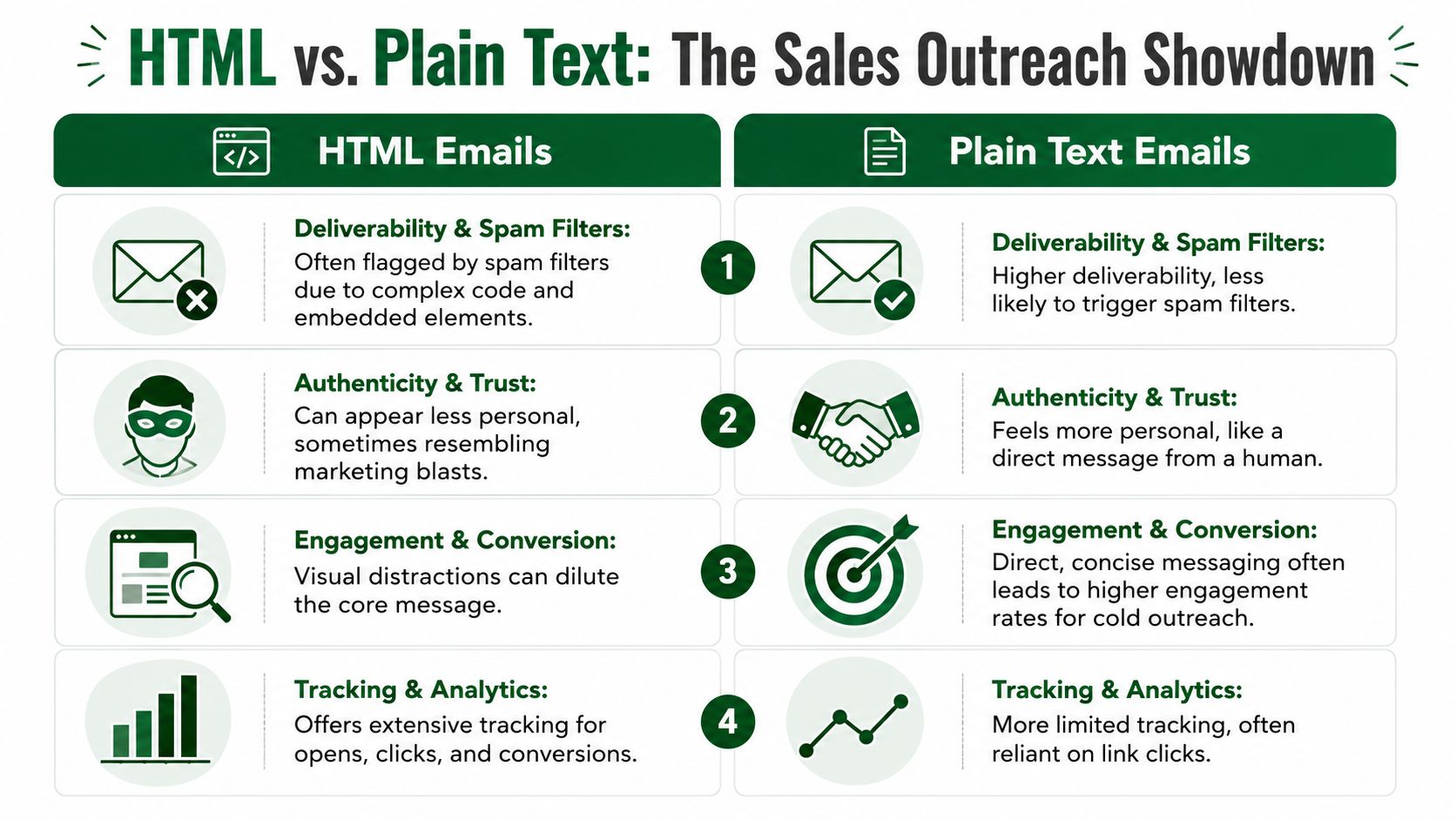
Deliverability decides whether the message gets a chance
If your email doesn't land cleanly and render clearly, the copy doesn't matter. Sales teams love to debate messaging frameworks while ignoring the reality that format can sabotage inbox placement and readability.
Plain text has the advantage here because it's simpler. Less code. Fewer rendering issues. Less that can go wrong across Gmail, Outlook, Apple Mail, and mobile apps.
One benchmark analysis cited by Stripo says readers spend 2.5 times longer reading HTML emails than plain-text emails, yet plain-text emails have a 42% higher open rate, while HTML emails with images see a 25% lower open rate. See Stripo's roundup of plain text vs HTML email benchmarks.
That tradeoff matters. HTML can hold attention once opened, but plain text often wins the battle to get opened in the first place. For outbound SDR work, first-touch access is usually more valuable than visual depth.
Tracking matters, but replies matter more
HTML gives you more instrumentation. That's useful. You can track clicks more cleanly, structure links, and test different layouts or buttons.
But reps overvalue tracking when they should be optimizing for conversations. Open data is noisy. Clicks are helpful, but many cold prospects reply without clicking anything. If a format gives you better analytics but fewer actual responses, it's not helping the number that matters.
A simple internal rule works well:
- Use HTML when click behavior is the point: event registration, content download, proposal review.
- Use plain text when reply behavior is the point: cold outbound, follow-up questions, meeting requests.
- Judge every format by meetings created: not by whether the dashboard looks richer.
Prospect perception changes the outcome
Cold outreach is perception-heavy. Buyers decide fast whether an email feels personal, automated, self-serving, or worth answering.
A heavily designed email often signals “campaign.” A plain-text email often signals “person.” That difference changes how the buyer reads your intent.
Litmus reported that in its own A/B testing, a plain-text-style email produced slightly higher open and click-through rates than an HTML version, according to Litmus's write-up on A/B testing HTML vs plain-text emails. That lines up with what experienced outbound teams already know. If the message looks like a real note and sounds like a real note, the buyer is more likely to treat it like one.
Buyers don't respond to “personalization theater.” They respond when the message reads like it was sent for a reason.
Accessibility and rendering are operational issues
This part gets ignored because it sounds like a design problem. It isn't. It's an execution problem.
Dark mode, mobile screens, and client-specific rendering can make HTML emails messy or unreadable. Plain text avoids most of that. Email on Acid also notes that plain text is easy to read in light or dark mode and recommends including a plain-text alternative in HTML sends, as explained in its guide to plain text email and when to use it.
For sales ops, the takeaway is simple:
| Factor | Plain text | HTML |
|---|---|---|
| Inbox resilience | Strong | Mixed |
| Dark mode readability | Strong | Can be inconsistent |
| Cross-client formatting risk | Low | Higher |
| Best for outbound reps who need speed | Yes | Sometimes |
If you manage SDRs, don't let format become a creative exercise. Treat it like a conversion lever. The safest default for cold outbound is still the one that gets out of its own way.
Strategic Use Cases for HTML in B2B Sales
Plain text should be the default for cold outbound. It shouldn't be the only tool in your kit.
HTML earns its keep when the buyer already knows who you are, expects structure, or needs to consume information that benefits from layout. In those situations, branding and visual hierarchy can help rather than hurt.
Warm audiences change the rules
Once a prospect has replied, attended a meeting, requested info, or engaged with your team, you're no longer fighting the same trust battle. The buyer has context. Now clarity and organization matter more than looking personal.
That's where HTML works.
A clean HTML email can make a follow-up easier to scan. It can separate recap points, next steps, attachments, dates, and links without turning the message into a wall of text. It can also make a webinar invite or product update easier to act on.
Where HTML helps instead of hurts
Use HTML when the format itself improves comprehension.
- Demo follow-up: Recaps, stakeholder next steps, and links to product materials benefit from clear structure.
- Event invitations: A webinar, workshop, or roundtable invite often needs time, date, registration details, and a visible CTA.
- Proposal delivery: Buyers reviewing pricing, implementation notes, or a formal summary often prefer something more organized.
- Content distribution: If you're sending a guide, case study, or recap package after interest is established, visual formatting can reduce friction.
If your team wants to compare what more structured outbound workflows can cost across different setups, review the options on PitchSmart pricing.
The key is discipline. HTML should support an already-warm conversation. It shouldn't be your opening move on a stranger.
A good test is simple. Ask whether the buyer is more likely to think, “Helpful, this organizes what I asked for,” or “This looks like a blast.” If it's the second one, don't send it.